Select value in dropdown in touch ui dialog based on the value selected in editable template | Community
Skip to main content
Level 3
September 11, 2018
Solved

Select value in dropdown in touch ui dialog based on the value selected in editable template

  • September 11, 2018
  • 1 reply
  • 2952 views

When the template author selects a value in design dialog it will be saved under policy of the editable template.

the design dialog will be as
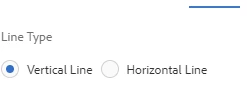
Now when the authors opens the dialog then by default vertical line has to be selected in the dialog. but only the top element is being selected

Now if i want to select the value authored by the template author then how to proceed? i tried by using cqDesign but i was not able to get it selected

Please suggest how to proceed?

This post is no longer active and is closed to new replies. Need help? Start a new post to ask your question.
Best answer by arunpatidar

Hi,

The selected property should be type of boolean not expression.

To achieve above you can use datasource to create dropdown with preselected value based on value set from design dialog.

AEM 6.0 Forms Help | Dynamically populating drop-down lists

AEM Note: How to create dynamic drop down in Touch UI dialog in AEM 6.2.

Example :

aem63app-repo/HelloWorldCompDDServlet.java at master · arunpatidar02/aem63app-repo · GitHub

1 reply

arunpatidar
Community Advisor
arunpatidarCommunity AdvisorAccepted solution
Community Advisor
September 11, 2018

Hi,

The selected property should be type of boolean not expression.

To achieve above you can use datasource to create dropdown with preselected value based on value set from design dialog.

AEM 6.0 Forms Help | Dynamically populating drop-down lists

AEM Note: How to create dynamic drop down in Touch UI dialog in AEM 6.2.

Example :

aem63app-repo/HelloWorldCompDDServlet.java at master · arunpatidar02/aem63app-repo · GitHub

Arun Patidar