Seeking JavaScript assistance on AEM Form date picker | Community
Skip to main content
Level 2
February 20, 2024
Solved

Seeking JavaScript assistance on AEM Form date picker

  • February 20, 2024
  • 1 reply
  • 1714 views

Hi Community,


I am seeking help on writing a piece of JavaScript to limit date picker and only allow selection from today + 7 days, as I am told the only way is putting code in rule editor.


Without the IT knowledge and resource, I turned to ChatGPT for help, but it didn't work.


Therefore, I want to find out what's wrong with the JavaScript ChatGPT gave me. Pasting them below


(I clicked copy selector and got this, then replaced ".datepicker" with it: #guideContainer-rootPanel-guidedatepicker__)


First try:
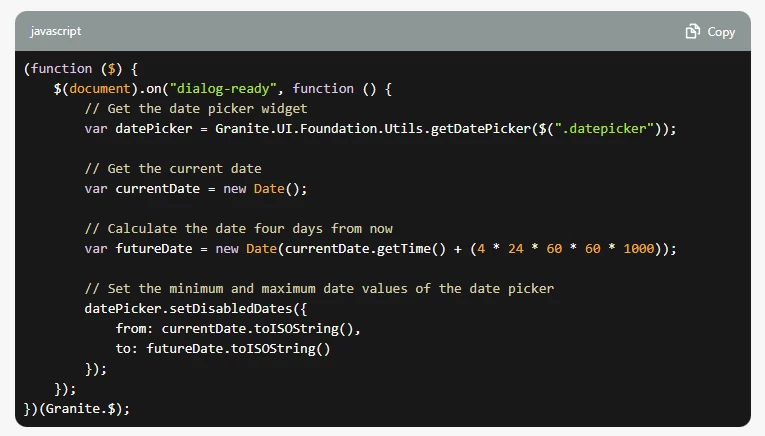
(function ($) {
    $(document).on("dialog-ready", function () {
        // Get the date picker widget
        var datePicker = Granite.UI.Foundation.Utils.getDatePicker($("#guideContainer-rootPanel-guidedatepicker__"));

        // Get the current date
        var currentDate = new Date();

        // Calculate the date four days from now
        var futureDate = new Date(currentDate.getTime() + (4 * 24 * 60 * 60 * 1000));

        // Set the minimum and maximum date values of the date picker
        datePicker.setDisabledDates({
            from: currentDate.toISOString(),
            to: futureDate.toISOString()
        });
    });
})(Granite.$);

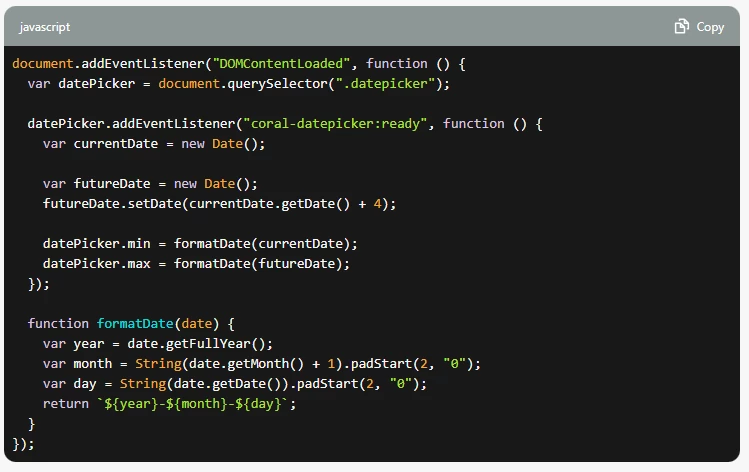
Second try:

document.addEventListener("DOMContentLoaded", function () {
  var datePicker = document.querySelector("#guideContainer-rootPanel-guidedatepicker__");

  datePicker.addEventListener("coral-datepicker:ready", function () {
    var currentDate = new Date();

    var futureDate = new Date();
    futureDate.setDate(currentDate.getDate() + 4);

    datePicker.min = formatDate(currentDate);
    datePicker.max = formatDate(futureDate);
  });

  function formatDate(date) {
    var year = date.getFullYear();
    var month = String(date.getMonth() + 1).padStart(2, "0");
    var day = String(date.getDate()).padStart(2, "0");
    return `${year}-${month}-${day}`;
  }
});


I also don't understand this error


Thanks so much in advance!



This post is no longer active and is closed to new replies. Need help? Start a new post to ask your question.
Best answer by Imran Khan

Can you please try to use var in place of let as es6 not working for you

(function (document, $) { $(document).on("click", ".cq-dialog-submit", function(e) { var currentDate = new Date(); var selectedDate = new Date($("[name='./date']").val()); // Calculate date difference var timeDifference = selectedDate.getTime() - currentDate.getTime(); // Calculating the no. of days between // two dates var numberOfDays =Math.round(timeDifference / (1000 * 3600 * 24)); // To display the final no. of days (result) console.log("Number of days - " + numberOfDays); if (numberOfDays > 7) { var ui = $(window).adaptTo("foundation-ui"); ui.alert("Error", "Date must be less than or equals to 7 days.", "error"); return false; } }); })(document, Granite.$);

1 reply

Imran Khan
Community Advisor
Community Advisor
February 20, 2024

We can add tooltip and try for below code also to show error on dialog submit to have 7 days


(function (document, $) { $(document).on("click", ".cq-dialog-submit", function(e) { let currentDate = new Date(); let selectedDate = new Date($("[name='./date']").val()); // Calculate date difference let timeDifference = selectedDate.getTime() - currentDate.getTime(); // Calculating the no. of days between // two dates let numberOfDays =Math.round(timeDifference / (1000 * 3600 * 24)); // To display the final no. of days (result) console.log("Number of days - " + numberOfDays); if (numberOfDays > 7) { var ui = $(window).adaptTo("foundation-ui"); ui.alert("Error", "Date must be less than or equals to 7 days.", "error"); return false; } }); })(document, Granite.$);


Level 2
February 20, 2024

Hi @imran__khan , Thank you for your advice! I think it is a great solution for my use case.


I tried it; however, I got this error.

"Let is available in ES6 (use 'esversion: 6') or Mozilla JS extension (use moz)"

Would there be a substitute of 'let'?

Also, may I ask what event do you choose to trigger it? I picked initialized.

Many thanks,

Brian

Imran Khan
Community Advisor
Imran KhanCommunity AdvisorAccepted solution
Community Advisor
February 20, 2024

Can you please try to use var in place of let as es6 not working for you

(function (document, $) { $(document).on("click", ".cq-dialog-submit", function(e) { var currentDate = new Date(); var selectedDate = new Date($("[name='./date']").val()); // Calculate date difference var timeDifference = selectedDate.getTime() - currentDate.getTime(); // Calculating the no. of days between // two dates var numberOfDays =Math.round(timeDifference / (1000 * 3600 * 24)); // To display the final no. of days (result) console.log("Number of days - " + numberOfDays); if (numberOfDays > 7) { var ui = $(window).adaptTo("foundation-ui"); ui.alert("Error", "Date must be less than or equals to 7 days.", "error"); return false; } }); })(document, Granite.$);