Searching in specific order | Community
Skip to main content
Level 4
August 31, 2021
Solved

Searching in specific order

  • August 31, 2021
  • 2 replies
  • 2338 views

We want our results from content to be returned in this order


  • URL contains <keyword/>
  • Page title contains <keyword/>
  • Tags contain <keyword/>
  • Page Description (will crawl all source metadata)  contains <keyword/>
  • Boost frequency <keyword/> to the top


how should we go about ensuring URL is included as first search criteria?


Thanks

This post is no longer active and is closed to new replies. Need help? Start a new post to ask your question.
Best answer by Vijayalakshmi_S

Hi @aembytes

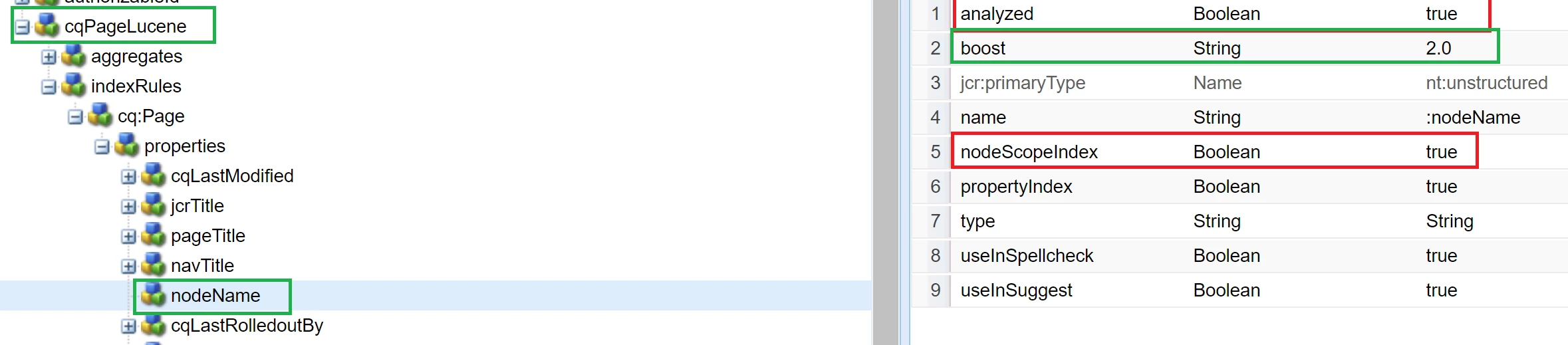
In order for URL to be first in the Search Results, we need to boost nodeName in the respective index (that is used for fulltext query execution)

Example:

For a full text query like below, cqPageLucene is used. 

path=/content/we-retail
fulltext=Skitouring
type=cq:Page
p.limit=-1

In order to have URLs that contain Skitouring to be rendered first than the jcr:title for instance,  update the cqPageLucene as below and reindex.
Explain Query response:

Query Results:

Just for a cross check I have amended the title of "Experience" page to Skitouring (which we see as a result in 4th entry)


Suggest to check which index is used for your fulltext query execution(as evident by Explain Query) and boost nodeName and other properties of that index accordingly. 


Update: Per official doc, boost should be of type "Double". (Screenshots from my local is when I used String and it works too)

2 replies

Ritesh_Mittal
Community Advisor and Adobe Champion
August 31, 2021

Hi @aembytes ,


You can create custom predicates for that. You can use orderBy predicate with desired property and can join the results. Also, you can boost a specific property and give desired value to have order in place.


https://experienceleaguecommunities.adobe.com/t5/adobe-experience-manager/aem-fulltext-search-result-order/td-p/320837

https://github.com/paulrohrbeck/aem-links/blob/master/querybuilder_cheatsheet.md


Vijayalakshmi_S
Vijayalakshmi_SAccepted solution
Level 10
August 31, 2021

Hi @aembytes

In order for URL to be first in the Search Results, we need to boost nodeName in the respective index (that is used for fulltext query execution)

Example:

For a full text query like below, cqPageLucene is used. 

path=/content/we-retail
fulltext=Skitouring
type=cq:Page
p.limit=-1

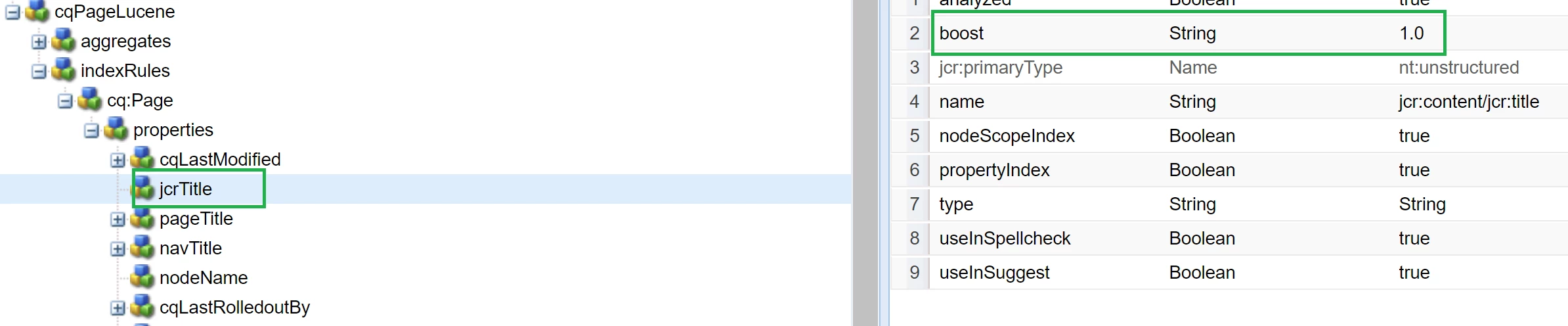
In order to have URLs that contain Skitouring to be rendered first than the jcr:title for instance,  update the cqPageLucene as below and reindex.
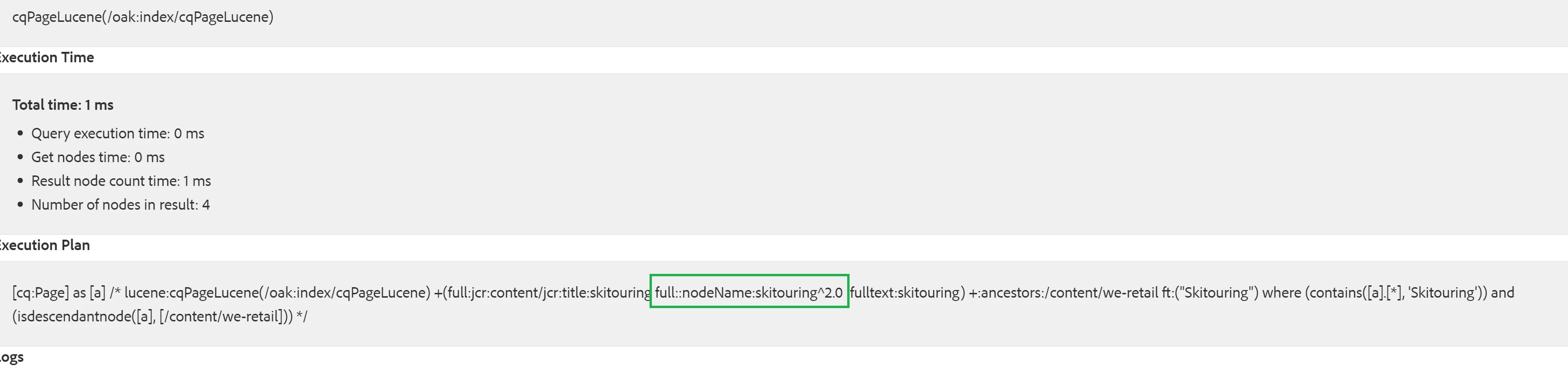
Explain Query response:
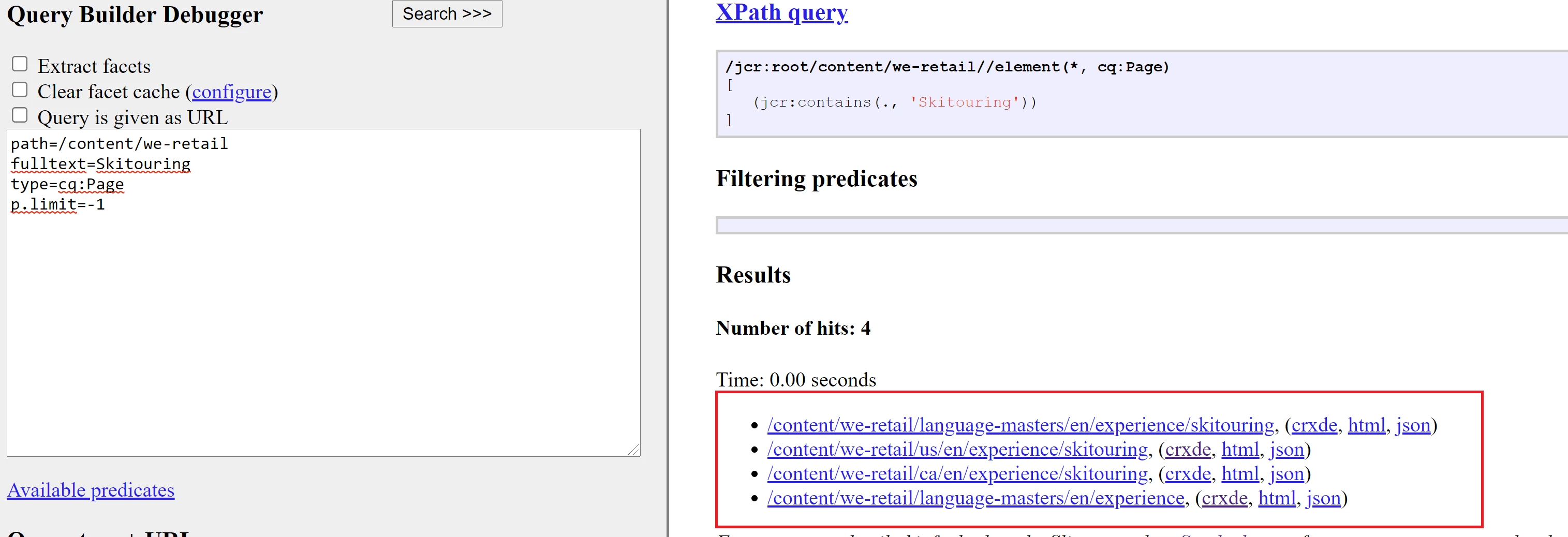
Query Results:

Just for a cross check I have amended the title of "Experience" page to Skitouring (which we see as a result in 4th entry)
 

Suggest to check which index is used for your fulltext query execution(as evident by Explain Query) and boost nodeName and other properties of that index accordingly. 


Update: Per official doc, boost should be of type "Double". (Screenshots from my local is when I used String and it works too)

aembytesAuthor
Level 4
September 5, 2021

One additional query, what you mentioned worked, so that's awesome. If I had to put a page with the highest occurrence of search word on the top, would that be OOB behavior in jcr:score ordering or I'll have to do that additionally with a different attribute etc?


Vijayalakshmi_S
Level 10
September 6, 2021

Thanks for the confirmation @aembytes 

It happens OOTB. For fulltext index, search results are sorted by jcr:score descending (result with highest score being the first) by default.

If you would like to cross check this, you can print the jcr:score as part of query results and observe the behaviour. 

Using the same example : 

select [jcr:path], [jcr:score] from [cq:Page] as a where contains(*, 'Skitouring') and isdescendantnode(a, '/content/we-retail')

Result:

  • results are returned with highest score being the top. 
  • experience page has the term "Skitouring" only in jcr:title and hence the least score.

Only thing to note is that if you have union of fulltext queries, scoring is applied for each subquery individually and hence the ultimate result won't be ordered by score in this case.