Save & Close button on bulk editor page not working in AEM6.4 | Community
Skip to main content
Naga_Seran
Level 2
January 22, 2019

Save & Close button on bulk editor page not working in AEM6.4

  • January 22, 2019
  • 3 replies
  • 6606 views

Hi Team,

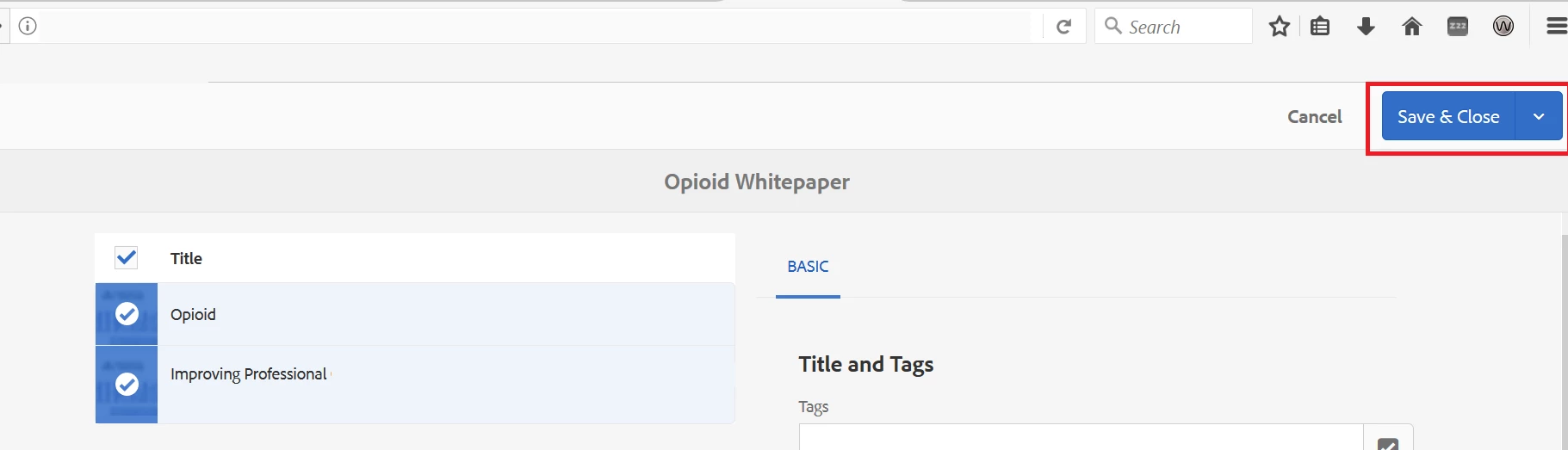
We are in process of migrating our aem application to AEM6.4 and we found that "Save & Close" button on bulk editor page not working in AEM6.4.Data is saving, but the page is not closing in all browser. Could you please help us on this.

/mnt/overlay/wcm/core/content/sites/properties.html
Thanks

Seran

This post is no longer active and is closed to new replies. Need help? Start a new post to ask your question.

3 replies

Gaurav-Behl
Level 10
January 22, 2019

Do you see any error in browser's console log or network tab? What is the SP and core components version on your setup?

smacdonald2008
Level 10
January 22, 2019

Are you getting the same behavior on all browsers? If so - could be some sort of upgrade bug.

Naga_Seran
Level 2
January 23, 2019

Yes, It's happening on all browser.

Level 2
May 31, 2019

Hi, Its happening to me as well. I am in AEM 6.3 SP3, was there any solution reached or is it indeed a bug?

vijkumar
Adobe Employee
Adobe Employee
July 15, 2019

Hi All,

The good news is, this behavior is fixed in the latest release for AEM 6.4 which is AEM 6.4.5.0. I have validated the same at my end and it is closing the console post saving the selected page properties.

markn78697218
March 4, 2021

"Save & Close" still appears to be broken under specific circumstances in out of the box 6.5.7.

When I perform a bulk edit of page properties, deselect page(s) that are to be included in the bulk edit, and reselect any subset of those pages, then hitting "Save & Close" will save any changes, but will incorrectly reload the editor instead of closing out to the sites console.

It seems like the fix in 6.4.5.0 doesn't account for this chain of events.