Safe to delete older versions of CFP? | Community
Skip to main content
ivanp2522110
Level 2
December 11, 2017
Solved

Safe to delete older versions of CFP?

  • December 11, 2017
  • 5 replies
  • 2886 views

Dear Experts,

in /crx/packmgr:

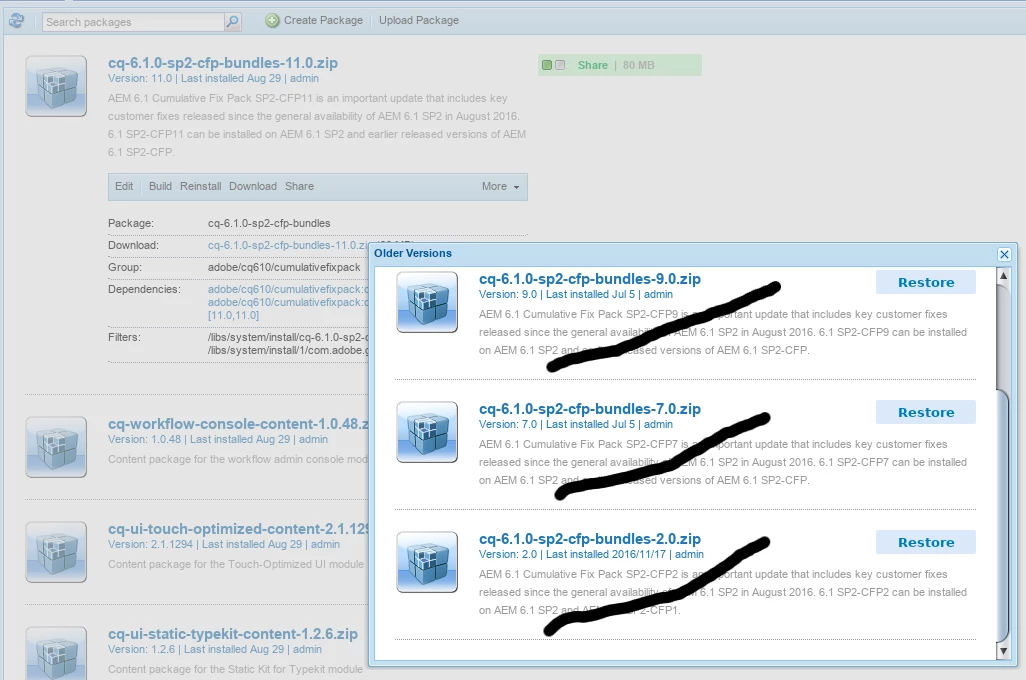
if I select the latest CFP Package, under More/Older Versions there are all the anterior CFPs still available

I know that they cannot be restored so maybe it would be a good idea to just delete them? It would free a lot of space

But is it safe?

Kind regards

Ivan

Here an example of what I would like to delete:
This post is no longer active and is closed to new replies. Need help? Start a new post to ask your question.
Best answer by MC_Stuff

Hi Ivan,

Except the latest cfp you can delete the rest safely.   Technically latest cfp is also not required but when adobe release new version of hotfix/cfp it will check the dependency hence better to retain it .

Thanks,

5 replies

smacdonald2008
Level 10
December 11, 2017

If they are for your current AEM version - i would not delete them.

MC_Stuff
MC_StuffAccepted solution
Level 10
December 12, 2017

Hi Ivan,

Except the latest cfp you can delete the rest safely.   Technically latest cfp is also not required but when adobe release new version of hotfix/cfp it will check the dependency hence better to retain it .

Thanks,

ivanp2522110
Level 2
December 15, 2017

Thanks for your answers!

I tried it out, but it didn't went well. A lot of packages seem to have dependencies to older CFPs,

so afterwards there are a lot of warnings in /crx/packmgr

If I go to Edit/Dependencies e.g. for cq-contexthub, I see:

cq-platform-content, contexthub.content, cfp6, cfp7, cfp8, cfp9, cfp10

So, my follow-up question is, what to do with such packages. Maybe remove dependencies to older CFPs to deactivate the warning?

Best regards,
Ivan

MC_Stuff
Level 10
December 16, 2017

Old packages you can remove it since it is already installed.

ivanp2522110
Level 2
February 16, 2018

Thanks a lot for your answers, guys!

I found another museum like location: crx-quickstart/launchpad/installer

There is a huge number of older versions for Packages like tika and oak-core

Is there any official process for purging old copies or may I just remove the files?

Kind regards

Ivan