RTE Source Edit button only for Administrators | Community
Skip to main content
Level 2
April 22, 2023
Solved

RTE Source Edit button only for Administrators

  • April 22, 2023
  • 3 replies
  • 1297 views

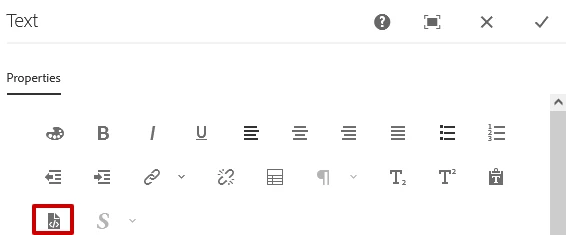
How can I only allow administrators access to the Source Edit button in the RTE? (AEM 6.5) Is there a permission I can use?

I am trying to avoid turning it on and off from the template.


This post is no longer active and is closed to new replies. Need help? Start a new post to ask your question.
Best answer by Shubham_borole

We can use the dialog submit call.


$(document).on("click", ".cq-dialog-submit", function (e) {
            //On submit this is invoked
// Ajax call to servlet here         });

An example here - Call any servlet in touchUI dialog |AEM 6.3+ – AEM Queries & Solutions (wordpress.com)


javascript - dialog-ready event does not fire when dialog opens in AEM 6.1? - Stack Overflow


Sling Servlet in AEM – AEM CQ5 Tutorials


Thanks


3 replies

Shubham_borole
Community Advisor
Community Advisor
April 28, 2023

Hello,


We can have a custom servlet that gets invoked on dialog ready and checks the logged in user against user group that should have access to view the source edit. As a response, it can just be a boolean allowed = true or false. Based on that we can show or hide the sourceedit button.


Thanks


Shubham

bb47Author
Level 2
April 29, 2023

That sounds doable. Do you have any documentation you could send me to set this in place?

Shubham_borole
Community Advisor
Shubham_boroleCommunity AdvisorAccepted solution
Community Advisor
May 5, 2023

We can use the dialog submit call.


$(document).on("click", ".cq-dialog-submit", function (e) {
            //On submit this is invoked
// Ajax call to servlet here         });

An example here - Call any servlet in touchUI dialog |AEM 6.3+ – AEM Queries & Solutions (wordpress.com)


javascript - dialog-ready event does not fire when dialog opens in AEM 6.1? - Stack Overflow


Sling Servlet in AEM – AEM CQ5 Tutorials


Thanks


bilal_ahmad
Level 5
April 29, 2023

Hi! you can make use of ComponentContext here. Create a sling model, check if the current user is a part of administrators group and then set the decoration true. This would make it non-editable for other users and editable for the users which are a part of administrators user group. 


thanks,

Bilal