Level 3
Dec 27, 2023 1:54 PM UTC
Solved

RTE numbered list with bold option

Hi All, 

We are using AEM Saas version for our website. I am trying to use the list in RTE component and when I use the bold option with number list, the text is bold but the numbers are not bold.  

Is there a workaround or solution for this?

I tried to add <b> tag in <ol>, but it doesn't work. 


Many thanks in advance 

 

This post is no longer active and is closed to new replies. Need help? Start a new post to ask your question.
Harwinder-singh
Harwinder-singhAccepted solution
Community Advisor
Dec 28, 2023 4:07 AM UTC

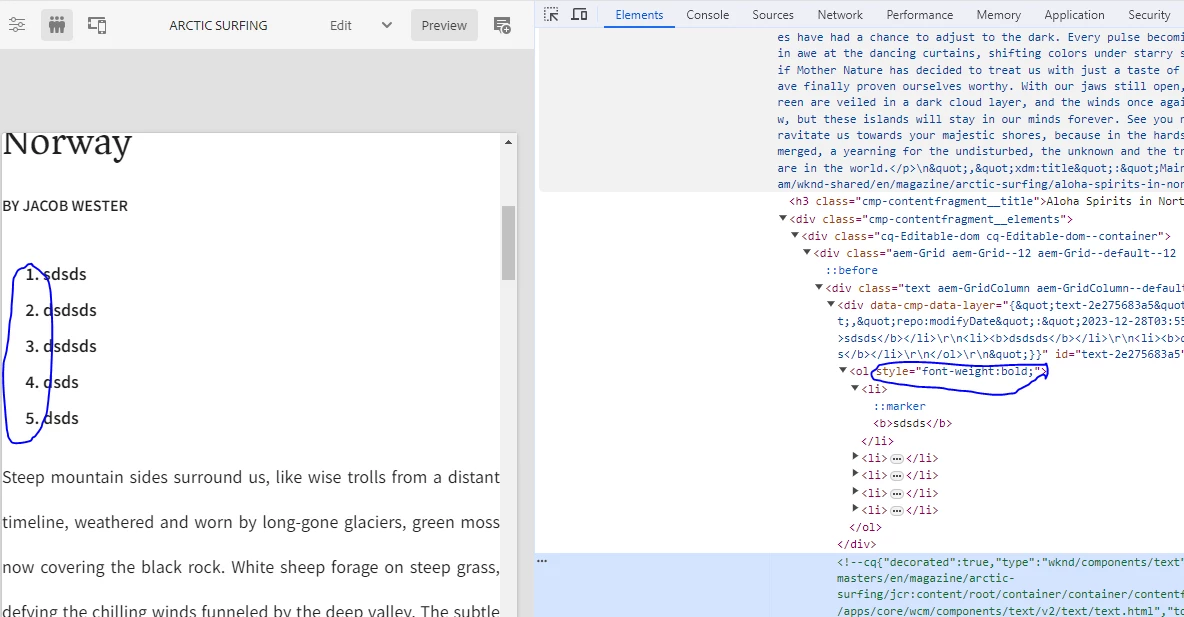
@jainrupal2408 Just override the style for <ol> and add the following 

style="font-weight:bold;"

You will need a custom css class for <ol> with the above mentioned style.


I tested this on WKND content and works just fine (both numbers and text are bold-ed).


2 replies

Harwinder-singh
Community Advisor
Harwinder-singhCommunity AdvisorAccepted solution
Community Advisor
Dec 28, 2023 4:07 AM UTC

@jainrupal2408 Just override the style for <ol> and add the following 

style="font-weight:bold;"

You will need a custom css class for <ol> with the above mentioned style.


I tested this on WKND content and works just fine (both numbers and text are bold-ed).


Translate
Level 3
Dec 28, 2023 8:29 AM UTC

Thank you, yes it works !

Translate