Rich Text Custom Plugin | Community
Skip to main content
Level 5
February 23, 2023
Solved

Rich Text Custom Plugin

  • February 23, 2023
  • 2 replies
  • 1419 views

Hi @arunpatidar ,


I hope you doing well.


I was following your article https://aemlab.blogspot.com/2019/07/aem-rte-custom-plugins-1.html.


AEM 6.5.13.


A)In Style Picker, close (x) and tick (✓) button does not work. When we try to click, it gives below error:
"Resource at '/apps/commons/rte/plugins/popovers/style-picker/undefined' not found: No resource found"

B) Remove style button: After we add a style using "Add property" button. Next time, if we want to remove this style from same text, It does not pre-select style in dropdown that was selected while using "Add styles button".


Screen Below:
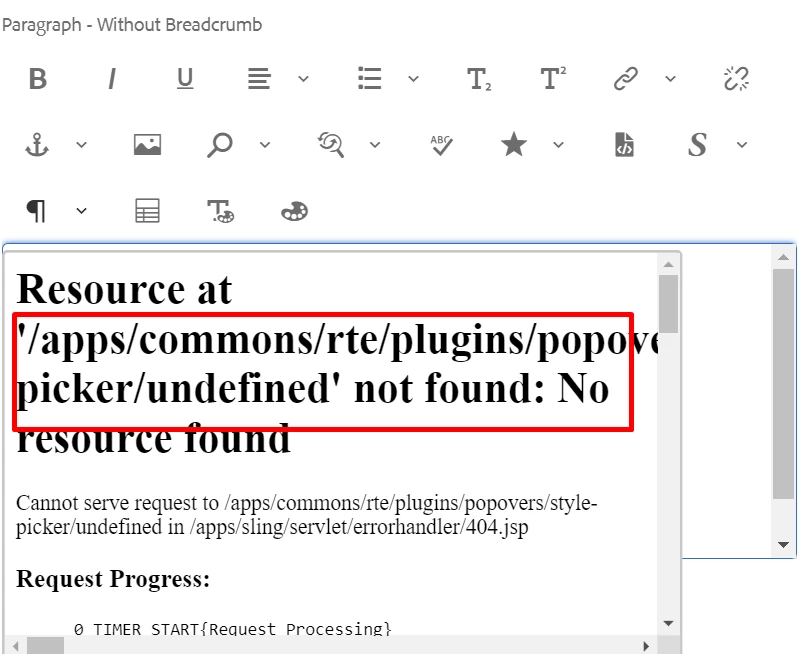


Thanks a lot in advance.

 

This post is no longer active and is closed to new replies. Need help? Start a new post to ask your question.
Best answer by arunpatidar

Hi,

Did you see, any console errors in the browser ? 

Those buttons were removed using javascript in this plugin(you can check gif in the blog) and close button has event to close the popup.
Seems like might be issue with underscore js. 

2 replies

SivakumarKanoori
Community Advisor
Community Advisor
February 23, 2023

@arvind-1 

Did you check , the below 2 paths are existing or not.


  • /apps/commons/rte/plugins/popovers/style-picker/datasource
  • /apps/commons/rte/plugins/popovers/style-picker/options.json'


Datasource is a JSP file which read json specified in options property and populates dropdown option for Style Picker plugin.
JSON file should have an array of elements in below format:

If want to show as Heading/Category use below format(value could be anything)
    {"text": "Background Color","value": "BTC","heading": "true"}


If Option

    {"text": "White","value": "white"}

Example : /apps/commons/rte/plugins/popovers/style-picker/options.json


[
    {"text": "Background Color","value": "BTC","heading": "true"},
    {"text": "White","value": "white"},
    {"text": "Black","value": "black"},
    {"text": "Green","value": "green"},
    {"text": "Orange","value": "orange"},
    {"text": "Light Grey","value": "lightgrey"},
    {"text": "List Style","value": "LS","heading": "true"},
    {"text": "Check","value": "list-checked"},
    {"text": "Cross","value": "list-crossed"},
    {"text": "Link Style","value": "LS","heading": "true"},
    {"text": "Primary","value": "btn-primary"},
    {"text": "Secondary","value": "btn-secondary"}
]


Thanks ,

Siva

Thanks,Siva
arvind-1Author
Level 5
February 23, 2023

@sivakumarkanoori  

Thanks for your kind reply. All Paths exist in AEM.


Issue is bit different. Not Data source .

If you could see below Gif FILE, when we try to close (X), It gives error.


FYI: @arunpatidar 

arunpatidar
Community Advisor
arunpatidarCommunity AdvisorAccepted solution
Community Advisor
February 24, 2023

Hi,

Did you see, any console errors in the browser ? 

Those buttons were removed using javascript in this plugin(you can check gif in the blog) and close button has event to close the popup.
Seems like might be issue with underscore js. 

Arun Patidar
arunpatidar
Community Advisor
Community Advisor
February 24, 2023

yes, styles are not pre selected, I will try to fix this.

Arun Patidar
arvind-1Author
Level 5
February 24, 2023

we will fix it and share fully functional package  shortly.

arunpatidar
Community Advisor
Community Advisor
February 25, 2023

you can trying adding another action on load to get the value and set the options 


sendDataMessage("load");


if (action === "load") { console.log('inside load : ' + inline); var $targetNode = startNode.nodeType == 3 ? $(startNode).parent() : $(startNode); var classList =$targetNode.attr('class').split(' '); $stylePicker = jQuery(document).find('.coral3-Select[name="./style"]'); $stylePicker.items.each({ console.log($(this)) // set values })


Arun Patidar