Revert to previous revision | Community
Skip to main content
Level 2
November 17, 2025
Solved

Revert to previous revision

  • November 17, 2025
  • 4 replies
  • 170 views

Hi Community,


We recently deployed a code package to our Cloud production environment, but unfortunately the deployment contained a bug that is now impacting users. We raised a P1 ticket with Adobe Support, and their recommendation was to revert to the previous working code.

However, Adobe has also mentioned that we must redeploy - either by fixing the issue and deploying a corrected version, or by redeploying the last known stable code.

Could someone please clarify the proper way to revert code in AEM Cloud Service?
Is there an Adobe-recommended method to roll back to a previously deployed version?


Thanks in advance!
Best answer by SantoshSai

Hi @mateuszno2,
Please go through this articel:

The official Adobe guidance for reverting to a previous deployment version is documented here:

Restore a Previous Code Deployment (AEM Cloud Service):
https://experienceleague.adobe.com/en/docs/experience-manager-cloud-service/content/operations/restore-previous-code-deployed

Using this method, you can select the last successful pipeline execution and redeploy it to restore your production environment back to a stable state.

4 replies

Level 2
November 17, 2025

Hi @mateuszno2


If a deployment introduces a critical bug that breaks important functionality or causes the website to go down, the immediate recommended action is Redeploy the last known stable build using Cloud Manager.


This is the safest and fastest way to roll back because AEM Cloud Service does not support traditional rollback. Every deployment is immutable, so redeploying a previous successful build effectively reverts the environment.


If the issue is minor and you can afford to wait until the bug is fixed, then

  • Apply the fix in your Git repository.
  • Run the pipeline to deploy the corrected version.

This approach avoids reverting and keeps progress moving forward.

giuseppebaglio
Level 10
November 17, 2025

Adobe introduced a one-click rollback feature called "Restore previous code deployed" that allows you to instantly revert an environment back to its last successful build without requiring a full pipeline run: https://experienceleague.adobe.com/en/docs/experience-manager-cloud-service/content/operations/restore-previous-code-deployed 

Alternatively, a manual rollback involves reverting the required changes in the Git repository, pushing them to the Cloud Manager Git repository, increasing the project version number (ensuring it's higher than the version currently in production), and rerunning the pipeline for production deployment.

 
SantoshSai
Community Advisor
SantoshSaiCommunity AdvisorAccepted solution
Community Advisor
November 17, 2025

Hi @mateuszno2,
Please go through this articel:

The official Adobe guidance for reverting to a previous deployment version is documented here:

Restore a Previous Code Deployment (AEM Cloud Service):
https://experienceleague.adobe.com/en/docs/experience-manager-cloud-service/content/operations/restore-previous-code-deployed

Using this method, you can select the last successful pipeline execution and redeploy it to restore your production environment back to a stable state.

Santosh Sai
TarunKumar
Community Advisor
Community Advisor
November 18, 2025

Hi @mateuszno2 ,

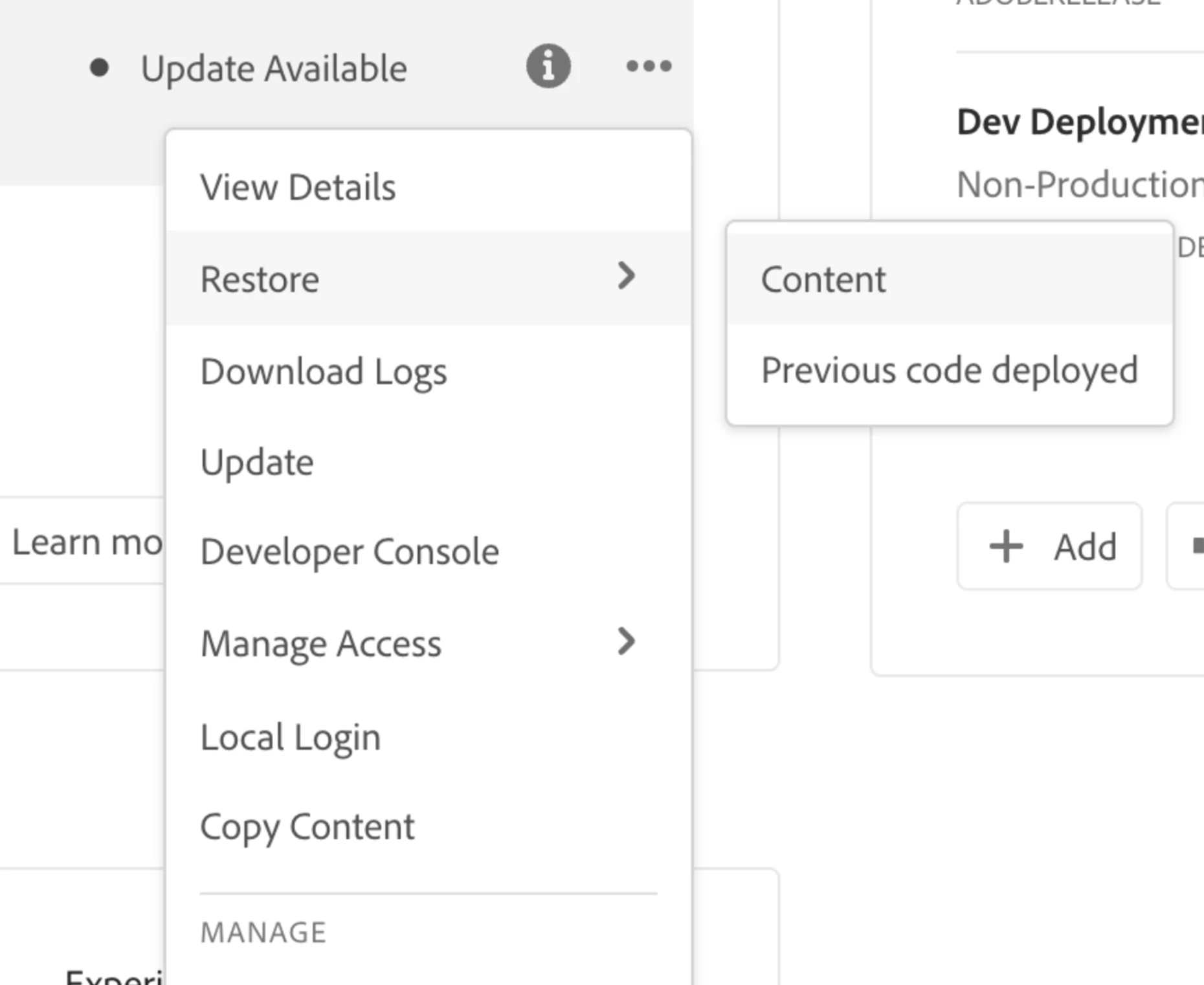
Use Restore previous code deployed to roll an environment back instantly to its last successful build—no pipeline run required.

You simply open the selected environment’s menu and choose Restore > Previous code deployed to roll back the most recently deployed source code in seconds.


Restore previous code deployed becomes available only when the following conditions are met:

  • Only one restore is allowed per successful pipeline execution; to restore again, complete another successful pipeline run.
  • You hold Environment Restore Create permissions. For details on managing permissions, see Custom Permissions.
  • The feature flag guarding this feature is enabled (on).
  • The program runs on AEM as a Cloud Service.
  • The last pipeline for that environment finished successfully and ran fewer than 30 days ago.
  • The environment status is Running and no pipeline is in progress.


Follow below link for more details on it:

https://experienceleague.adobe.com/en/docs/experience-manager-cloud-service/content/operations/restore-previous-code-deployed


Hope it helps!


-Tarun