Request for Guidance on Workflow Trigger Condition for cq:tags Updates | Community
Skip to main content
veerareddyc1015
Level 3
September 30, 2024

Request for Guidance on Workflow Trigger Condition for cq:tags Updates

  • September 30, 2024
  • 3 replies
  • 787 views

Hi Team,

I need to configure a workflow launcher to trigger whenever the cq:tags property is updated or modified on a page. Could you please provide guidance on how to set up this condition in the workflow launcher?

Thank you in Advance!

Thanks & Regards

Veera
 

This post is no longer active and is closed to new replies. Need help? Start a new post to ask your question.

3 replies

EstebanBustamante
Community Advisor and Adobe Champion
September 30, 2024

Hi, 

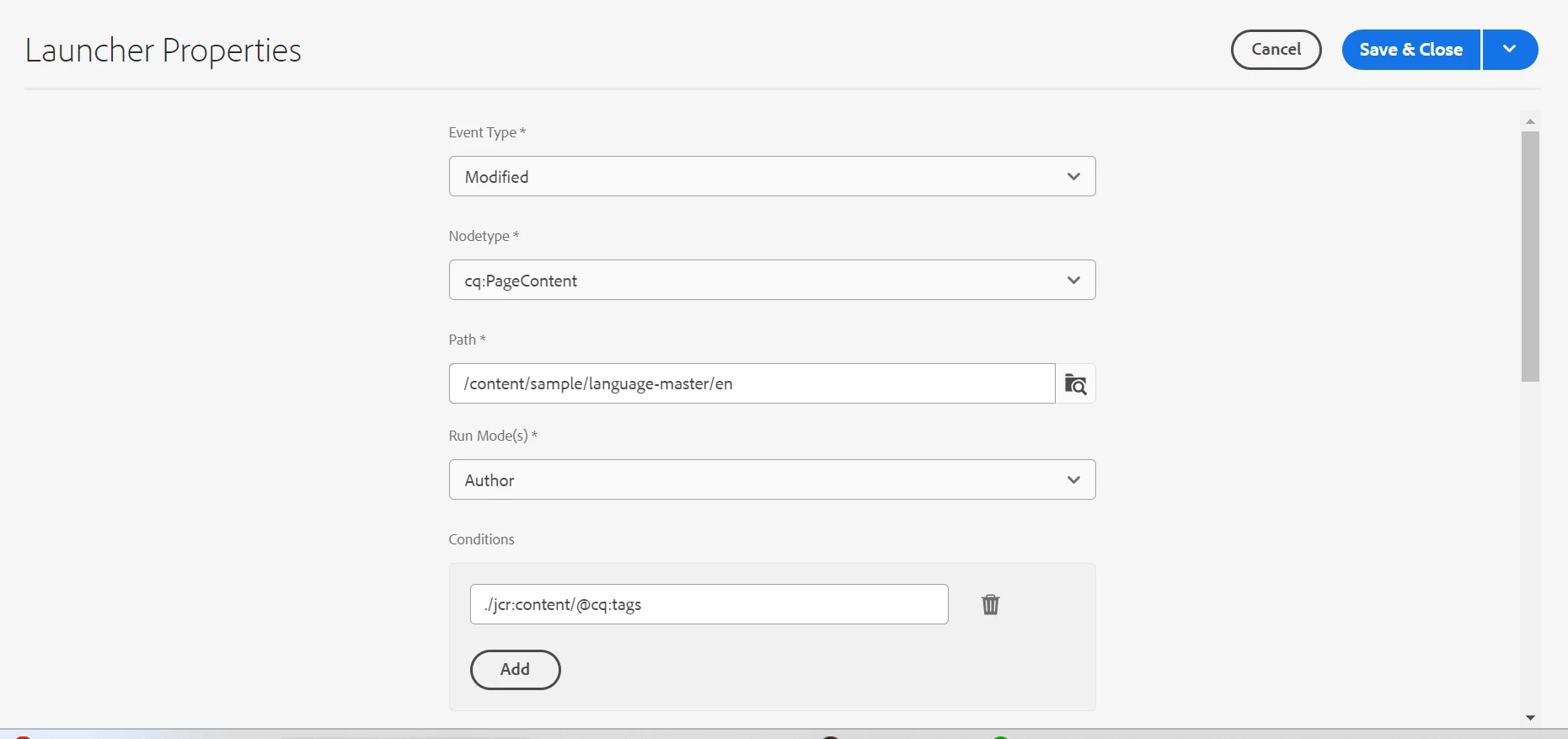
Something like this should work, you don't need extra conditions, due to the Event Type is enough to catch the property change:


Hope this helps

Esteban Bustamante
veerareddyc1015
Level 3
October 1, 2024

Thanks Esteban Bustamante for the quick reply.
Launcher is not getting triggered once we add the above details.

khamat_bn
Level 4
October 1, 2024

Hello @veerareddyc1015 

This can be achieved with the condition with value as
jcr:content/@cq:tags != '' || jcr:content/@cq:tags != null
refer below screenshot. Also change the path as per requirement, if you want to add path with jcr:content then nodetype and condition will change accordingly


Let me know if you have any questions. 


~Bhausaheb

veerareddyc1015
Level 3
October 1, 2024

Thanks, Bhausaheb, for the quick response. However, the launcher is currently being triggered by any updates to the page properties or content changes on the page.

What I need is for the launcher to trigger only when the cq:tags in the page properties are updated. It should not trigger for changes to other properties or any content updates on the page.

Could you please assist me in refining the condition for this?

arunpatidar
Community Advisor
Community Advisor
October 1, 2024

Hi @veerareddyc1015 
I tried with below but it only launch one workflow at a time


Arun Patidar
kautuk_sahni
Community Manager
Community Manager
October 9, 2024

@veerareddyc1015 Did you find the suggestions helpful? Please let us know if you require more information. Otherwise, please mark the answer as correct for posterity. If you've discovered a solution yourself, we would appreciate it if you could share it with the community. Thank you!

Kautuk Sahni