


Replication via a selected replication agent in AEM | AEM Community Blog Seeding
Replication via a selected replication agent in AEM by Shiv Prakash
Abstract
Objective
After reading this Article, You should have an Understanding of –

Replication via a selected replication agent in Java
Introduction
In AEM, sometimes we come across the scenario of replicating the content with a specific replication agent. For example, if we want to replicate the content from one instance to another AEM instance, we can’t achieve this with the default replication agent. To achieve this, we have to create the replication agent and replicate with the help of the Replication API and Replication Options.

Hence, without any further delay, let’s get started:

Custom Replication Agent Creation
We can create the replication agent following the below steps:

Navigate to miscadmin tool and select the replication agent on Author – http://localhost:4502/miscadmin#/etc/replication/agents.author
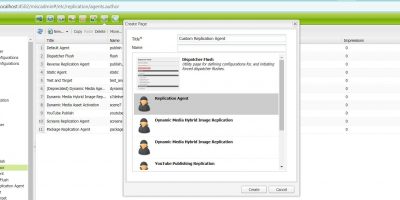
Click on Create, insert the title, select the template as Replication Agent, and click on Create
Now edit the replication agent to configure it.
In the Setting Tab, Enabled = true, Serialization Type = default, Retry Delay = 6000, Log Level = info.
In the Transport Tab, configure proper URI, User Name, and Password.
In the Triggers Tab, Ignore Default = true and save the changes.
Check the test connection and if you get a success message, that’s it. We are done.
If we encounter an issue, we can view the log by clicking View log.
Read Full Blog
Replication via a selected replication agent in AEM
Q&A
Please use this thread to ask the related questions.