React SPA app renders 403 error page for 404 error | Community
Skip to main content
Level 2
April 30, 2024
Solved

React SPA app renders 403 error page for 404 error

  • April 30, 2024
  • 1 reply
  • 857 views

Hello everyone,


I'm currently working on setting up error pages for a React SPA app. I've been following the documentation provided at the link below:

https://github.com/niekraaijmakers/aem-spa-editor-errorpages-example


However, when I try to access a non-existing page, I receive a 404 HTML response. Despite this, the subsequent model.json call returns a 403, causing the SPA to render the 403 page instead of the expected 404.
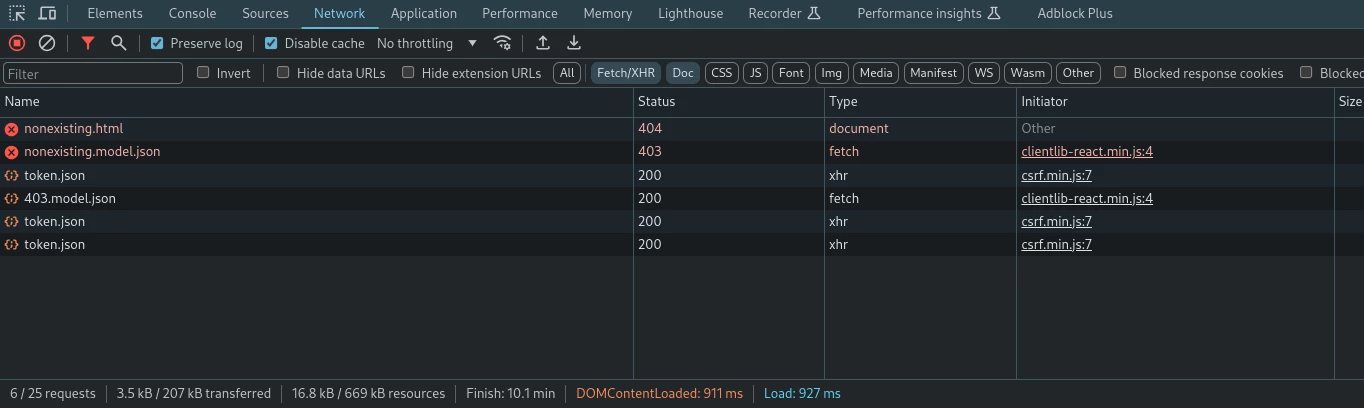


Any insights or suggestions on how to resolve this issue would be greatly appreciated. Thank you!


update: After investigating further, I found that publish admin user were able to access these pages and received the expected 404 response. The issue might be related to anonymous users permission, but I am not sure which permission I should assign to the anonymous user for the expected 404 scenario. 

 

This post is no longer active and is closed to new replies. Need help? Start a new post to ask your question.
Best answer by abhishekanand_

Hi @julkar__naim 

seems to be related to the server-side configuration. Here are some key points from the current page that might help you resolve the problem:

  • SPA Editor Configuration: Ensure you’ve followed the tutorial on the ACS AEM commons page to install the module and set up the JSP files, dialog of the root page, and necessary pages. SPA Page model manager 1.4.0 or higher is required.

  • 404 Pages: For 404 pages to work, include the specified code in your page template’s customheaderlibs.html and use it in the front-end initialization as shown.

you can follow the below links for more references to your problem which might help you 
https://aemfrontend.blogspot.com/2021/08/aem-spa-editor-error-page-handling.html 

https://adobe-consulting-services.github.io/acs-aem-commons/features/error-handler/index.html 

https://experienceleague.adobe.com/en/docs/experience-manager-cloud-service/content/implementing/developing/full-stack/custom-error-page 

1 reply

abhishekanand_
Community Advisor
abhishekanand_Community AdvisorAccepted solution
Community Advisor
April 30, 2024

Hi @julkar__naim 

seems to be related to the server-side configuration. Here are some key points from the current page that might help you resolve the problem:

  • SPA Editor Configuration: Ensure you’ve followed the tutorial on the ACS AEM commons page to install the module and set up the JSP files, dialog of the root page, and necessary pages. SPA Page model manager 1.4.0 or higher is required.

  • 404 Pages: For 404 pages to work, include the specified code in your page template’s customheaderlibs.html and use it in the front-end initialization as shown.

you can follow the below links for more references to your problem which might help you 
https://aemfrontend.blogspot.com/2021/08/aem-spa-editor-error-page-handling.html 

https://adobe-consulting-services.github.io/acs-aem-commons/features/error-handler/index.html 

https://experienceleague.adobe.com/en/docs/experience-manager-cloud-service/content/implementing/developing/full-stack/custom-error-page 

Abhishek Anand