React components not available in WKND SPA React | Community
Skip to main content
Level 2
June 2, 2022

React components not available in WKND SPA React

  • June 2, 2022
  • 2 replies
  • 2109 views

Hey all,


I'm trying to follow the tutorial for building the WKND SPA React project and am not able to see or edit the React components that come with the project. This fella here: https://experienceleague.adobe.com/docs/experience-manager-learn/getting-started-with-aem-headless/spa-editor/react/overview.html?lang=en


When I view the page in the console, the Components tab does not list any components (according to the tutorial, I should see a Text and Layout component there).
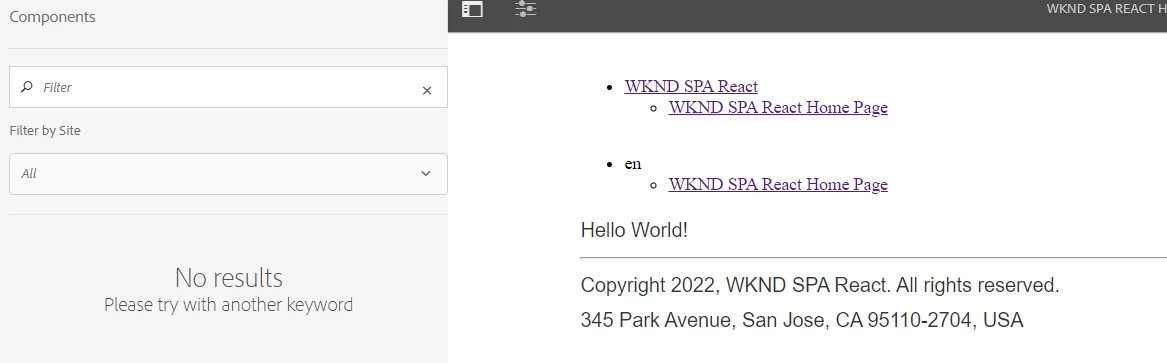
 

When I view the page as published and inspect the page, the Hello world string is contained in a <p> tag whereas I'd expect to see a script there that pulls in the content.


And, the console displays the following warnings:

 

So, the page is looking for those minified js and css files and they aren't there. Is this likely the cause of the behaviors I'm seeing? I've tried invalidating the clients and clearing the browser cache but no luck.


I'm guessing there's an issue in my maven build that is causing those files not to get copied where they need to be, but I'm not really sure where to look. I'm very new to both Maven and AEM, so any tips would be greatly appreciated!


AEM: 6.5.12

JDK 11.0.5

Maven 3.8.5

Node.js (locally installed for this project): 14.16.1

Node.js (globally installed for another project): 16.14

This post is no longer active and is closed to new replies. Need help? Start a new post to ask your question.

2 replies

SantoshSai
Community Advisor
Community Advisor
June 2, 2022

Hi @wesbarichak 

May I know what is the maven archetype you are using to build project? Appreciate if you paste command here.

Regards,
Santosh

Santosh Sai
Level 2
June 2, 2022

@santoshsai 


mvn -B archetype:generate \
 -D archetypeGroupId=com.adobe.aem \
 -D archetypeArtifactId=aem-project-archetype \
 -D archetypeVersion=36 \
 -D appTitle="WKND SPA React" \
 -D appId="wknd-spa-react" \
 -D artifactId="aem-guides-wknd-spa.react" \
 -D groupId="com.adobe.aem.guides.wkndspa.react" \
 -D frontendModule="react" \
 -D aemVersion="6.5.12"
SantoshSai
Community Advisor
Community Advisor
June 2, 2022

@wesbarichak 

I believe it requires, core components - do you have installed them? https://github.com/adobe/aem-core-wcm-components
If you check here for /apps/wknd-spa-react/components/text component inherits to core components.

Santosh Sai
sunil_kumar_
Level 5
June 2, 2022

Hi @wesbarichak ,
Try to get existing wknd react spa code from get and build at your local. It works. You can use this for your learning. 
Build as per you AEM, If using AEM 6.5.x use additional parameter while build as mantion
mvn clean install -PautoInstallSinglePackage -Pclassic

https://github.com/adobe/aem-guides-wknd-spa/tree/React/latest

Check this as well, If it helps.

https://youtu.be/cWEfSNrgvRE

SantoshSai
Community Advisor
Community Advisor
June 2, 2022

Though I agree cloning project works but need to identify what's the problem in building project in batch mode when system specs are at its place. 

Santosh Sai