Level 6
Aug 29, 2022 11:05 AM UTC
Solved

prod environment is alternating use of /apps/acs-commons-old and /apps/acs-commons - causing Dialog save errors

hi folks,

This happened after a recent upgrade to 6.5.12 from 6.5.5.

It doesn't happen on lower environments where only /apps/acs-commons is used.

According to my Package Mgr, acs-commons 4.11.0  apps and content are installed on Prod which looks the same as the lower environments.


thanks in advance for any assistance!

Fiona
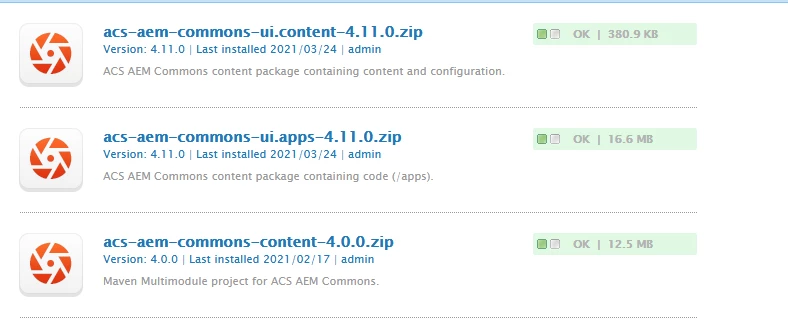


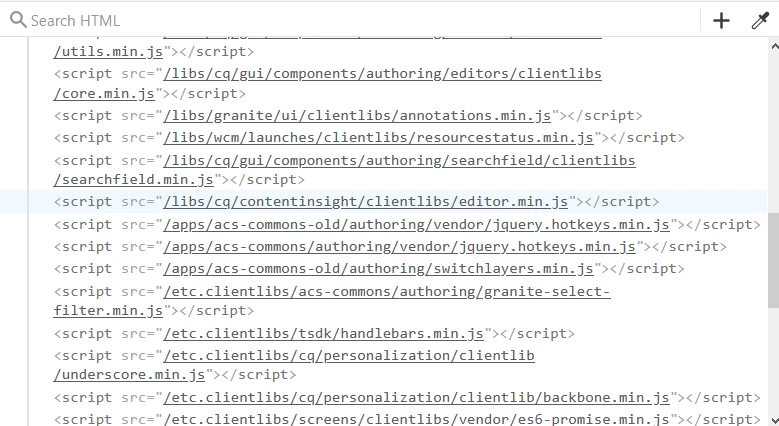
Here is the debug showing the JS libraries loaded
 

This post is no longer active and is closed to new replies. Need help? Start a new post to ask your question.
Sachin_Arora_
Sachin_Arora_Accepted solution
Community Advisor
Aug 29, 2022 1:24 PM UTC

If old acs-commons is still available inside /apps then the client libraries present in it will still be getting applied. So /apps/acs-commons-old should be removed.

10 replies

Sachin_Arora_
Community Advisor
Community Advisor
Aug 29, 2022 11:19 AM UTC

Did you rename the old /apps/acs-commons to /apps/acs-commons-old before installing package?

Translate
Level 6
Aug 29, 2022 12:32 PM UTC

hi !

Actually, It is my Adobe Customer Success Engineer (CSE) who deals with our prod environment.

She didn't upgrade the ACS Commons libraries this upgrade as far as I remember.

She may have made a copy of acs-commons during the 6.5 upgrade a few years ago?

But I don't see anything like that in the crx/packmgr.

Should I ask her to do something special ? Uninstall the acs commons and reinstall it perhaps?

thanks


Fiona

Translate
Sachin_Arora_
Community Advisor
Sachin_Arora_Community AdvisorAccepted solution
Community Advisor
Aug 29, 2022 1:24 PM UTC

If old acs-commons is still available inside /apps then the client libraries present in it will still be getting applied. So /apps/acs-commons-old should be removed.

Translate
arunpatidar
Community Advisor
Community Advisor
Aug 29, 2022 1:31 PM UTC

There could be issue due to duplicate instances of files.

You should be using only one instance of ACS Common.

Translate
Arun Patidar
Level 6
Aug 29, 2022 11:17 PM UTC

Hi,

I got rid of the dud duplicate library, but I still had my Dialog save problem.

On further examination, I finally figured that the Dialog code that was breaking was using underscore.

So I found this.


https://experienceleaguecommunities.adobe.com/t5/adobe-experience-manager/after-updating-aem-6-5-10-underscore-dependency-is-not-loading/m-p/426336#M121452


It says "Adobe recommends customers that still require Lodash/underscore for their code to add it into their project code base."


I'm not sure how to do this so that the correct clientlib is picked up by the Authoring code.


If I do something like,

aem.ui.apps/src/main/content/jcr_root/apps/myproj/clientlibs/underscore

with a directory

js/underscore.js

js.txt -> with "#base=js " and "underscore.js"

.content.xml with


<?xml version="1.0" encoding="UTF-8"?>
<jcr:root xmlns:cq="http://www.day.com/jcr/cq/1.0" xmlns:jcr="http://www.jcp.org/jcr/1.0"
jcr:primaryType="cq:ClientLibraryFolder"
allowProxy="{Boolean}true"
categories="[underscore]"/>


will this do the job I wonder.


thanks

FIona


Translate
Level 6
Aug 30, 2022 11:03 AM UTC

In the end, in my .content.xml files, I put lodash.underscore instead of underscore and that worked to fix my Dialog errors. I think the "underscore" was removed in 6.5.10 but you can still use the lodash.underscore.

Translate