problem submitting new app | Community
Skip to main content
MyraStarklint
January 13, 2016
Solved

problem submitting new app

  • January 13, 2016
  • 2 replies
  • 978 views

I was in the process of creating new certificates and updating the app in iTunes Connect.


Everything went well, up until when I was submitting the new build via “Application Loader 3.0”.

A window appeared stating: The resulting API analysis file is too large. We were unable to validate your API usage prior to delivery. This is just an informational message."
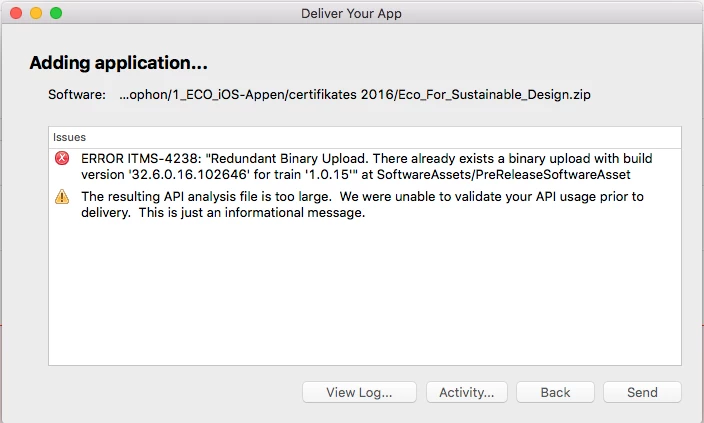
How do I make the API smaller?

How can I get the app to be approved by iTunes connect?


What is my next step from here?


I’m thankful for any help you can provide.

Kind regards,

Myra

This post is no longer active and is closed to new replies. Need help? Start a new post to ask your question.
Best answer by bobbr3212

As a general rule, don't worry about any yellow triangle message that appears when you upload an app binary. You don't need to take any action. Just submit the app for review.

2 replies

bobbr3212Adobe EmployeeAccepted solution
Adobe Employee
January 13, 2016

As a general rule, don't worry about any yellow triangle message that appears when you upload an app binary. You don't need to take any action. Just submit the app for review.

MyraStarklint
January 14, 2016

Thank you Bob, you were absolutely correct.

At the time, I couldn't submit the app for review, but after a few hours it was possible.

So the issue was resolved eventually.

A little patience goes a long way...