Pre-upgrade maintenance task | Community
Skip to main content
Level 3
November 5, 2021
Solved

Pre-upgrade maintenance task

  • November 5, 2021
  • 2 replies
  • 1734 views

Hi all,


I am trying to upgrade AEM 6.2 to 6.5. If I didn't run Pre-upgrade maintenance task, will there be any issue in upgrading?


Edit: What I mean is how about if I didn't run this com.day.cq.audit.impl.AuditLogMaintenance? how can I check whether my AEM run on crx2 or crx3 mode?
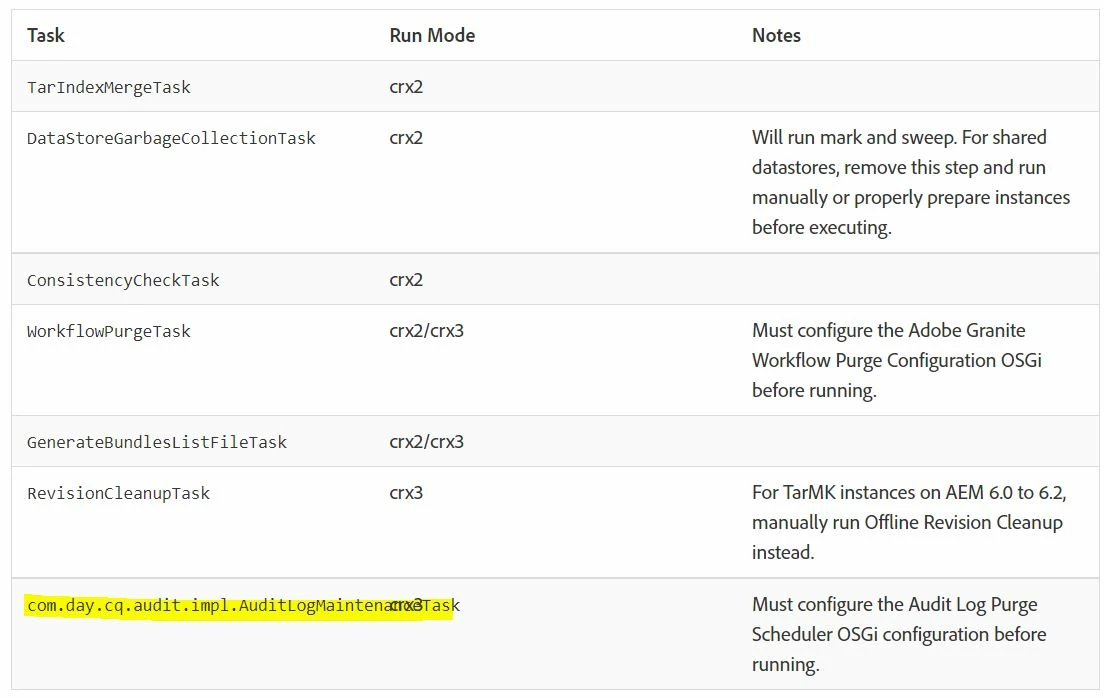
Thanks.

This post is no longer active and is closed to new replies. Need help? Start a new post to ask your question.
Best answer by joerghoh

The documentation recommends to do run these. Why do you want to skip them?

2 replies

joerghoh
Adobe Employee
joerghohAdobe EmployeeAccepted solution
Adobe Employee
November 5, 2021

The documentation recommends to do run these. Why do you want to skip them?

Raja-Karuppsamy
Community Advisor
Community Advisor
November 6, 2021

@ariesyinn Adobe recommends to perform the pre-upgrade task before performing upgrade activities. Instead of carrying the old logs , un-referenced data/blobs in repository , completed workflows  from old version to NEW AEM version- better to perform all the pre-upgrade maintenance tasks.


Mainly, repository size will be reduced after performing all the maintenance tasks. 

Please refer :https://experienceleague.adobe.com/docs/experience-manager-64/deploying/upgrading/pre-upgrade-maintenance-tasks.html?lang=en


ariesyinnAuthor
Level 3
November 8, 2021

Sorry for in complete question. I have edited the ques.

Raja-Karuppsamy
Community Advisor
Community Advisor
November 8, 2021

@ariesyinn First check whether you have configured Audit log in your repository -> /<AEM installation path>/crx-quickstart/logs/*.


How can I check whether my AEM run on crx2 or crx3 mode? Check run mode configuration in start file or cq file -> /<AEM installation path>/crx-quickstart/bin/start.sh