Pathfield for Text component hyperlink in 6.3 Classic UI | Community
Skip to main content
CT1012
Level 4
October 17, 2017

Pathfield for Text component hyperlink in 6.3 Classic UI

  • October 17, 2017
  • 1 reply
  • 4776 views

As a part of upgrade from 5.6.1 to 6.3.

In AEM 6.3 Pathfield for hyperlink in text component handled under LinkDialog.js is not us allowing to leave blank
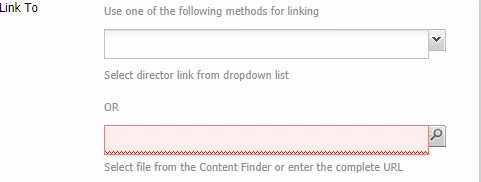
We are using basic libs LInkDialog.js... Code for pathfield

{

                    "itemId": "href",

                    "name": "href",

                    "parBrowse": false,

                    "anchor": CQ.themes.Dialog.ANCHOR,

                    /*"fieldLabel": CQ.I18n.getMessage("Link"),*/

                    "xtype": "pathfield",

                    "ddGroups": [

                        CQ.wcm.EditBase.DD_GROUP_PAGE,

                        CQ.wcm.EditBase.DD_GROUP_ASSET

                    ],

                    "fieldDescription": CQ.I18n.getMessage("Select file from the Content Finder or enter the complete URL"),

                    "listeners": {

                        "dialogselect": {

                            "fn": this.selectAnchor,

                            "scope": this

                        },

                        "render": this.initHrefDragAndDrop

                    },

                    "validator": CUI.rte.Utils.scope(this.validateLink, this),

                    "validationEvent": "keyup",

                    "escapeAmp": true

                }

Validate Link

    validateLink: function(href) {

        var linkRules = this.getParameter("linkRules");

        if (!linkRules) {

            return (href.length > 0 ? true : CQ.I18n.getMessage("No link provided"));

        }

        var isValid = linkRules.validateHref(href);

        return isValid || CQ.I18n.getMessage("Invalid link");

    }

});

Should i need to add any Properties or config options?

This post is no longer active and is closed to new replies. Need help? Start a new post to ask your question.

1 reply

smacdonald2008
Level 10
October 17, 2017

In AEM 6.3 - you should be working in TOuch UI and using Granite data types. Most of the code examples you will find in AEM 6.3 is applicable for TOuch UI. I will to see if there are any Classic UI examples still.

CT1012
CT1012Author
Level 4
October 17, 2017

  Thanks donald

Somehow i see validate link is causing the issue, even i've tried allowBlank=True

ValidateLink from 5.6.1

validateLink: function() {

        var href = this.getFieldByName("href");

        if (!href) {

            return false;

        }

        href = href.getValue();

        var linkRules = this.getParameter("linkRules");

        if (!linkRules) {

            return (href.length > 0);

        }

        return linkRules.validateHref(href);

    }

ValidateLink from 6.3

validateLink: function(href) {

        var linkRules = this.getParameter("linkRules");

        if (!linkRules) {

            return (href.length > 0 ? true : CQ.I18n.getMessage("No link provided"));

        }

        var isValid = linkRules.validateHref(href);

        return isValid || CQ.I18n.getMessage("Invalid link");

    }

VeenaVikraman
Community Advisor
Community Advisor
October 17, 2017

can you share a sample for me to test this out ? I can see if we can figure out any fix for this