PathBrowser not working in Multifield coral AEM 6.3
Hi all, My English is so bad, so I depicted the picture below, everyone please help me.
Pathfield, select, datepicker,... click OK, only PathBrowser click not working in Coral , AEM 6.3
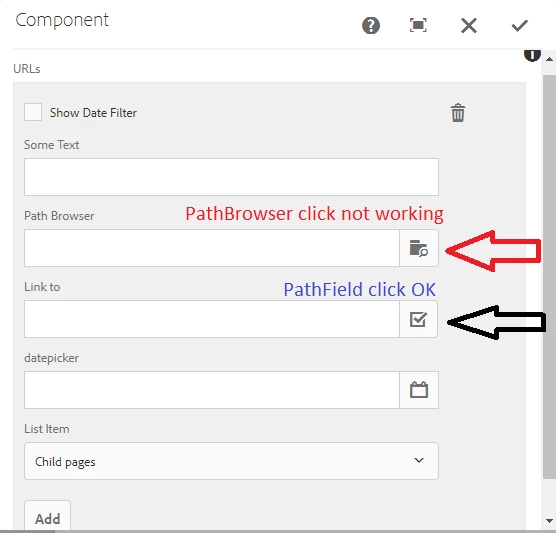
My code .content.xml
<pages
jcr:primaryType="nt:unstructured"
sling:resourceType="granite/ui/components/coral/foundation/form/multifield"
composite="{Boolean}true"
fieldDescription="Click '+' to add a new page"
fieldLabel="URLs">
<field
jcr:primaryType="nt:unstructured"
sling:resourceType="granite/ui/components/coral/foundation/container"
name="./items">
<items jcr:primaryType="nt:unstructured">
<column
jcr:primaryType="nt:unstructured"
sling:resourceType="granite/ui/components/foundation/container">
<items jcr:primaryType="nt:unstructured">
<filterSectionText
jcr:primaryType="nt:unstructured"
sling:resourceType="granite/ui/components/coral/foundation/form/textfield"
fieldLabel="Some Text"
name="./someText" />
<pathBrowser
jcr:primaryType="nt:unstructured"
sling:resourceType="granite/ui/components/coral/foundation/form/pathbrowser"
fieldLabel="Path Browser"
name="./searchPath"
rootPath="/etc/tags" />
<buttonLinkTo
jcr:primaryType="nt:unstructured"
sling:resourceType="granite/ui/components/coral/foundation/form/pathfield"
fieldLabel="Link to"
name="./buttonLinkTo"
rootPath="/content"
suffix=".html" />
<datepicker
jcr:primaryType="nt:unstructured"
sling:resourceType="granite/ui/components/coral/foundation/form/datepicker"
displayedFormat="MM-DD-YYYY HH:mm"
fieldLabel="datepicker"
name="./datepicker"
type="datetime"
typeHint="Date" />
<listFrom
granite:class="cmp-options--editor-type-v1"
jcr:primaryType="nt:unstructured"
sling:resourceType="granite/ui/components/coral/foundation/form/select"
fieldLabel="List Item"
name="./listItem">
<items jcr:primaryType="nt:unstructured">
<children
jcr:primaryType="nt:unstructured"
text="Child pages"
value="children" />
<static
jcr:primaryType="nt:unstructured"
text="Fixed list"
value="static" />
</items>
</listFrom>
</items>
</column>
</items>
</field>
</pages>