Parsys Component Issue | Community
Skip to main content
April 12, 2018
Solved

Parsys Component Issue

  • April 12, 2018
  • 7 replies
  • 4248 views

Hi All,

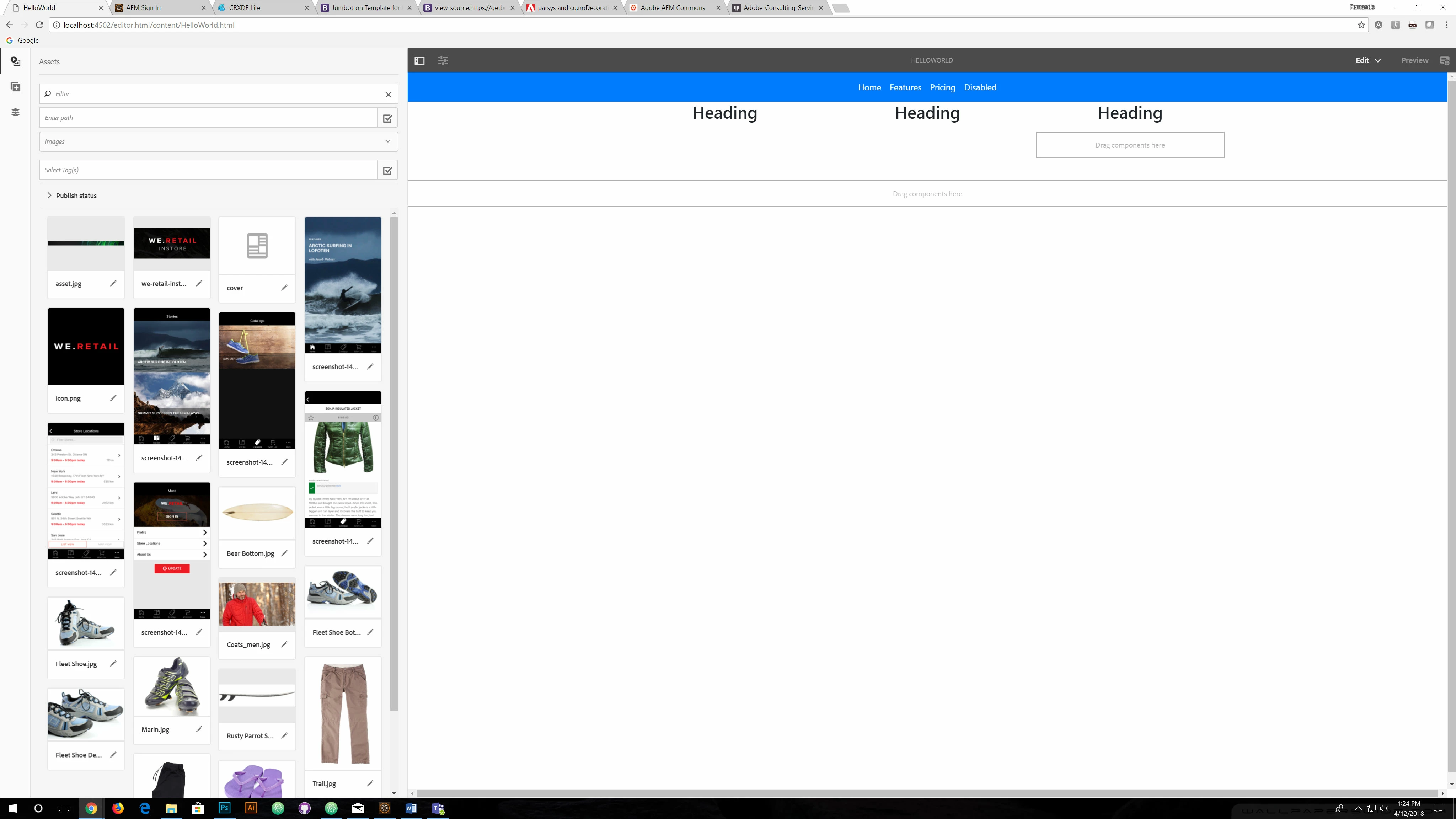
I'm having a weird issue with the parsys component for some reason its only showing one drop zone, and not 3 within AEM edit mode. I've pasted my code from my column control component with a screenshot of my error.

Control Component Markup

<div class="container">

        <!-- Example row of columns -->

        <div class="row">

          <div class="col-md-4 text-center">

            <sly data-sly-resource="${'par' @resourceType='foundation/components/parsys'}" data-sly-unwrap></sly>

          </div>

          <div class="col-md-4 text-center">

             <sly data-sly-resource="${'par' @resourceType='foundation/components/parsys'}" data-sly-unwrap></sly>

          </div>

          <div class="col-md-4 text-center">

             <sly data-sly-resource="${'par' @resourceType='foundation/components/parsys'}" data-sly-unwrap></sly>

          </div>

        </div>

Here is a screenshot of my parsys component only showing one and not three?.
Thanks,

- Abel

This post is no longer active and is closed to new replies. Need help? Start a new post to ask your question.
Best answer by Vijayalakshmi_S

Hi,

From the code snippet, could see that the "path" for all three parsys is mentioned as "par". Can you make it unique.(any meaningful name of your choice)

  • Components included in the parsys will be saved under that name in "jcr:content" of the page where this column component is authored. (in this case, HelloWorld.html per the screenshot)
  • In CRXDE, /content/HelloWorld/jcr:content/par/.. , /content/HelloWorld/jcr:content/midPar/... and /content/HelloWorld/jcr:content/colPar/...

Naming like below will help produce respective parsys container in 3 columns.

....     <div data-sly-resource="${'par' @ resourceType='wcm/foundation/components/parsys'}"></div>

          </div>

          <div class="col-md-4 text-center">

             <div data-sly-resource="${'midpar' @ resourceType='wcm/foundation/components/parsys'}"></div>

          </div>

          <div class="col-md-4 text-center">

             <div data-sly-resource="${'colpar' @ resourceType='wcm/foundation/components/parsys'}"></div>

          </div> ..

7 replies

Vijayalakshmi_S
Level 10
April 12, 2018

Can you add Column control component markup, It's missing in the original post.

April 12, 2018

Sorry that was odd here it is.

<div class="container">

        <!-- Example row of columns -->

        <div class="row">

          <div class="col-md-4 text-center">

            <div data-sly-resource="${'par' @ resourceType='wcm/foundation/components/parsys'}"></div>

          </div>

          <div class="col-md-4 text-center">

             <div data-sly-resource="${'par' @ resourceType='wcm/foundation/components/parsys'}"></div>

          </div>

          <div class="col-md-4 text-center">

             <div data-sly-resource="${'par' @ resourceType='wcm/foundation/components/parsys'}"></div>

          </div>

        </div>

Thanks

Vijayalakshmi_S
Vijayalakshmi_SAccepted solution
Level 10
April 12, 2018

Hi,

From the code snippet, could see that the "path" for all three parsys is mentioned as "par". Can you make it unique.(any meaningful name of your choice)

  • Components included in the parsys will be saved under that name in "jcr:content" of the page where this column component is authored. (in this case, HelloWorld.html per the screenshot)
  • In CRXDE, /content/HelloWorld/jcr:content/par/.. , /content/HelloWorld/jcr:content/midPar/... and /content/HelloWorld/jcr:content/colPar/...

Naming like below will help produce respective parsys container in 3 columns.

....     <div data-sly-resource="${'par' @ resourceType='wcm/foundation/components/parsys'}"></div>

          </div>

          <div class="col-md-4 text-center">

             <div data-sly-resource="${'midpar' @ resourceType='wcm/foundation/components/parsys'}"></div>

          </div>

          <div class="col-md-4 text-center">

             <div data-sly-resource="${'colpar' @ resourceType='wcm/foundation/components/parsys'}"></div>

          </div> ..

April 13, 2018

Ok I'll give that a shot tomorrow thanks

April 13, 2018

Awesome that worked, I'ts been a grueling learning experience following these tutorials from Adobe, I followed a tutorial and they requested me to use this set of code unfortunately, it didn't work, but this sure did!.

smacdonald2008
Level 10
April 13, 2018

" I followed a tutorial and they requested me to use this set of code unfortunately, it didn't work"

What tutorial are you referring to?

Most HELPX articles have been tested many times by community members. Can you let us know what one you are referring to.

Ratna_Kumar
Level 10
April 13, 2018

Hi,

Could you please let us know which Adobe docs you have followed.

Also, you can always follow Adobe HELPX Articles which are perfectly working fine(Might be you are following non-community article) - Which I personally tested many times from 4 years!!

Thanks,

Ratna.