
Panel container - remove is-disabled for inactive panels | Community
Skip to main content
MichaelNeu007
Level 2
July 5, 2024
Solved

Panel container - remove is-disabled for inactive panels

  • July 5, 2024
  • 1 reply
  • 916 views

Hello


I am creating a custom Carousel component based on the core Carousel. In my implementation, multiple slides are visible on the desktop simultaneously. 


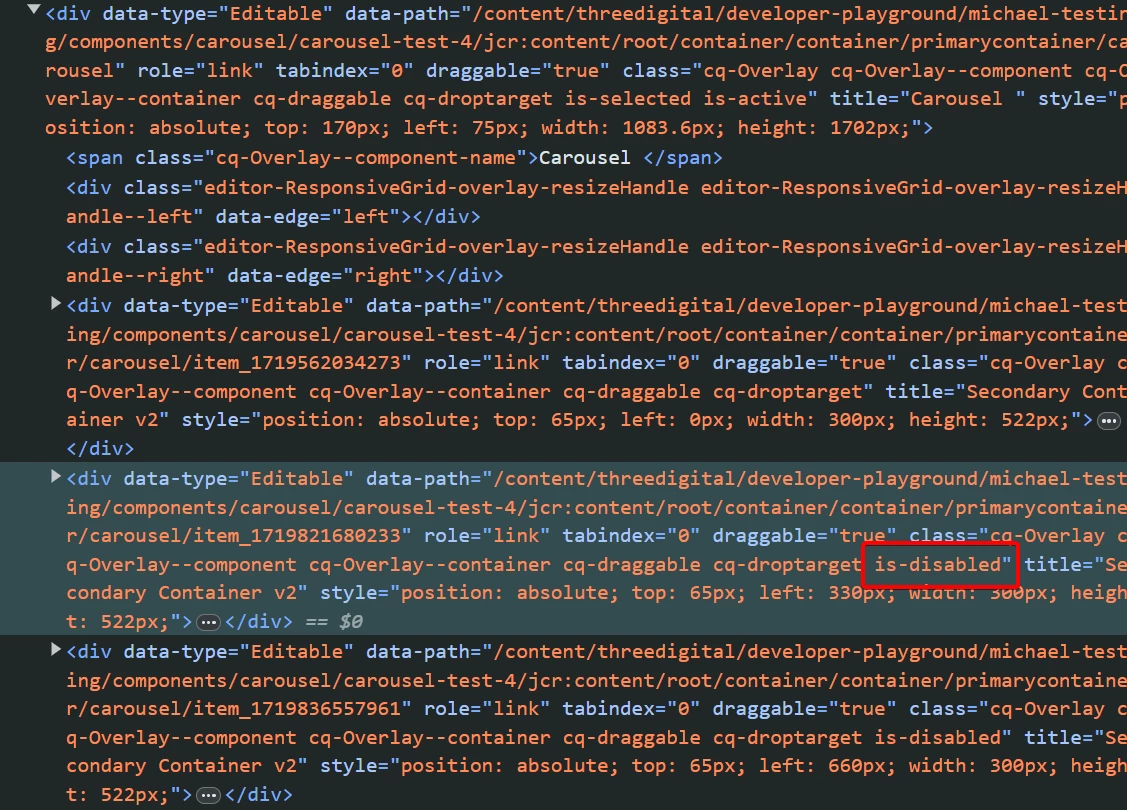
In authoring mode, even though the content of the slides is visible I can't click the slide to edit it. This is because there is a class "is-disabled" on the cq:Overlay. I suppose it is present because the original carousel is based on Panel Container. That is switching between active slides for authoring using the PANEL_SELECT button in the editable toolbar.


For my solution in author mode, I am displaying all the slides so I don't need this extra is-disabled functionality in this component. 

How to adjust my component to turn this off? 


I tried hacky solution manipulating with the cq:Overlay in the component Javascript but it seems like document.querySelector can't target cq:Overlay components.

Is there a hacky way to reach it?


This post is no longer active and is closed to new replies. Need help? Start a new post to ask your question.
Best answer by MichaelNeu007

Looks like this works. I just need to make it into a editor only clientlib:
I tried in the console something like this and it worked:
Granite.author.editables[25].overlay.dom.removeClass("is-disabled")

Also it seems my exact problem was resolved even better here
https://experienceleaguecommunities.adobe.com/t5/adobe-experience-manager/how-to-remove-is-disabled-class-in-component-in-author-or-add/m-p/558659

1 reply

h_kataria
Community Advisor
Community Advisor
July 5, 2024
MichaelNeu007
MichaelNeu007AuthorAccepted solution
Level 2
July 5, 2024

Looks like this works. I just need to make it into a editor only clientlib:
I tried in the console something like this and it worked:
Granite.author.editables[25].overlay.dom.removeClass("is-disabled")

Also it seems my exact problem was resolved even better here
https://experienceleaguecommunities.adobe.com/t5/adobe-experience-manager/how-to-remove-is-disabled-class-in-component-in-author-or-add/m-p/558659