
OOTB AEM 6.5.0 is not running in M1 processor Mac machine. | Community
Skip to main content
Saravanan_Dharmaraj
Community Advisor
Community Advisor
July 18, 2022

OOTB AEM 6.5.0 is not running in M1 processor Mac machine.

  • July 18, 2022
  • 3 replies
  • 2375 views

Hi,

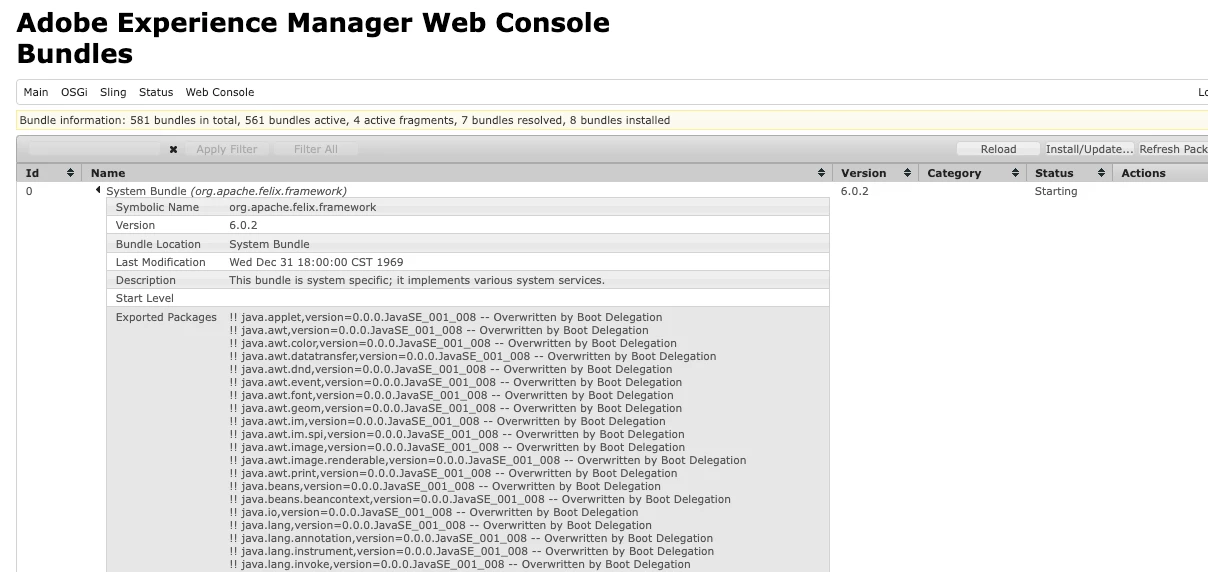
I am trying to run the "out of the box" plain AEM 6.5.0 in new M1 Mac. The system bundle shown in pic below stuck in "starting" status and not becoming active. I can login into osgi bundles and see but the crx & login are not coming up and the AEM is unusable.


The java version is
    java version "1.8.0_333"
    Java(TM) SE Runtime Environment (build 1.8.0_333-b02)
    Java HotSpot(TM) 64-Bit Server VM (build 25.333-b02, mixed mode)

I tried downgrade the java 8 version to 311, still no luck.
Any help or documentation to fix this will be helpful.


This post is no longer active and is closed to new replies. Need help? Start a new post to ask your question.

3 replies

Manu_Mathew_
Community Advisor
Community Advisor
July 18, 2022

@saravanan_dharmaraj Is there anything on the error logs? Can you share that too?

Saravanan_Dharmaraj
Community Advisor
Community Advisor
July 18, 2022

I have copied the error log generated when the AEM is loaded when i started. 

https://www.dropbox.com/s/hs5opgw3kz6yh4y/error.log?dl=0 

Other than i dont see any errors. 

SantoshSai
Community Advisor
Community Advisor
July 18, 2022

Hi @saravanan_dharmaraj ,

Please check if your Core Component is in Active state or any other bundles. Resolve those and bring them to Active if any to make it functional.

Regards,

Santosh

Santosh Sai
Saravanan_Dharmaraj
Community Advisor
Community Advisor
July 18, 2022

Below pic shows the list of bundles not in active state. I tried to start manually too , nothing happens and nothing in log file too.


SantoshSai
Community Advisor
Community Advisor
July 18, 2022

@saravanan_dharmaraj - check your AEM Core WCM Components bundle - what's error? If you install latest SP it will resolve - it's because of incompatibility of AEM Core component bundle and AEM version.


Santosh Sai
Saravanan_Dharmaraj
Community Advisor
Community Advisor
July 22, 2022

One thing made it work for me is removing all the java versions from the M1 mac and installed Java 11.

Then restarted the AEM instance it worked. Then i installed SP10. It worked too.

This similar post helped 

https://experienceleaguecommunities.adobe.com/t5/adobe-experience-manager/anyone-able-to-setup-aem-6-5-on-m1-macbook/m-p/440904 

July 25, 2022

Hi Saravanan,


Thank you for this reply! I was running into this same roadblock on this because I was using Java 18 (using brew and getting latest) on my M1Pro Mac and AEM wasn't starting up so I uninstalled it, and installed Java 11 instead (brew install openjdk@11) and it now works as expected.


Thank you!

Level 2
January 24, 2023

I was having similiar issues using Java 11 x64.


All issues have been resolved after updating to arm64 based Java 11.