Level 2
Nov 12, 2021 12:23 PM UTC

On selecting the Rich text editor(RTE)- special characters cursor is not moving forwards.

I am trying to select the special characters from the RTE but when I select the special character the cursor is not moving forward because of which the next character is added in front of first character. 

In the below screenshot, first I have selected "£" next "—" and then "©".
So it should show up as "£—©" but since the cursor is not moving it is displayed as "©—£".


Below is the screenshot of the issue.
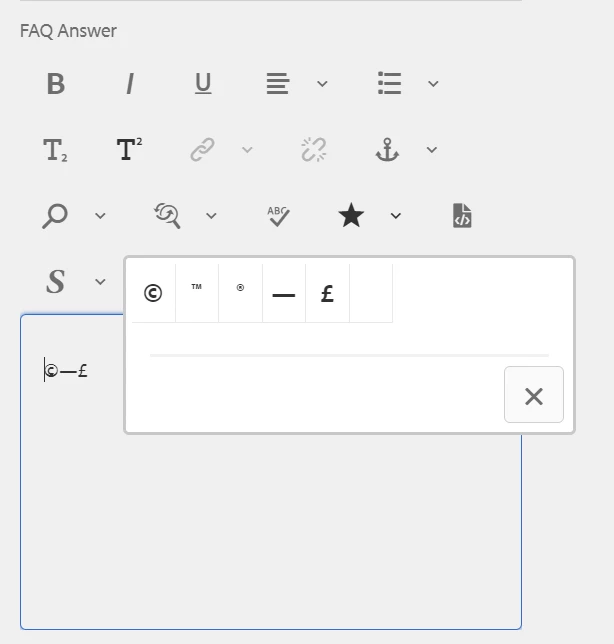


Can someone please help me how to resolve the issue.

This post is no longer active and is closed to new replies. Need help? Start a new post to ask your question.

6 replies

Level 2
Nov 15, 2021 3:28 PM UTC

@9571194 

Translate
Shubham_borole
Community Advisor
Community Advisor
Nov 16, 2021 4:49 PM UTC

Hi @junnu_ravali 
Can you please confirm what AEM version you are using and whether the richtext component is based on core component?

Please try extending from /apps/core/wcm/components/text/v2/text 

Also check out - https://experienceleague.adobe.com/docs/experience-manager-65/administering/operations/rich-text-editor.html?lang=en#aboutplugins


Thanks

Translate
Level 2
Nov 18, 2021 11:05 AM UTC

Hi @shubham_borole 
I am using AEM 6.5 and the sling:resourceType is  "cq/gui/components/authoring/dialog/richtext" and its a custom component.

Translate
Adobe Employee
Dec 30, 2021 7:36 PM UTC

Can also be seen in any Text component in AEM 6.5 using latest (2.17.14) WCM Core text component (/apps/core/wcm/components/text/v2/text).

It's a bug - SITES-1256

Translate
Sep 21, 2023 3:28 PM UTC

Hi

is this issue resolved ?

Translate
Adobe Employee
Sep 21, 2023 5:58 PM UTC

No, that bug is not fixed.

Translate