Omnisearch text box in AEM assets returns values with space as first charachter. | Community
Skip to main content
niks1020
Level 2
November 16, 2019

Omnisearch text box in AEM assets returns values with space as first charachter.

  • November 16, 2019
  • 4 replies
  • 5514 views

i am having an issue in my AEM installation:

In Author instance when I go to Assets-> click Filter from the top left option icon as shown below:
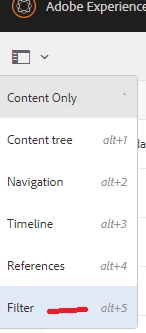
and then when I start typing keywords in the omnisearch box, I recive the suggestion drop down properly, but that suggestion drop down is formed using below kind of response. It has space ahead of the value and suggestion key's value as shown in the sample response below:

{"availableModules":[{"name":"Assets","contentNodePath":"/libs/granite/omnisearch/content/metadata/asset","id":"asset"}],

"suggestions":[{"value":"  asset\\_name","suggestion":"  asset_name"}]}

Can somebody help me with how this omnisearch works technically. I looked everywhere on google but was not able to find the technical details about this omnisearch box and the typeahead suggestion drop down formtion.

Thanks,

Nikhil

This post is no longer active and is closed to new replies. Need help? Start a new post to ask your question.

4 replies

Adobe Employee
November 18, 2019

What version of AEM are you running ?

What keyword do you type ? i.e. as asset name ?

niks1020
niks1020Author
Level 2
November 18, 2019

I am using AEM 6.4.3

Key word I type is PAW

Adobe Employee
November 18, 2019

So do you see a problem or its just a question on how omni search work ?

niks1020
niks1020Author
Level 2
November 18, 2019

Oh sorry I didn't mention that it's a know issue in AEM assets 6.4.

If there is a space inserted as the first character for search then that search will return no result even if the assets for that keyword exists.

So how would someone go and customize the response so that ali is returning results with spaces in the value ( I am sure OOTB omnisearch suggestion respond doesn't have this bug).