not able to set coral icon to rte plugin | Community
Skip to main content
Level 3
December 24, 2024
Solved

not able to set coral icon to rte plugin

  • December 24, 2024
  • 3 replies
  • 706 views

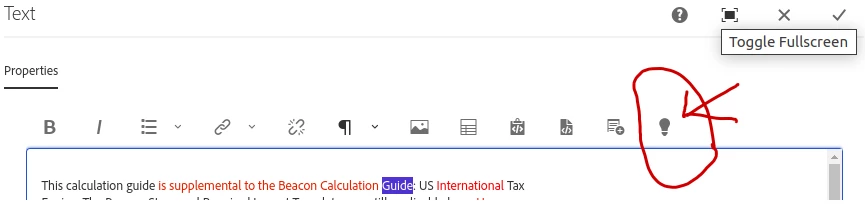
Hello everyone , I am using aemaacs local sdk. I tried to use coral icon "lightbulb" icon as rte plugin icon using tbGenerator.registerIcon(pluginname , "lightbulb"). 


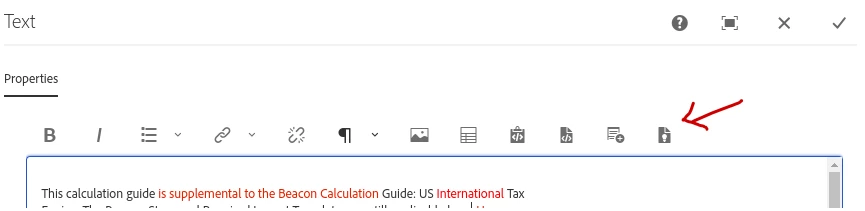
1.why I am able to use other icons but not able to use some icons like lightbulb , fileIdea.?

2. how to use custom icon in aem rte plugin ?


I have seen many online sites , blogs . but not able to find answer.

Best answer by MukeshYadav_

Hi @alisyed1 ,

We can set all the avialable icon mentioned here https://developer.adobe.com/experience-manager/reference-materials/6-5/coral-ui/coralui3/Coral.Icon.html#availableIcons

I am able to set the mentioned  icons like lightbulb , fileIdea,etc We can register icon with their class name.

tbGenerator.registerIcon(groupFeature, "fileIdea");

or 

tbGenerator.registerIcon(groupFeature, "lightbulb");

where groupfeature is like below, 

var groupFeature = GROUP + "#" + PLUGIN_FEATURE;

You may refer https://experience-aem.blogspot.com/2021/03/aem-cloud-service-css-and-color-picker-plugin-rte-rich-text-editor.html for more details on group, feature & groupFeature.

PFA

Thanks

3 replies

Pallavi_Shukla_
Community Advisor
Community Advisor
December 24, 2024

Hi @alisyed1 

There are a few reasons why some Coral icons may not work as expected when registered as RTE plugin icons:

  • Not all Coral icons are available in every context. Some icons may be restricted or not included in the specific version of the Coral library that AEM is using. 
  • The icons may require specific CSS classes or styles to render correctly. If the icon is not displaying, it could be missing styles or incorrect class names.
  • Ensure that you are registering the icon correctly. After the RTE is fully initialised, the `tbGenerator.registerIcon` method should be called. If you attempt to register the icon too early, it may not work.
  • Sometimes, icons may be part of a specific namespace or require a prefix. Make sure you are using the correct identifier for the icon.
Kamal_Kishor
Community Advisor
Community Advisor
December 24, 2024

@alisyed1 : Not sure if you have already seen this: https://experience-aem.blogspot.com/2021/03/aem-cloud-service-css-and-color-picker-plugin-rte-rich-text-editor.html


I was able to use stylePicker icon by looking at this. Please try if you not already tried.

thank you.

MukeshYadav_
Community Advisor
MukeshYadav_Community AdvisorAccepted solution
Community Advisor
December 25, 2024

Hi @alisyed1 ,

We can set all the avialable icon mentioned here https://developer.adobe.com/experience-manager/reference-materials/6-5/coral-ui/coralui3/Coral.Icon.html#availableIcons

I am able to set the mentioned  icons like lightbulb , fileIdea,etc We can register icon with their class name.

tbGenerator.registerIcon(groupFeature, "fileIdea");

or 

tbGenerator.registerIcon(groupFeature, "lightbulb");

where groupfeature is like below, 

var groupFeature = GROUP + "#" + PLUGIN_FEATURE;

You may refer https://experience-aem.blogspot.com/2021/03/aem-cloud-service-css-and-color-picker-plugin-rte-rich-text-editor.html for more details on group, feature & groupFeature.

PFA

Thanks