
not able to send emails aem day cq mail service
I am trying to send an email using "day cq mail service", below are the config values and debug log I see. How can I get email service working in my local aem instance.
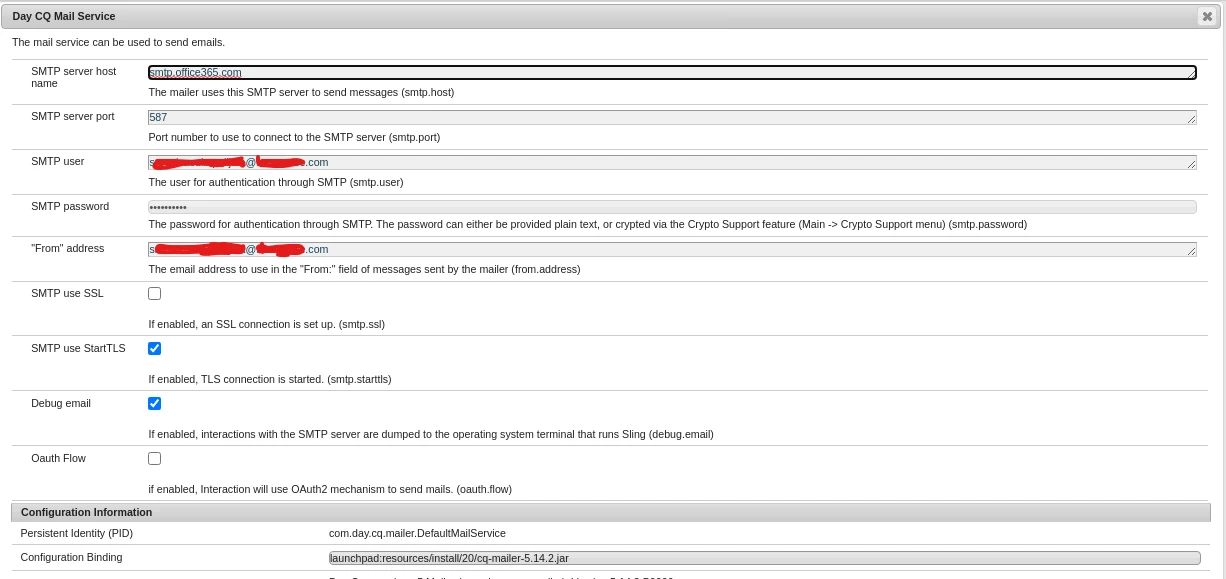
DEBUG: JavaMail version 1.6.2
DEBUG: expected resource not found: /META-INF/javamail.default.address.map
DEBUG: failed to load address map, using defaults
DEBUG: failed to load any providers, using defaults
DEBUG: Tables of loaded providers from javamail.providers
DEBUG: Providers Listed By Class Name: {com.sun.mail.smtp.SMTPTransport=javax.mail.Provider[TRANSPORT,smtp,com.sun.mail.smtp.SMTPTransport,Oracle,1.6.2], com.sun.mail.imap.IMAPSSLStore=javax.mail.Provider[STORE,imaps,com.sun.mail.imap.IMAPSSLStore,Oracle,1.6.2], com.sun.mail.pop3.POP3Store=javax.mail.Provider[STORE,pop3,com.sun.mail.pop3.POP3Store,Oracle,1.6.2], com.sun.mail.smtp.SMTPSSLTransport=javax.mail.Provider[TRANSPORT,smtps,com.sun.mail.smtp.SMTPSSLTransport,Oracle,1.6.2], com.sun.mail.imap.IMAPStore=javax.mail.Provider[STORE,imap,com.sun.mail.imap.IMAPStore,Oracle,1.6.2], com.sun.mail.pop3.POP3SSLStore=javax.mail.Provider[STORE,pop3s,com.sun.mail.pop3.POP3SSLStore,Oracle,1.6.2]}
DEBUG: Providers Listed By Protocol: {imap=javax.mail.Provider[STORE,imap,com.sun.mail.imap.IMAPStore,Oracle,1.6.2], smtp=javax.mail.Provider[TRANSPORT,smtp,com.sun.mail.smtp.SMTPTransport,Oracle,1.6.2], pop3=javax.mail.Provider[STORE,pop3,com.sun.mail.pop3.POP3Store,Oracle,1.6.2], imaps=javax.mail.Provider[STORE,imaps,com.sun.mail.imap.IMAPSSLStore,Oracle,1.6.2], smtps=javax.mail.Provider[TRANSPORT,smtps,com.sun.mail.smtp.SMTPSSLTransport,Oracle,1.6.2], pop3s=javax.mail.Provider[STORE,pop3s,com.sun.mail.pop3.POP3SSLStore,Oracle,1.6.2]}
DEBUG: getProvider() returning javax.mail.Provider[TRANSPORT,smtp,com.sun.mail.smtp.SMTPTransport,Oracle,1.6.2]
DEBUG SMTP: need username and password for authentication
DEBUG SMTP: protocolConnect returning false, host=smtp.office365.com, user=NT4XXX\user746, password=<null>
DEBUG SMTP: useEhlo true, useAuth true
DEBUG SMTP: trying to connect to host "smtp.office365.com", port 587, isSSL false
DEBUG SMTP: exception reading response, THROW:
java.net.SocketTimeoutException: Read timed out