Not able to resize layout container in Mobile and Tablet | Community
Skip to main content
Level 5
July 18, 2020
Solved

Not able to resize layout container in Mobile and Tablet

  • July 18, 2020
  • 1 reply
  • 2054 views

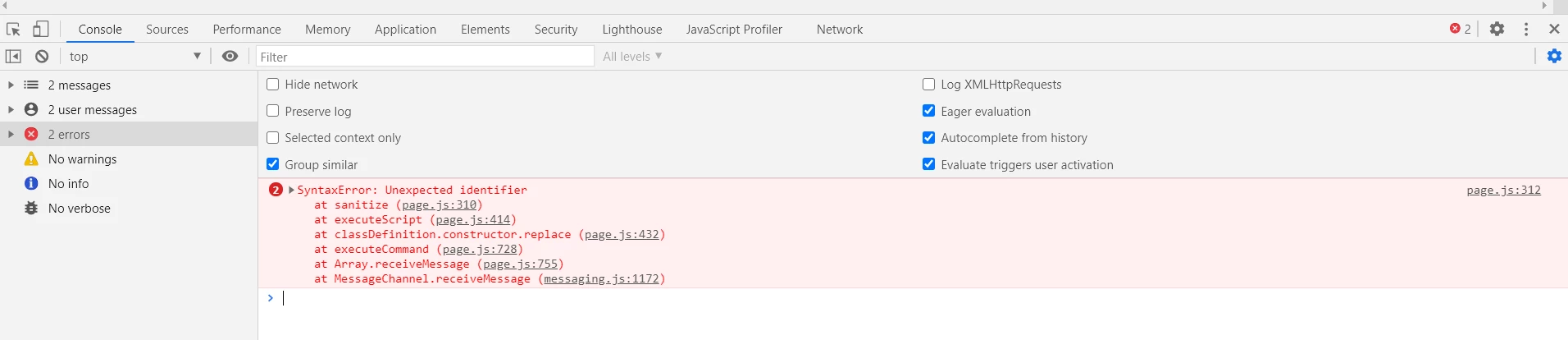
Hello All - I have an issue with responsive grid that is working in desktop but not in mobile and tablet breakpoints. This is happening in 6.4 version. the same settings is working as expected in 6.5. I see the errors in the console if I resize the component. Can somone please help to resolve this issue.


/libs/cq/gui/components/authoring/editors/clientlibs/internal/page.js
@arunpatidar , @smacdonald2008 

This post is no longer active and is closed to new replies. Need help? Start a new post to ask your question.
Best answer by ArpitVarshney

Hi @v1101 

If it is working in AEM 6.5 and not in 6.4 then can you just give a try updating your AEM 6.4 instance to latest service pack and validate if it is still appearing for you?


Regards,

Arpit Varshney

1 reply

ArpitVarshney
Community Advisor
ArpitVarshneyCommunity AdvisorAccepted solution
Community Advisor
July 18, 2020

Hi @v1101 

If it is working in AEM 6.5 and not in 6.4 then can you just give a try updating your AEM 6.4 instance to latest service pack and validate if it is still appearing for you?


Regards,

Arpit Varshney

v1101Author
Level 5
July 18, 2020
Hi Arpit - In other 6.4, it is working without any issues. both are installed with same service pack and moreover I am niot sure why the resizing is working in desktop and not in tablet and mobile breakpoints. Once I resize the components, it is not persisted in the UI and the size values are captured in the jcr properties. I have compared the environments and dont see any issues. After I rebuild the clientlibs, I can see some behavior that it is working if I remove the compoents and authored it again, after cople of resizing in mobile/tablet, it is not working. not sure where exactly it is failing.