AEM_Dev_Newbie
Level 2
May 25, 2020 11:14 AM UTC
Solved

Not able to install any package through Package Manager

I have been having this issue since last week. Tried to create a new AEM instance so I deleted the crx-quickstart folder and started AEM again. Everything went fine but when I tried to install the AEM service pack it could not be installed. The same behavior is happening for any package being installed through http://localhost:4502/crx/packmgr/index.jsp and I get the following error:
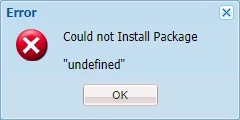
Also get the following error in logs whenever the above problem occurs:

*ERROR* [qtp1913257142-71] org.apache.jackrabbit.vault.packaging.impl.ZipVaultPackage Error during install.
org.eclipse.jetty.io.RuntimeIOException: org.eclipse.jetty.io.EofException
at org.eclipse.jetty.server.ResponseWriter.isOpen(ResponseWriter.java:133) [org.apache.felix.http.jetty:4.0.8]
at org.eclipse.jetty.server.ResponseWriter.format(ResponseWriter.java:467) [org.apache.felix.http.jetty:4.0.8]
at org.eclipse.jetty.server.ResponseWriter.printf(ResponseWriter.java:439) [org.apache.felix.http.jetty:4.0.8]
at com.day.crx.packaging.impl.response.StreamedScriptResponse.writeCallback(StreamedScriptResponse.java:228) [com.adobe.granite.crx-packagemgr:1.2.74]
at com.day.crx.packaging.impl.response.StreamedScriptResponse.access$000(StreamedScriptResponse.java:44) [com.adobe.granite.crx-packagemgr:1.2.74]
at com.day.crx.packaging.impl.response.StreamedScriptResponse$1.flush(StreamedScriptResponse.java:82) [com.adobe.granite.crx-packagemgr:1.2.74]
at java.io.PrintWriter.flush(Unknown Source)...

There are more lines in error.log


I have tried starting AEM in a completely fresh browser such that not extensions interfere or any scripts don't get blocked. Still no luck. This problem started happening suddenly. There has been no change in the way I start new AEM instances and no change in code or my system's Java installation.

This post is no longer active and is closed to new replies. Need help? Start a new post to ask your question.
PiotrRAccepted solution
Level 2
May 25, 2020 1:31 PM UTC

I have noticed similar problems after updating the chrome to Version 83.0.4103.61 (Official Build) (64-bit).

It looks like new chrome close the connection too early and I am not able to upload the package with Chrome.

Try different browser and let's hope it will be fixed in next Chrome update.

27 replies

VeenaVikraman
Community Advisor
Community Advisor
May 25, 2020 11:52 AM UTC

@aem_dev_newbie Are you sure you are installing an AEM package ? Not all zip files can be installed in AEM. If you read the documentation on packages , it is clearly mentioned what all constitutes and AEM package. 


A package also contains vault meta information, including the filter definitions and import configuration information. Additional content properties (that are not used for package extraction) can be included in the package, such as a description, a visual image, or an icon; these properties are for the content package consumer and for informational purposes only.


If you extract/open the zip file you are trying to install, you should be able to find the below structure 


There should be a jcr_root folder and a META_INF folder. If you don't find those, then the zip file you are trying to install is not an AEM package. 

Translate
AEM_Dev_Newbie
Level 2
May 25, 2020 1:12 PM UTC
Yes all packages I tried to install are packages that have been installed successfully before this problem occurred. Even the official AEM Service Packs are failing to install.
Translate
Adobe Employee
May 25, 2020 12:45 PM UTC

Adding to what Veena mentioned. You need to make sure that if you extract the archive you get the jcr_root as one of the folders. AEM need to find jcr_root as the first folder otherwise it will not install. 

other than that, please make sure you are trying in a private window and logged in as admin

Translate
AEM_Dev_Newbie
Level 2
May 25, 2020 1:14 PM UTC
Yes all the packages that I tried to install are valid AEM packages with jcr_root directory. AEM even throws a different error when the packages are not valid. The above mentioned problem is occurring ever for official AEM Service Pack.
Translate
PiotrRAccepted solution
Level 2
May 25, 2020 1:31 PM UTC

I have noticed similar problems after updating the chrome to Version 83.0.4103.61 (Official Build) (64-bit).

It looks like new chrome close the connection too early and I am not able to upload the package with Chrome.

Try different browser and let's hope it will be fixed in next Chrome update.

Translate
AEM_Dev_Newbie
Level 2
May 25, 2020 2:28 PM UTC
You are correct. I had noticed there was a Chrome update but didn't think that it would have an impact on AEM and never bothered to try a different browser.
Translate
VeenaVikraman
Community Advisor
Community Advisor
May 25, 2020 1:53 PM UTC

@aem_dev_newbie Since @piotrr  had similar issue, may be you can try it in a different browser and check if it is working. 

Translate
BrianKasingli
Adobe Champion and Community Advisor
May 25, 2020 2:19 PM UTC

@aem_dev_newbie,

I took the time to spin up a new AEM 6.4/6.5 instance to test our this problem. After installing Chrome, Version 83.0.4103.61 (Official Build) (64-bit), I had similar problems with the package manager;  I had the exact same problem as you.

  • I cannot install a content package.
  • I cannot build a content package.
  • I cannot create a new content package with content filters.

I solved this problem by using another browser, like Firefox or Safari.

While using Chrome, these are the errors that I am catching:


// error 25.05.2020 15:24:18.519 *WARN* [qtp1034376894-1722] org.eclipse.jetty.server.HttpChannel //localhost:4502/crx/packmgr/service/script.html/etc/packages/my_packages/test.zip java.lang.IllegalStateException: Committed at org.eclipse.jetty.server.HttpChannel.resetBuffer(HttpChannel.java:808) [org.apache.felix.http.jetty:3.4.7.B012] at org.eclipse.jetty.server.HttpOutput.resetBuffer(HttpOutput.java:887) [org.apache.felix.http.jetty:3.4.7.B012] at org.eclipse.jetty.server.Response.resetBuffer(Response.java:1246) [org.apache.felix.http.jetty:3.4.7.B012] at javax.servlet.ServletResponseWrapper.resetBuffer(ServletResponseWrapper.java:195) [org.apache.felix.http.servlet-api:1.1.2] at org.apache.felix.http.base.internal.dispatch.ServletResponseWrapper.sendError(ServletResponseWrapper.java:67) [org.apache.felix.http.jetty:3.4.7.B012] at org.apache.felix.http.base.internal.dispatch.ServletResponseWrapper.sendError(ServletResponseWrapper.java:61) [org.apache.felix.http.jetty:3.4.7.B012] at org.apache.felix.http.base.internal.dispatch.Dispatcher$1.doFilter(Dispatcher.java:156) [org.apache.felix.http.jetty:3.4.7.B012] at org.apache.felix.http.base.internal.whiteboard.WhiteboardManager.invokePreprocessors(WhiteboardManager.java:1000) [org.apache.felix.http.jetty:3.4.7.B012] at org.apache.felix.http.base.internal.dispatch.Dispatcher.dispatch(Dispatcher.java:91) [org.apache.felix.http.jetty:3.4.7.B012] at org.apache.felix.http.base.internal.dispatch.DispatcherServlet.service(DispatcherServlet.java:49) [org.apache.felix.http.jetty:3.4.7.B012] at javax.servlet.http.HttpServlet.service(HttpServlet.java:725) [org.apache.felix.http.servlet-api:1.1.2] at org.eclipse.jetty.servlet.ServletHolder.handle(ServletHolder.java:848) [org.apache.felix.http.jetty:3.4.7.B012] at org.eclipse.jetty.servlet.ServletHandler.doHandle(ServletHandler.java:584) [org.apache.felix.http.jetty:3.4.7.B012] at org.eclipse.jetty.server.session.SessionHandler.doHandle(SessionHandler.java:224) [org.apache.felix.http.jetty:3.4.7.B012] at org.eclipse.jetty.server.handler.ContextHandler.doHandle(ContextHandler.java:1180) [org.apache.felix.http.jetty:3.4.7.B012] at org.eclipse.jetty.servlet.ServletHandler.doScope(ServletHandler.java:512) [org.apache.felix.http.jetty:3.4.7.B012] at org.eclipse.jetty.server.session.SessionHandler.doScope(SessionHandler.java:185) [org.apache.felix.http.jetty:3.4.7.B012] at org.eclipse.jetty.server.handler.ContextHandler.doScope(ContextHandler.java:1112) [org.apache.felix.http.jetty:3.4.7.B012] at org.eclipse.jetty.server.handler.ScopedHandler.handle(ScopedHandler.java:141) [org.apache.felix.http.jetty:3.4.7.B012] at org.eclipse.jetty.server.handler.ContextHandlerCollection.handle(ContextHandlerCollection.java:213) [org.apache.felix.http.jetty:3.4.7.B012] at org.eclipse.jetty.server.handler.HandlerWrapper.handle(HandlerWrapper.java:134) [org.apache.felix.http.jetty:3.4.7.B012] at org.eclipse.jetty.server.Server.handle(Server.java:534) [org.apache.felix.http.jetty:3.4.7.B012] at org.eclipse.jetty.server.HttpChannel.handle(HttpChannel.java:333) [org.apache.felix.http.jetty:3.4.7.B012] at org.eclipse.jetty.server.HttpConnection.onFillable(HttpConnection.java:251) [org.apache.felix.http.jetty:3.4.7.B012] at org.eclipse.jetty.io.AbstractConnection$ReadCallback.succeeded(AbstractConnection.java:283) [org.apache.felix.http.jetty:3.4.7.B012] at org.eclipse.jetty.io.FillInterest.fillable(FillInterest.java:108) [org.apache.felix.http.jetty:3.4.7.B012] at org.eclipse.jetty.io.SelectChannelEndPoint$2.run(SelectChannelEndPoint.java:93) [org.apache.felix.http.jetty:3.4.7.B012] at org.eclipse.jetty.util.thread.strategy.ExecuteProduceConsume.executeProduceConsume(ExecuteProduceConsume.java:303) [org.apache.felix.http.jetty:3.4.7.B012] at org.eclipse.jetty.util.thread.strategy.ExecuteProduceConsume.produceConsume(ExecuteProduceConsume.java:148) [org.apache.felix.http.jetty:3.4.7.B012] at org.eclipse.jetty.util.thread.strategy.ExecuteProduceConsume.run(ExecuteProduceConsume.java:136) [org.apache.felix.http.jetty:3.4.7.B012] at org.eclipse.jetty.util.thread.QueuedThreadPool.runJob(QueuedThreadPool.java:671) [org.apache.felix.http.jetty:3.4.7.B012] at org.eclipse.jetty.util.thread.QueuedThreadPool$2.run(QueuedThreadPool.java:589) [org.apache.felix.http.jetty:3.4.7.B012] at java.lang.Thread.run(Thread.java:748)


Translate
Level 2
May 27, 2020 6:17 PM UTC

I am pretty sure this is related to one of the request headers which are sent with those POST requests by Chrome:

So this probably requires a fix in either the underlying Jetty or the client JS bound to the request (ExtJS form submit)


Translate
sunjot16
Adobe Employee
Adobe Employee
May 25, 2020 3:39 PM UTC

It's reproducible. Seems like a Chrome issue.


Try to reload the browser after a few seconds. You will see the package installed.

Or, you can either go back to a previous version of Chrome, or use some other browser.


Hope it helps !!


Translate
BrianKasingli
Adobe Champion and Community Advisor
May 25, 2020 4:22 PM UTC

@sunjot16 

My Chrome was automatically updated to Version 83.0.4103.61 (Official Build) (64-bit), and I started experiencing a lot of weird situations. Even a new AEM startup, locally caused problems.

The temporary solution is using another browser such as Safari or Firefox, ane AEM was working as expected. 

Whats really strange is that I am seeing weird icons that I've never seen before, on Chrome. on other browsers, the icons are rendering as expected.


Translate
Adobe Employee
May 26, 2020 1:26 PM UTC

This issue has been observed by quite a few people and organizations.

Specific to build 83.0.4103.61 of Google Chrome.

Translate
bohdanm13335765
May 27, 2020 10:46 AM UTC
Hi aemmarc. Do you guys expect that this issue will be resolved with the future Chrome updates or do we need to wait for some fix from you? As our project supports only Chrome and we do not want to switch users between browsers for stuff like that. Thanks!
Translate
Level 2
May 29, 2020 1:10 PM UTC

Meanwhile Adobe confirmed that this is a problem with the package manager. So Chrome is not to blame here (only because they implemented a slightly more strict sandboxing model).


This is tracked internally at GRANITE-30226 (Package Manager) and GRANITE-30280 (CRX DE) and the following bundle contains the fix: com.adobe.granite:com.adobe.granite.crx-packagemgr:1.2.100.


This is supposed to be contained in an upcoming ServicePack/Hotfix.

Translate
Adobe Employee
May 29, 2020 1:13 PM UTC
This is correct.
Translate
Yogas24
Jun 1, 2020 10:43 AM UTC

It's Chrome Browser issue, works with Mozilla . 


Thanks.

Translate
debasis-swain
Level 2
Jun 1, 2020 11:13 AM UTC

Hi,


This issues is with chrome browser latest version 83.0.4103.61 . There is a known bug reported Jira bug number : GRANITE-30226 with Adobe for fix.


In the meanwhile you can use other browsers for installing.


Thanks,


Translate