Not able to create integration for Launch - AEM | Community
Skip to main content
Level 2
February 18, 2019
Solved

Not able to create integration for Launch - AEM

  • February 18, 2019
  • 5 replies
  • 5176 views

I have been following  below url to integrate launch with AEM

Integrate AEM with Adobe Launch Via Adobe I/O

for Adobe I/O Configuration  steps -

1) Open Adobe I/O Console at https://console.adobe.io/integrations

2) Create Integration

3) Select Access an API
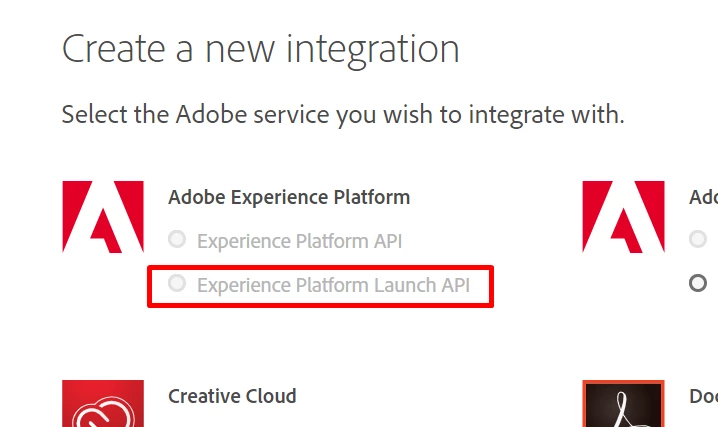
4) Select Experience Cloud > Launch, by Adobe in the next step

5) Select New Integration

at step 4, Launch option is coming as disabled for me. Is there anything missed out or if there is any other way to achieve it ?
This post is no longer active and is closed to new replies. Need help? Start a new post to ask your question.
Best answer by Gaurav-Behl

Found the instructions provided by Adobe:

Please note that Every Experience environment is Adobe I/O integrated, all we need to ensure is that you have the following permissions;

System Administrator of the AEC instance.Admin of the Product he/she needs to integrate e.g Analytics / Target Admin

Once they are they can start accessing the Adobe I/O though this url ; https://console.adobe.io/integrations

Further information can be found under this wiki ; https://helpx.adobe.com/marketing-cloud-core/kb/adobe-io-authentication-step-by-step.html

5 replies

smacdonald2008
Level 10
February 18, 2019

Check with your Sales rep to make sure your account has access to this product.

Level 2
February 18, 2019

thanks for quick response !! I will check with sales rep but as an alternate solution can we utilize below config to achieve AEM-Launch integration ( although my AEM version is 6.4) 

Integrate AEM 6.3 with Adobe Launch

Gaurav-Behl
Level 10
February 18, 2019

Login to adminconsole and check if you've "admin" access privileges on your org. and you should've "Launch" product added in the console (provided you've license for it).

P.S. I had faced a similar issue in the past and it was resolved after I got admin access on the org via adminconsole.

Gaurav-Behl
Gaurav-BehlAccepted solution
Level 10
February 19, 2019

Found the instructions provided by Adobe:

Please note that Every Experience environment is Adobe I/O integrated, all we need to ensure is that you have the following permissions;

System Administrator of the AEC instance.Admin of the Product he/she needs to integrate e.g Analytics / Target Admin

Once they are they can start accessing the Adobe I/O though this url ; https://console.adobe.io/integrations

Further information can be found under this wiki ; https://helpx.adobe.com/marketing-cloud-core/kb/adobe-io-authentication-step-by-step.html

jezwn
Level 5
May 4, 2020
Hi Gaurav. I have the said access privileges, but on trying to access https://console.adobe.io/integrations it's redirecting to https://console.adobe.io/home. What might be the issue?
Level 2
February 22, 2019

I am able to sort out the issue, problem was with the access only. you need the system administrator (As an administrator, you can access the Admin Console to administer and manage user accounts and products ) access of the sandbox to work with Adobe IO features which can be granted from the other user who has similar access.