
Manu_Mathew_
Community Advisor
Community Advisor
Oct 29, 2021 5:44 AM UTC
Question

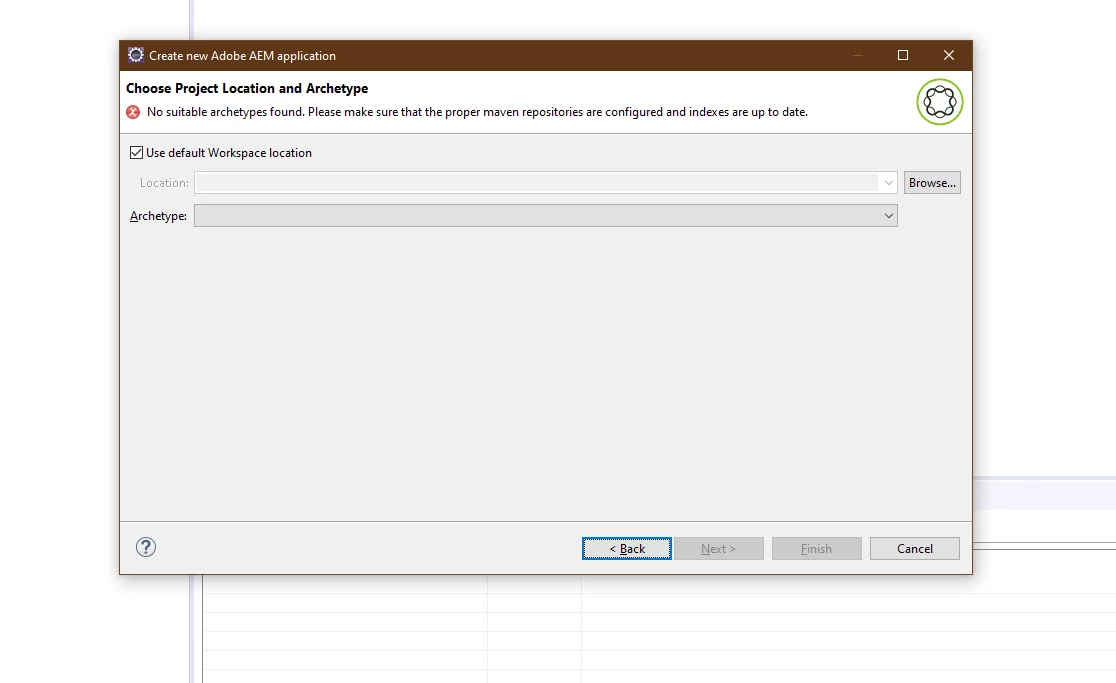
No Archetypes in eclipse

1. Select File > New > Project

2. Select AEM > AEM Sample Multi-Mode Project

3. Select Next

4. In the Choose Project Location and Archetype window the following error message is shown.    "No suitable archetypes found. Please make sure that the proper maven repositories are configured and indexes are up to date."
 

This post is no longer active and is closed to new replies. Need help? Start a new post to ask your question.

2 replies

Siva_Sogalapalli
Community Advisor
Community Advisor
Oct 29, 2021 11:02 AM UTC

1. Are you using any proxy or vpn where you don't have access for repo? 

2. Can you please go to Window>Preferences>.. and check User Settings points to the correct settings.xml?

3. Can you please check if you can access the repo from your browser?


or you can also create project through command line and import from eclilpse.

https://experienceleague.adobe.com/docs/experience-manager-core-components/using/developing/archetype/overview.html?lang=en 

Translate
Manu_Mathew_
Community Advisor
Community Advisor
Oct 29, 2021 12:02 PM UTC

Hi @siva_sogalapalli 


I do have access to repo in browser, also included settings.xml, cmd line is working fine. Just wanted to know why I am not able create via eclipse.


I have added this in my settings.xml:


Translate