New tab oppening after clickin on button | Community
Skip to main content
September 11, 2024
Solved

New tab oppening after clickin on button
  • September 11, 2024
  • 3 replies
  • 1077 views

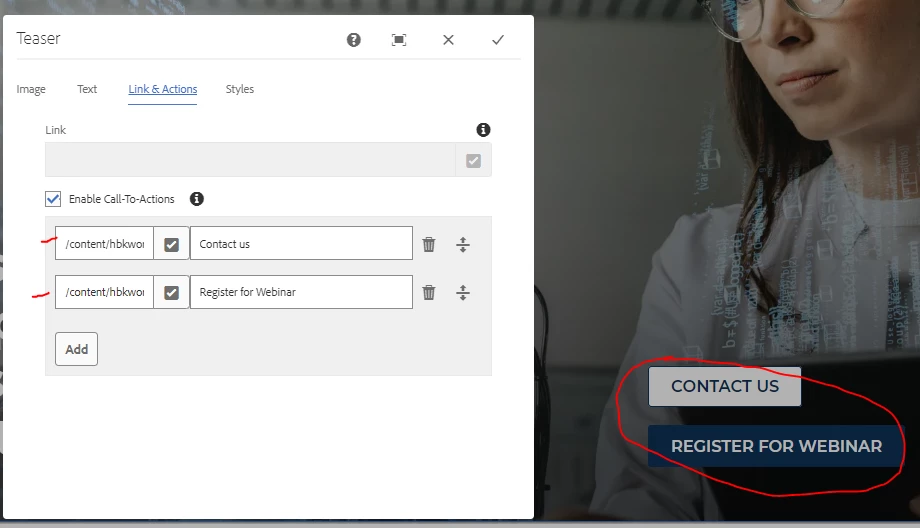
How do I make AEM open a new tab after clicking on the "Contact us" and "Register for webinar" buttons?

Attached screenshot is the view I have, I'm missing a checkmark asking to open in same window or new tab.

This post is no longer active and is closed to new replies. Need help? Start a new post to ask your question.
Best answer by BrianKasingli

It seems like you are using Teaser V1.

From my findings, if you are using the latest and greatest, It looks like TeaserV2 already has the Touch UI, with target blank on line:75 https://github.com/adobe/aem-core-wcm-components/blob/d2a7b02405db241fadbad02a4878f8770b36e246/content/src/content/jcr_root/apps/core/wcm/components/teaser/v2/teaser/_cq_dialog/.content.xml#L75C11-L75C76

I would suggest you either upgrade your Teaser Component to use Version 2, and if not, the most viable option is to overlay the touch UI for TeaserV1, include the target links and then use the delegation pattern via sling model to update the 'actions' object. You can take a look at the TeaserV2, understanding how they did it, so you can replicate the solution.

3 replies

Level 2
September 11, 2024

nice

BrianKasingli
Community Advisor and Adobe Champion
BrianKasingliCommunity Advisor and Adobe ChampionAccepted solution
Community Advisor and Adobe Champion
September 11, 2024

It seems like you are using Teaser V1.

From my findings, if you are using the latest and greatest, It looks like TeaserV2 already has the Touch UI, with target blank on line:75 https://github.com/adobe/aem-core-wcm-components/blob/d2a7b02405db241fadbad02a4878f8770b36e246/content/src/content/jcr_root/apps/core/wcm/components/teaser/v2/teaser/_cq_dialog/.content.xml#L75C11-L75C76

I would suggest you either upgrade your Teaser Component to use Version 2, and if not, the most viable option is to overlay the touch UI for TeaserV1, include the target links and then use the delegation pattern via sling model to update the 'actions' object. You can take a look at the TeaserV2, understanding how they did it, so you can replicate the solution.

kapil_rajoria
Community Advisor
Community Advisor
September 12, 2024

Hi @alenfa you can override the teaser component cq dialog to add a checkbox to open the link in new tab. Use the following code:

<checkbox
jcr:primaryType="nt:unstructured"
sling:resourceType="granite/ui/components/coral/foundation/form/checkbox"
name="./openInNewTab"
text="Open in New Tab"
value="true"/>


For overriding, you can download the cq dialog of the default teaser component from crx de and add the above code.

Above code can be utilized in the html via:

<a href="${your_model.link}" target="${your_model.openInNewTab ?'_blank':''}">