Need Specific CRX node structure for Component tab contents.
Using AEM 6.4 service pack 7 .
We have a component ( we are creating component using dialog.xml file ) .
Created new tab "Labels"
We have content structure
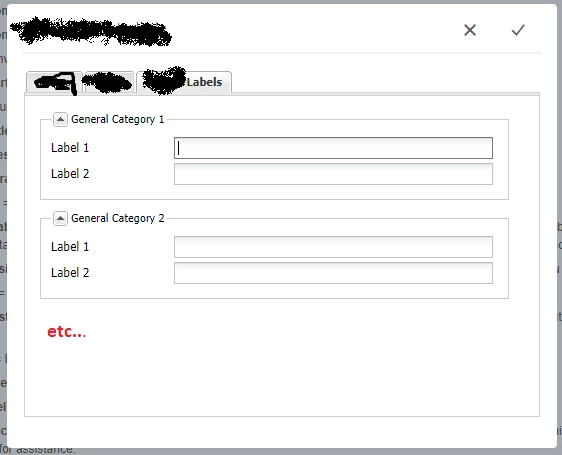
General Category 1
General Category 2
......
General Category 20
Each category should have 15 Labels per each ( In screenshot added only 2 labels )
General Category 1 -> Label1 ,Lable12 .....Labe115
.......
Now we need CRX structure should look like below format

categorylabels
category1 -> label1,label2.....label15
category2 -> label1,label2.....label15
.......
category15 -> label1,label2...label15
These are the country specific labels (these values translated later)
Example:
If we retrieve Label categorylabels/category1/label1
Suppose If we are in US page , this should fetch US category label value.
If we are in CHINA page , this should fetch CHINA category label value.
We tried to achieve this using multifield or multicomposite field . But We don't get exact node structure ( Because node values incremented by random values , but we need node should have specific values like category25 ,catgory80 etc..).
Can anyone please help me, how to save these details in CRX with above mentioned format ?
Code Snippet:
<?xml version="1.0" encoding="UTF-8"?>
<jcr:root xmlns:cq="" xmlns:jcr="" xmlns:nt="" jcr:primaryType="cq:Dialog"
    title=" " xtype="tabpanel">

    <items jcr:primaryType="cq:WidgetCollection">

		 <categoryConfiguration jcr:primaryType="cq:Widget" xtype="panel"
		   title=" Labels">

            <items jcr:primaryType="cq:WidgetCollection">

                <category1 jcr:primaryType="cq:Widget"  title="General Category 1" xtype="dialogfieldset">

					<items jcr:primaryType="cq:WidgetCollection">

						<lablel1
                            jcr:primaryType="cq:Widget"

                            fieldLabel="Label 1"

                            name="./lablel1"

                            xtype="textfield">

                        </lablel1>

						<lablel2
                            jcr:primaryType="cq:Widget"

                            fieldLabel="Label 2"

                            name="./lablel2"

                            xtype="textfield">

                        </lablel2>
                    </items>

                </category1>

		   </items>

        </categoryConfiguration>

    </items>
</jcr:root>