Need a popup while clicking to publish the page before it replicated into the publish node? | Community
Skip to main content
Level 3
July 13, 2020
Solved

Need a popup while clicking to publish the page before it replicated into the publish node?

  • July 13, 2020
  • 6 replies
  • 3285 views

I want to send small message in email while published my modified page into the pub node 

either from both side in .../aem/start.html or while page in editor.html(Edit) mode
 

This post is no longer active and is closed to new replies. Need help? Start a new post to ask your question.
Best answer by vanegi

You can implement event handlers to create such pop ups, please refer to the document [0] for more details.The following code represents the event handler that is invoked when the Touch UI dialog is opened:

 
1
2
3
$document.on("dialog-ready", function() {
        $(window).adaptTo("foundation-ui").alert("Open", "Dialog now open, event [dialog-ready]");
    });


[0]: https://helpx.adobe.com/experience-manager/using/creating-touchui-events.html

6 replies

Adobe Employee
July 13, 2020
Varun_Shakya
Community Advisor
Community Advisor
July 13, 2020

If you want to send an email after publishing the page I would say use workflow, refer this.


https://www.aemquickstart.in/2016/08/creating-custom-aem-workflow-steps-that.html


if you still want a popup on the page after publishing page you can customize consoles refer this

https://docs.adobe.com/content/help/en/experience-manager-64/developing/extending-aem/customizing-consoles-touch.html

Vaibhavi_J
Level 7
July 13, 2020

Hi @keshav_goud 

In order to send emails first you need to configure the mail server. 

To configure Experience Manager to use a Mail Server, perform these tasks:

1. Login to Apache Felix Web Console at http://server:port/system/console/bundles (default admin user = admin with password= admin).

2. Under the OSGi menu item, select Configuration.

3. Click the + icon that appears in the Day CQ Mail Service row.

4. Enter the following values:

  • SMTP server host name - the SMTP server that you want to use.
  • SMTP server port - the server port to use, Typically this value is 25. 
  • Username - the user name for the SMTP user. 
  • Password - the corresponding password.

5. Click Save.

For more details on configuring emails check the document below. 

https://helpx.adobe.com/experience-manager/6-3/sites/administering/using/notification.html

Once email configuration is ready you need to set up workflow to trigger emails when the page is published. 

Below document give step by step guide on how to configure workflow to trigger email. 

https://helpx.adobe.com/experience-manager/using/creating-custom-aem-workflow-steps.html


Along with above, if you need to display the pop up in author it is possible using EventListner. 

EventListner capture the action when the page replication is triggered. 

Below method will be called when the activation is triggered. You can add your logic here to meet your need. 

@Activate
public void activate(ComponentContext context) throws Exception {
     log.info("activating Example") }
Below document explains in detail. 
Level 3
July 13, 2020

hi @ vaibhavi_235640,


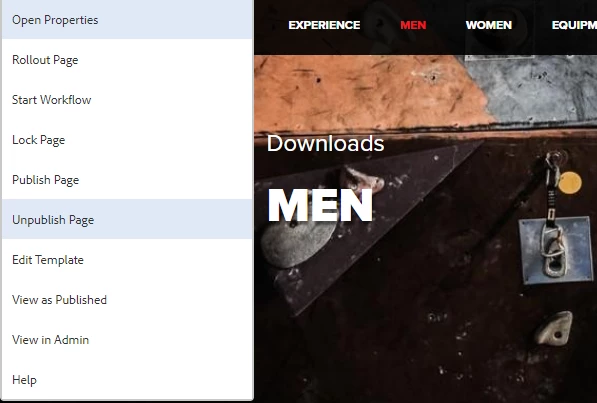
                Thanks for your reply, I don't want use workflow and need popup before publishing the page when author clicks as shown in above consoles screenshots thankyou

vanegi
Adobe Employee
vanegiAdobe EmployeeAccepted solution
Adobe Employee
July 13, 2020

You can implement event handlers to create such pop ups, please refer to the document [0] for more details.The following code represents the event handler that is invoked when the Touch UI dialog is opened:

 
1
2
3
$document.on("dialog-ready", function() {
        $(window).adaptTo("foundation-ui").alert("Open", "Dialog now open, event [dialog-ready]");
    });


[0]: https://helpx.adobe.com/experience-manager/using/creating-touchui-events.html

VeenaVikraman
Community Advisor
Community Advisor
July 13, 2020

@keshav_goud I am not sure about your exact requirement. But what I understand from what you have mentioned is that , you might need to send a notification as soon as a page is published. I would say , the best way is to write a workflow , which will send a notification as soon as a page is published. @varun_shakya and @ankushb  have provided links you can refer to. 

arunpatidar
Community Advisor
Community Advisor
July 13, 2020

Hi,

Are you looking for confirm dialog box to decide send or not send the email? But you are sending email before publishing. What happens if replication is failed due to either replication queue is blocked or publisher is down etc.

Either you have to use workflow or event listener to capture replication status and send email.

Arun Patidar