Multiple language close captions for Dynamic Media video player | Community
Skip to main content
Level 2
November 10, 2020
Solved

Multiple language close captions for Dynamic Media video player

  • November 10, 2020
  • 1 reply
  • 1451 views

The video player on Adobe's own documentation for the video players support multiple languages for close captions:
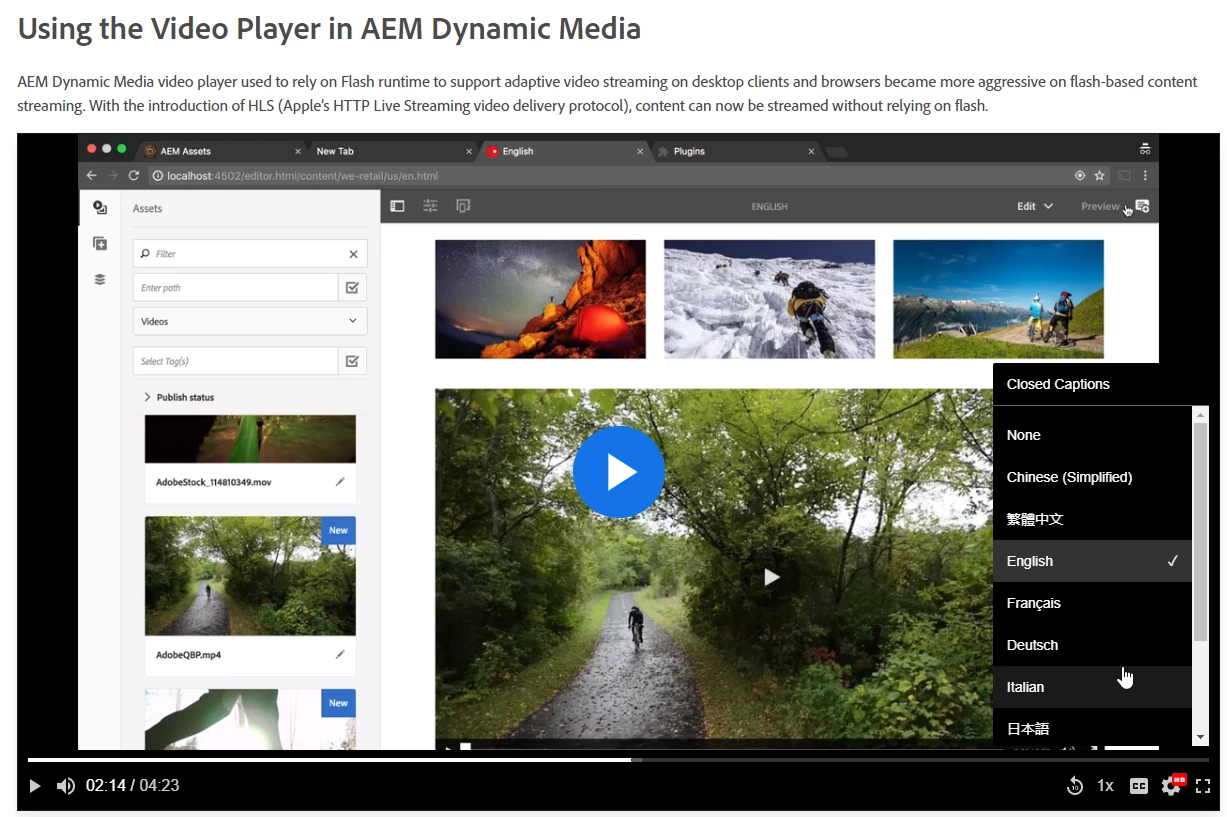


But I cannot see how to do this anywhere in the DM/S7 documentation. Am I led to believe Adobe isn't even using it's own video player on it's own site?


Could someone from Adobe reading this post this to the internal dl_dogfood email list? 😛

 

This post is no longer active and is closed to new replies. Need help? Start a new post to ask your question.
Best answer by Pallavi_Shukla_

Hi @timdonovanffs 


If your video player in AEM Dynamic Media supports caption files, you'll need to upload separate caption files for each language you want to include, typically in WebVTT or SRT format. These files will be linked to the video assets so that they can be displayed as selectable caption tracks.


1. Create multiple caption files: Make one file for each language. Ensure that the captions are formatted correctly in WebVTT or SRT format (e.g., video-en.vtt for English, video-fr.vtt for French, video-es.vtt for Spanish).


2. Upload the caption files: Add the caption files to your AEM Dynamic Media assets, usually alongside the video files or as related assets.

1 reply

Pallavi_Shukla_
Community Advisor
Pallavi_Shukla_Community AdvisorAccepted solution
Community Advisor
November 22, 2024

Hi @timdonovanffs 


If your video player in AEM Dynamic Media supports caption files, you'll need to upload separate caption files for each language you want to include, typically in WebVTT or SRT format. These files will be linked to the video assets so that they can be displayed as selectable caption tracks.


1. Create multiple caption files: Make one file for each language. Ensure that the captions are formatted correctly in WebVTT or SRT format (e.g., video-en.vtt for English, video-fr.vtt for French, video-es.vtt for Spanish).


2. Upload the caption files: Add the caption files to your AEM Dynamic Media assets, usually alongside the video files or as related assets.