Multi field collapses after submit | Community
Skip to main content
Level 2
May 7, 2023
Solved

Multi field collapses after submit

  • May 7, 2023
  • 2 replies
  • 964 views

Hello Community,


I am not able to read the values of a multi field while the dialog submit event, below is the example before dialog submission.

the can be accessed using jQuery but,
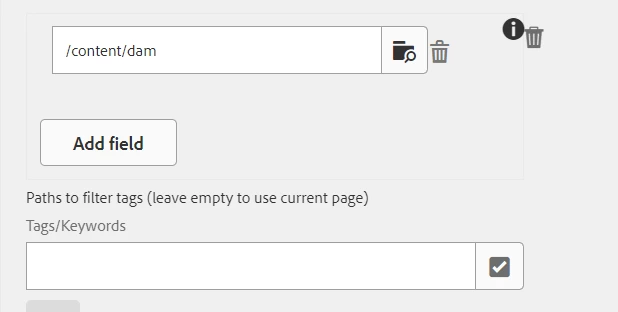


after the dialog is submitted the field collapses and the DOM objects and the values are not available. Below is the example after dialog submit.
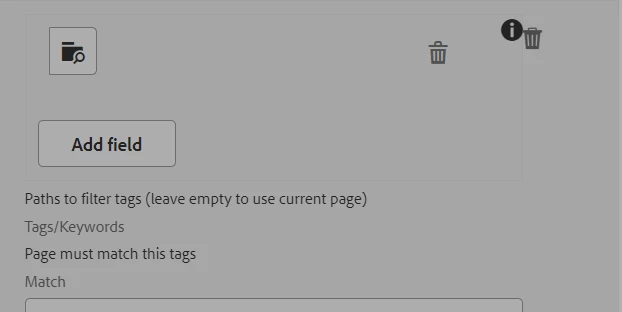
The fields are not available, is there anyway to read the multi field values.

This post is no longer active and is closed to new replies. Need help? Start a new post to ask your question.
Best answer by Sady_Rifat

Hello @vinod-n-e ,
The problem is in your code you just missed composite="{Boolean}true" where you put the value as false.

composite="{Boolean}true"

This property will solve your problem.

Still, the recommendation is to use Coral 3 which is the latest.

New structure sample code,


<rootPaths jcr:primaryType="nt:unstructured" sling:resourceType="granite/ui/components/coral/foundation/form/multifield" fieldLabel="Root nodes are not allowed" composite="{Boolean}true"> <field jcr:primaryType="nt:unstructured" sling:resourceType="granite/ui/components/coral/foundation/container" name="./rootPaths"> <items jcr:primaryType="nt:unstructured"> <parentPage jcr:primaryType="nt:unstructured" sling:resourceType="granite/ui/components/foundation/form/pathbrowser" name="./tagsSearchRoot" rootPath="/content"/> </items> </field> </rootPaths>


2 replies

Saravanan_Dharmaraj
Community Advisor
Community Advisor
May 8, 2023

@vinod-n-e Please see the example below for the multifield in AEM

https://exadel.com/news/setting-up-a-multifield-in-aem-touch-ui-dialogs-tutorial/

Please post the dialog xml here to get more support. When you say you are not able to read , you mean in Sling model or sightly ? Are you using composite multifield?


Vinod-N-EAuthor
Level 2
May 8, 2023
<rootPaths jcr:primaryType="nt:unstructured" sling:resourceType="granite/ui/components/foundation/form/multifield" composite="{Boolean}false" fieldDescription="Root nodes are not allowed" name="./rootPaths"> <field jcr:primaryType="nt:unstructured" sling:resourceType="granite/ui/components/foundation/form/fieldset" composite="{Boolean}false" key="rootPaths" name="./rootPaths"> <items jcr:primaryType="nt:unstructured"> <column jcr:primaryType="nt:unstructured" sling:resourceType="granite/ui/components/coral/foundation/container"> <items jcr:primaryType="nt:unstructured"> <parentPage jcr:primaryType="nt:unstructured" sling:resourceType="granite/ui/components/foundation/form/pathbrowser" name="./tagsSearchRoot" rootPath="/content"/> </items> </column> </items> </field> </rootPaths>


The values are getting posted to the crx, I am trying to validate the multi field using JS.

I am able to get the values before submit, but during the submit, the fields are not available that's the issue.

Sady_Rifat
Community Advisor
Sady_RifatCommunity AdvisorAccepted solution
Community Advisor
May 8, 2023

Hello @vinod-n-e ,
The problem is in your code you just missed composite="{Boolean}true" where you put the value as false.

composite="{Boolean}true"

This property will solve your problem.

Still, the recommendation is to use Coral 3 which is the latest.

New structure sample code,


<rootPaths jcr:primaryType="nt:unstructured" sling:resourceType="granite/ui/components/coral/foundation/form/multifield" fieldLabel="Root nodes are not allowed" composite="{Boolean}true"> <field jcr:primaryType="nt:unstructured" sling:resourceType="granite/ui/components/coral/foundation/container" name="./rootPaths"> <items jcr:primaryType="nt:unstructured"> <parentPage jcr:primaryType="nt:unstructured" sling:resourceType="granite/ui/components/foundation/form/pathbrowser" name="./tagsSearchRoot" rootPath="/content"/> </items> </field> </rootPaths>


Vinod-N-EAuthor
Level 2
May 8, 2023

Thanks Sady, I tested this and it seems to be fine  now.