
mixed content https, http login fail - AEM 6.3 sp1
Hi there,
Following issue not happened on AEM 6.3.0.2
I have AEM 6.3.1.0 version ( 6.3 with service pack1 ) in my QA environment.
QA AEM author instance accessed through an vip url with 2FA (externa url with https talks to AEM author instance)
When any author user tries to access the AEM author instance using vip url (browser console has js errors about mixed content https, http login), enter credential on aem login screen and click submit button, it just stays on the login page only.
If author user access the AEM instance directly without any vip url and with http , login works and could access the site admin pages.
I tried to have https configuration in my local author instance to see, if i could get login request with httpS rather than http to solve https vs http issue on QA Author when accessed using vip url.
Question: Is there some new configuration in AEM 6.3 Service Pack 1 that needs to be done to solve https vs http login issue, this issue did not occur on earlier version 6.3 or 6.3.0.2?
I did not get https configuration worked on my local. I have done following things to enable https and tried to access HTTPS://<computername.companyname.com>:4502/crx/de , following is ther response.
This site can’t provide a secure connection
How can I get the https enabled on my local instance?
I generated a keystore file using following command:
keytool -genkeypair -keyalg RSA -validity 3650 -alias cqse
-keystore /Users/pulijas/Desktop/Author-latest/ssl/keystorename.keystore -keypass password123
-storepass password123 -dname "CN=computername.companyname.com, OU=CQ,
O=BWI,L=PHX, S=AZ, C=US"
There were two Apache Felix Jetty Based Http Service configurations.
I clicked on second one with + symbol, as the first one giving ajax error and not able to save the configurations.

and then following OSGI config updated.
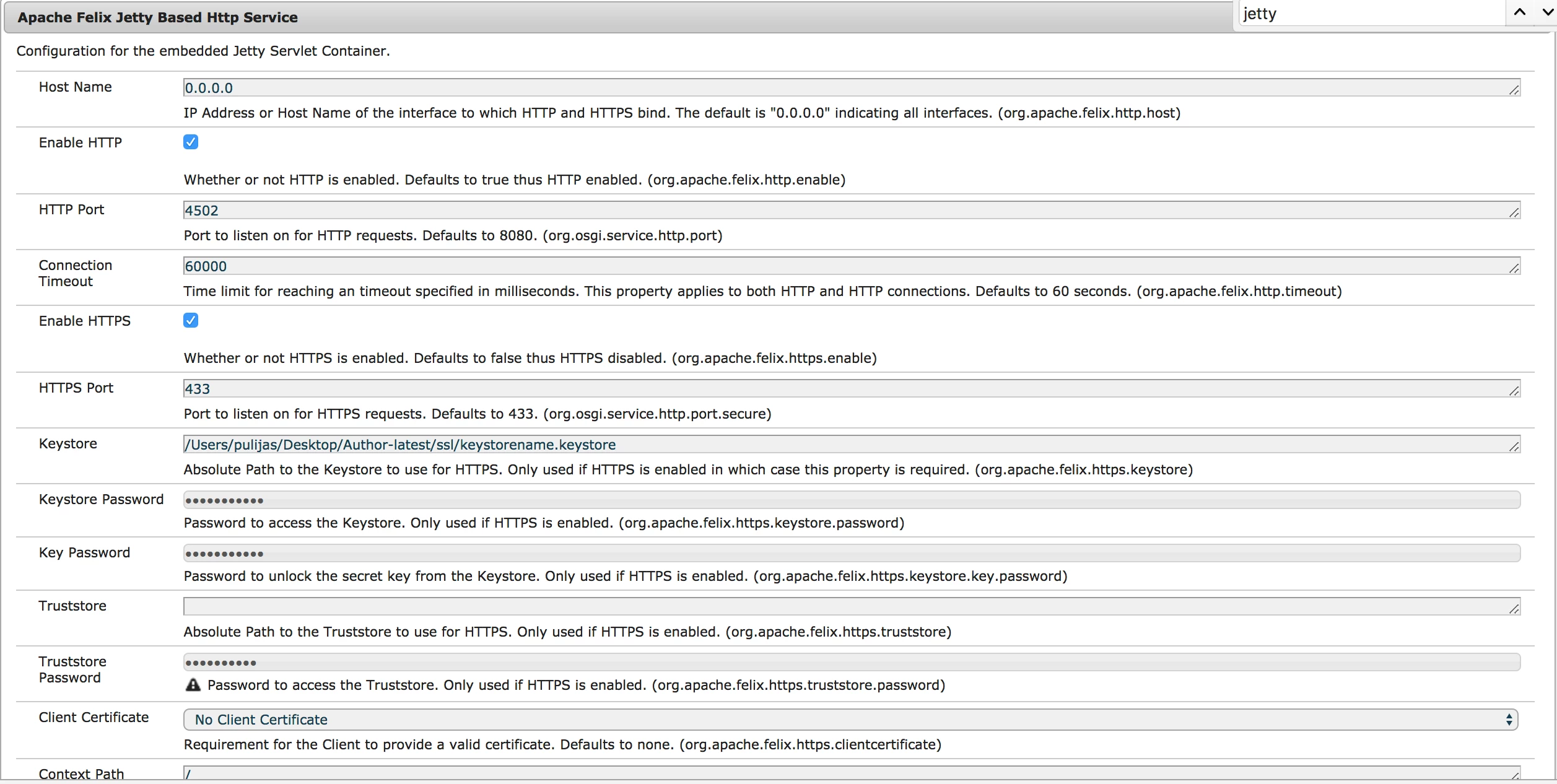
Thanks,
Sreeni