Looking for a component | Adobe Higher Education
Skip to main content
Level 2
October 16, 2023
Respondido

Looking for a component

  • October 16, 2023
  • 2 respostas
  • 946 Visualizações

Good morning,
maybe someone can help me. I need a component where I have 4 columns and should look like this:
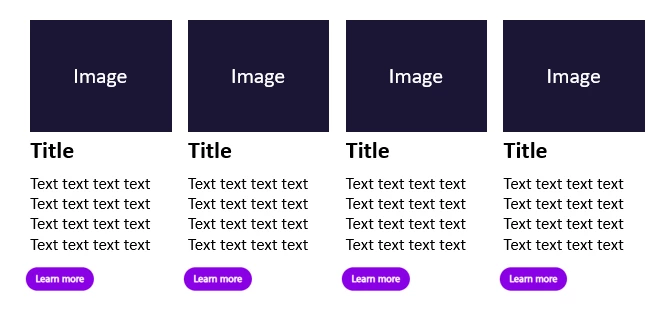
Thank you so much!


Este tópico foi fechado para respostas.

2 Respostas

arunpatidar
Community Advisor
arunpatidarCommunity AdvisorResposta
Community Advisor
October 16, 2023
Sady_Rifat
Community Advisor
Community Advisor
October 16, 2023

Hello @heidi05 ,

As Arunpatidar mentioned teaser component. After you configure the core teaser component your view will be something like this,


For controlling the column you can get help from layout mode,

You need to extend the core teaser component in your project and customize it to your own design guidelines.


However, as you mentioned, your component should be 4 columns and the view will be like this. If I don't misunderstand, you want to use a teaser component as well as 4 column view. If so, this is a bad practice. For controlling the column you should have a column control component. which can be configured as 1/2/3/4 column option. In each column parsys you will put and configure the teaser component. 
This will make your component functionality more reusable.

Heidi05Autor
Level 2
October 16, 2023

Hi Sady_Rifat

Thank you so much for your support. I only have this teaser components:

  • Content Teaser
  • Image teaser with hotspots
  • Product Teaser
  • Simple Content Teaser
  • Story Teaser
  • Teaser Focus Topics

That would be perfect. But when I try to make it smaller in Layout any teaser, nothing happens. I'm pretty new and don't know much about it yet.

Sady_Rifat
Community Advisor
Community Advisor
October 16, 2023

Hello @heidi05 ,

The mentioned teasers are your custom teasers. But we are talking about the core teaser which is in core/wcm/components/teaser/v2/teaser.

The sample configuration is performed in the we-retail project (/content/we-retail/language-masters/de).


If you don't find the Layout option in the page then the problem is in your page template. When you switch to Layout Mode you will get this feature like this.

As I mentioned earlier, you better go with the column control for controlling the columns. This will be the better practice instead of using the Layout option