LOGOUT FUNCTION DOES NOT INVALIDATE TOKEN | Community
Skip to main content
Level 4
March 21, 2024
Solved

LOGOUT FUNCTION DOES NOT INVALIDATE TOKEN

  • March 21, 2024
  • 2 replies
  • 1563 views

Hi All,

We are facing an issue with the login-token, where the old or previous login-token are working for the new login on the same day.

1.Log in as testuser@gmail.com.
2.
Take note of the login-token session cookie.
3.
Log out.
4.Logged in again and changed the login-token with the old token which i got from step 2. All pages are still coming. But the original flow should redirect the page to login page

As checked in my AEM local instance, after changing the login-token to the previous one, the session is getting logout and redirecting to login page. But i cannot able to reproduce the redirect flow in our higher environments. 

So i am suspecting it may be changes required from dispatcher side.

Can anyone please suggest what i need to do for the above scenario to work perfectly.


Thanks & Regards,

Bhavani Bharanidharan

 

This post is no longer active and is closed to new replies. Need help? Start a new post to ask your question.
Best answer by Jineet_Vora

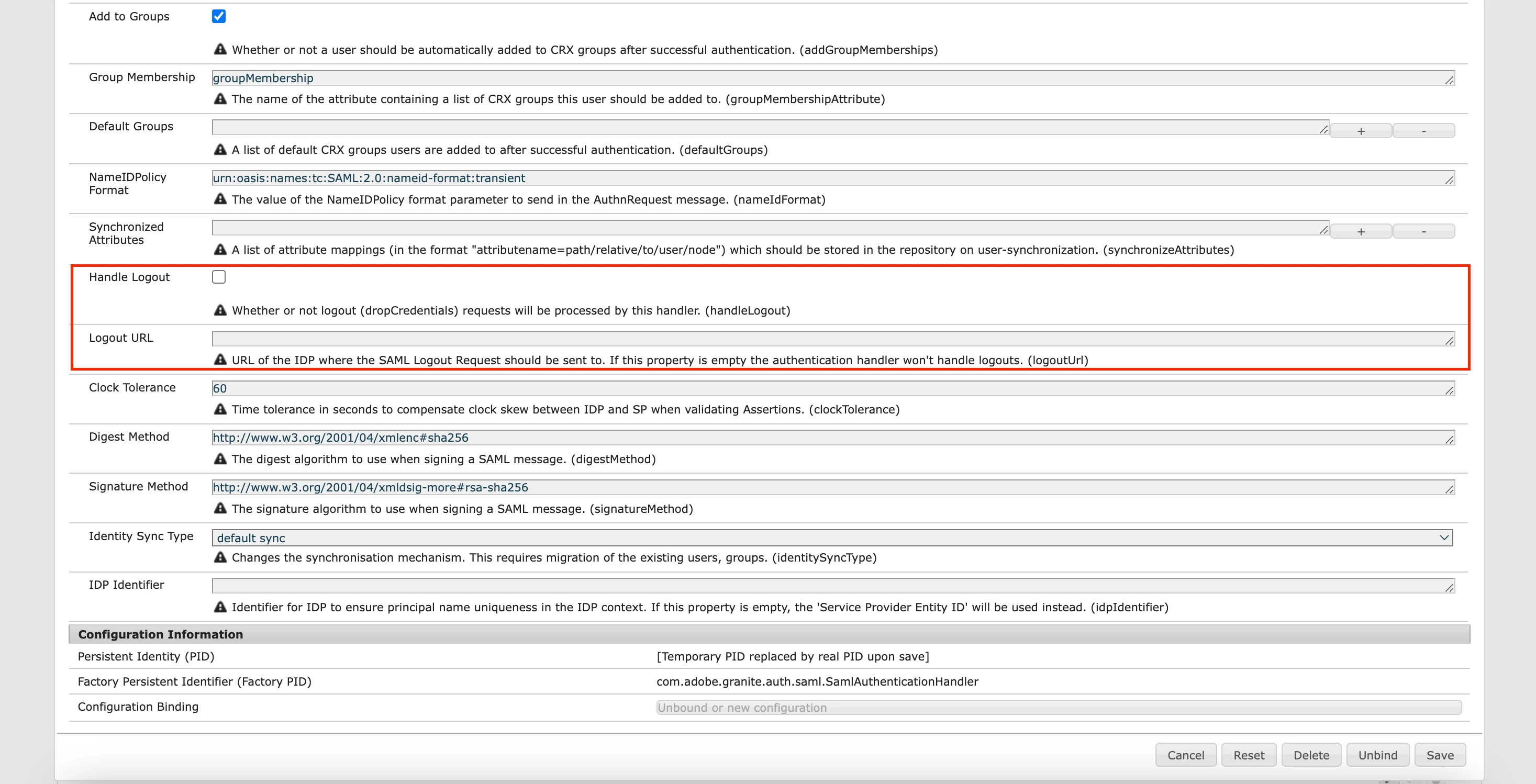
@bhavanibharani - Ensure these 2 properties are populated correctly where logoutUrl should be provided by your IdP to invalidate the session.


You can also refer to this doc here - https://aemblogger.medium.com/saml-2-0-authentication-in-aem-using-microsoft-azure-active-directory-sso-integration-e49b2a04d661

2 replies

Jineet_Vora
Community Advisor and Adobe Champion
March 21, 2024

@bhavanibharani - If I understand this correctly then the issue could be that the SAML authentication handler may not be logging out (invalidating) the requests. Please ensure that 'handleLogout' and 'logoutUrl' is specified in your AEM SAML authentication handler - <AEM_HOST>/system/console/configMgr/com.adobe.granite.auth.saml.SamlAuthenticationHandler

For reference: https://aemblogger.medium.com/saml-2-0-authentication-in-aem-using-microsoft-azure-active-directory-sso-integration-e49b2a04d661

Level 4
March 21, 2024

Hi @jineet_vora ,

Thanks for your response first. I can able to see the logout url by debugging the code.

but can you please specify what the handleLogout means here?


Regards,

Bhavani Bharanidharan

Jineet_Vora
Community Advisor and Adobe Champion
Jineet_VoraCommunity Advisor and Adobe ChampionAccepted solution
Community Advisor and Adobe Champion
March 21, 2024

@bhavanibharani - Ensure these 2 properties are populated correctly where logoutUrl should be provided by your IdP to invalidate the session.


You can also refer to this doc here - https://aemblogger.medium.com/saml-2-0-authentication-in-aem-using-microsoft-azure-active-directory-sso-integration-e49b2a04d661

MayurSatav
Community Advisor and Adobe Champion
March 25, 2024

@bhavanibharani , Did you find the suggestions from users helpful? Please let us know if more information is required. Otherwise, please mark the answer as correct for posterity. If you have found out solution yourself, please share it with the community.

Level 4
March 29, 2024

Hi @mayursatav ,

I m still facing the issue. if anyone knows how to invalidate login-token on the server side once the logout button is clicked. I tried session.invalidate() in my logout servlet, but this didn't helped.


Ragards,

Bhavani Bharanidharan