
Live Copy Move Issue | Community
Skip to main content
Deepikaa_Nagesh
Level 3
November 20, 2019
Solved

Live Copy Move Issue

  • November 20, 2019
  • 4 replies
  • 5316 views

Hi,

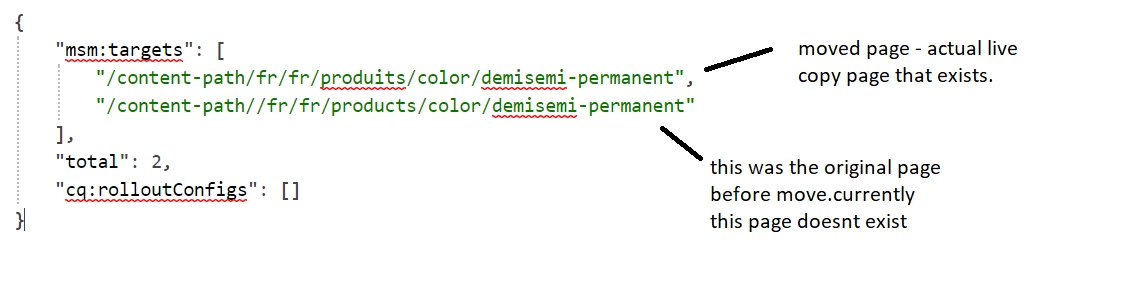
After i move a livecopy page (basically rename) Live copy works perfectly fine but both references are shown in list of live-copies  ( reference before and after move).

How to get rid of older references.
Thanks,

Deepikaa

This post is no longer active and is closed to new replies. Need help? Start a new post to ask your question.
Best answer by kautuk_sahni

Solution from @deepikaa_nagesh 

"

Hi,


We finally figured out why this happens,

when a live copy page is renamed, the original live copy page name is added in the exclude list.

If the above step does not happen, then both the pages are shown here as stated in the original post.


Since we did all live copy pages renaming programmatically, the excluded list did not get updated. This eventually did show both the live copy pages on-screen ( before n after rename)


thanks

"

4 replies

Adobe Employee
November 20, 2019

If the page is linked to or referenced, then these references will be listed in the Adjust/Republish step. You can indicate which should be adjusted and republished as appropriate.

Deepikaa_Nagesh
Level 3
November 21, 2019

Hi,

All references are updated, there is no issue with move operation but when try to roll out the page from blueprint both the pages (page links before and after move)are shown as live copy

For example,

In blue print tab of the source page, live copies are listed correctly

But when i try to roll out, it shows be both pages ( before and after move) where as only one livecopy exist.

Deepikaa_Nagesh
Level 3
April 22, 2020

Hi,


We finally figured out why this happens,

when a live copy page is renamed , the original live copy page name is added in exclude list .

If the above step does not happen, then both the pages are shown here as stated in original post .


Since we did all live copy pages renaming programatically , excluded list did not get updated . This eventually did show both the live copy pages on screen ( before n after rename)


thanks

kautuk_sahni
Community Manager
kautuk_sahniCommunity ManagerAccepted solution
Community Manager
May 12, 2020

Solution from @deepikaa_nagesh 

"

Hi,


We finally figured out why this happens,

when a live copy page is renamed, the original live copy page name is added in the exclude list.

If the above step does not happen, then both the pages are shown here as stated in the original post.


Since we did all live copy pages renaming programmatically, the excluded list did not get updated. This eventually did show both the live copy pages on-screen ( before n after rename)


thanks

"

Kautuk Sahni