Large size Image is not visible using Image core component (v2) | Community
Skip to main content
Level 2
September 27, 2022
Solved

Large size Image is not visible using Image core component (v2)

  • September 27, 2022
  • 2 replies
  • 1506 views

Hi,
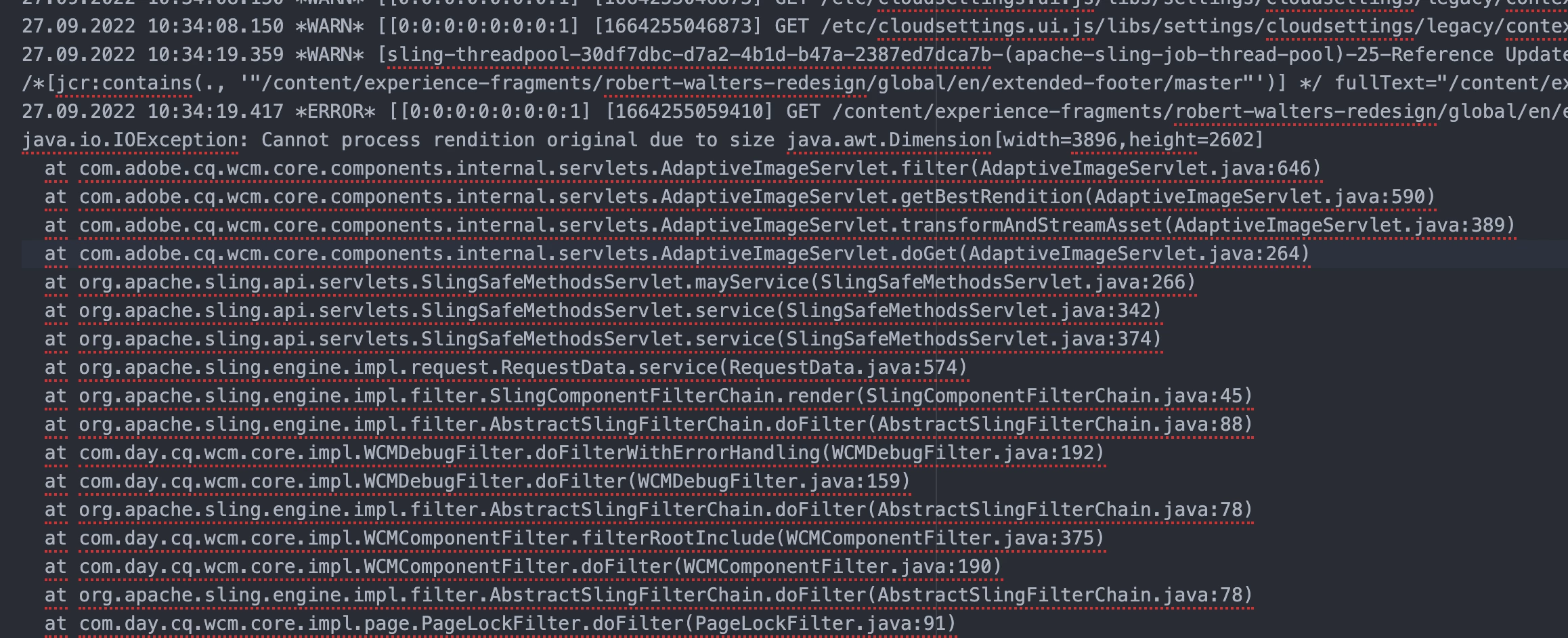
I am using image core component (v2) to display image and for large size image Image core component is unable to display the image.
I am attaching the exception screenshot.
Please respond if there there is any solution anybody has.



Thanks

This post is no longer active and is closed to new replies. Need help? Start a new post to ask your question.
Best answer by skchauhan

Hi @shivamkumarchauhan ,

In this, you will have to do some configuration in the config manager if your image is greater than the defined size, you can increase the size here, else you can reduce the resolution of your image and use it on the page.

Go to  -> AEM core WCM Components Adaptive Image Servlet Mapping Configuration

and change this field i.e. Maximum processed image size as per your usecase

2 replies

milind_bachani
Adobe Employee
Adobe Employee
September 27, 2022

Hi @shivamkumarchauhan ,


Looks like this is an already open issue reported, 
check : https://github.com/adobe/aem-core-wcm-components/issues/1488


They have discussed a solution to have a fallback mechanism in the code to use MAX_WIDTH possible when the width are greater than supported sizes.

Thanks,
Milind

Level 2
September 28, 2022

Thanks @milind_bachani for the help. But I did not get the MAX_WIDTH you mentioned. As it was nowhere in the above link. Can you please explain it more clearly.

milind_bachani
Adobe Employee
Adobe Employee
September 28, 2022

Hi @shivamkumarchauhan ,

If you read the possible solutions in the link, it says :

The getBestRendition method in AdaptiveImageServlet shouldn't fallback to the "original" rendition if width is larger than the DEFAULT_MAX_SIZE AND height is larger than width.

Which means that if you are using an image whose width & height is greater than allowed dimensions[dimensions of the largest rendition], in your case [3896 x 2602](read from logs) - you should be writing a fallback mechanism to take up the rendition available having the max dimensions instead [e.g. load the page with 1280 rendition] of taking up unusual dimensions[3896 x 2602 in your case].

Hope this helps, thanks!

skchauhanAccepted solution
Level 2
May 10, 2024

Hi @shivamkumarchauhan ,

In this, you will have to do some configuration in the config manager if your image is greater than the defined size, you can increase the size here, else you can reduce the resolution of your image and use it on the page.

Go to  -> AEM core WCM Components Adaptive Image Servlet Mapping Configuration

and change this field i.e. Maximum processed image size as per your usecase