yellar5366253
Level 2
January 2, 2019
Solved

jcr: content nodes don't want to display when browse and search using pathfiled in touch ui dialog

I'm currently working on a site implementation with AEM 6.4 touch ui . We have a touch ui dialog that is using granite/ui/components/coral/foundation/form/pathfield, this is how the code looks like:        

                        <csvpath

                                       jcr:primaryType="nt:unstructured"

                                       jcr:title="CSV Link URL"

                                       sling:resourceType="/libs/granite/ui/components/coral/foundation/form/pathfield"

                                       fieldDescription="Location of the CSV with the graph data"

                                       fieldLabel="CSV Path"

                                       name="./csvPercentGraphPath"

                                       rootPath="/content/dam/lgs/us/legal/transparency/data”/>

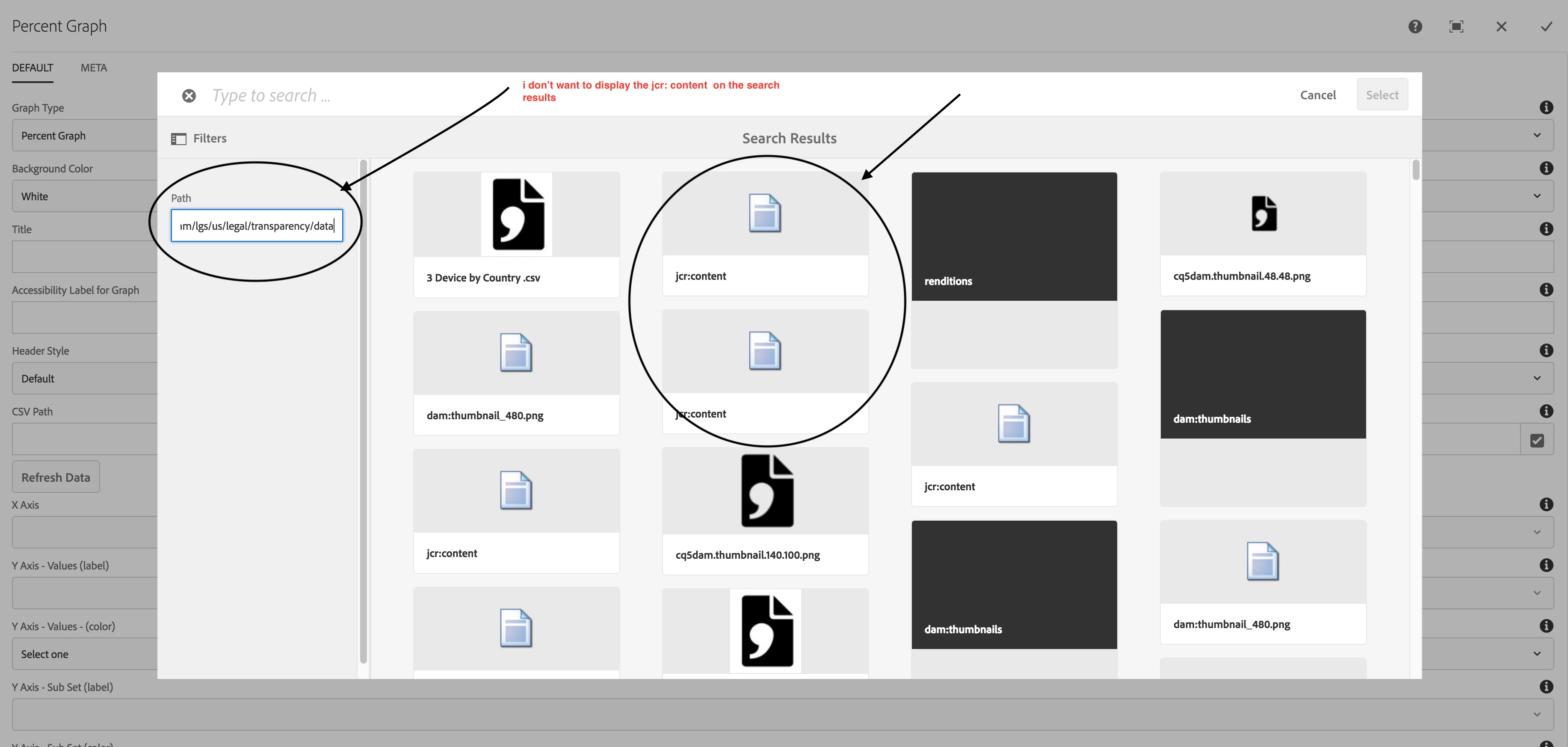
When edit the component and  click on path filed  going to the filters If  given the path  like "/content/dam/lgs/us/legal/transparency/data” I don’t want to display the jcr:content nodes on search results , could you please do the need full .

   I’m highlighted the jcr:content( I don’t want jcr:content  on search results ) on search results in below screen shot.
Arun Patidar​ smacdonald2008​Amy_Wong​soumyadipd33248700

This post is no longer active and is closed to new replies. Need help? Start a new post to ask your question.
vish.dhaliwalAccepted solution
Adobe Employee
September 4, 2019

Hello Everyone,

The product team is currently working on this issue. The internal reference number is GRANITE-15894 and GRANITE-26358.

This has been classified as an enhancement to the product.

Regards,

Vishu

8 replies

yellar5366253
Level 2
January 2, 2019

Please answer immeditly ,  its  blocker for our  project.

Arun Patidar smacdonald2008Amy_Wongsoumyadipd33248700

Translate
arunpatidar
Community Advisor
Community Advisor
January 2, 2019

Hi

Not sure if filter property works but you can apply dialog filters to avoid jar:content as input.

Translate
Arun Patidar
yellar5366253
Level 2
January 2, 2019

Hi Arun,

     i tried  with filter with jcr:content  also not working,

Translate
arunpatidar
Community Advisor
Community Advisor
January 2, 2019

There is similar thread

if that helps otherwise you can use dialog validations.

Translate
Arun Patidar
yellar5366253
Level 2
January 2, 2019

Even i followed that blog also not working and i think it is product bug ,

Arun Patidar smacdonald2008Amy_Wongsoumyadipd33248700

Translate
aalfarocr
Level 2
August 30, 2019

Any updates on this ISSUE ??? , it looks like a product BUG ! Very annoying by the way ...

Translate
aalfarocr
Level 2
August 30, 2019

Hey yellar5366253​ at the end have u figure it out ? We're facing the same annoying issue now... thx !

Translate
vish.dhaliwalAdobe EmployeeAccepted solution
Adobe Employee
September 4, 2019

Hello Everyone,

The product team is currently working on this issue. The internal reference number is GRANITE-15894 and GRANITE-26358.

This has been classified as an enhancement to the product.

Regards,

Vishu

Translate