Is there any way to show the load time of each component at page level in request.log file so that I can use this time in my application ? | Community
Skip to main content
Level 2
February 6, 2017
Solved

Is there any way to show the load time of each component at page level in request.log file so that I can use this time in my application ?

  • February 6, 2017
  • 2 replies
  • 1949 views

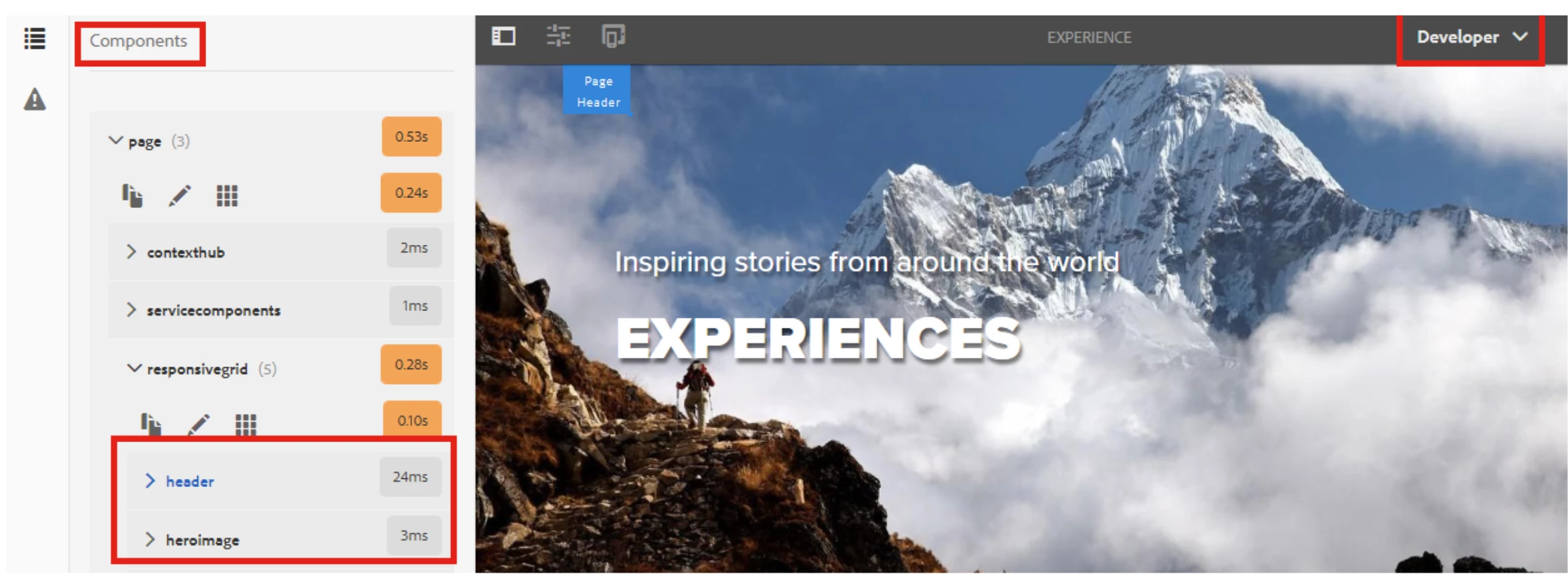
In AEM 6.2 we can get the loading time of each component in touch Optimized UI in Developer Mode But It depends on server. Other way is that we can use timing component  but it also server dependent because we have to include this component in global.jsp.

But I want the loading time of each component on client side. If anyone can help me Please give me some suggestions.

This post is no longer active and is closed to new replies. Need help? Start a new post to ask your question.
Best answer by aanchal-sikka

AEM 6.5 provides the component load time in the sidebar of the page. It can be utilized for investigations


2 replies

smacdonald2008
Level 10
February 6, 2017

Here is the only applicable article: 

http://www.wemblog.com/2014/05/how-to-find-component-load-time-on-page.html

However - this is server. Does not look like there is a tool specifically for client side.

You can look at using general tools that measure the time it takes to load a page - for example - Chrome tool: 

https://chrome.google.com/webstore/detail/page-load-time/fploionmjgeclbkemipmkogoaohcdbig?hl=en

There are other tools as well that show client loading time. 

aanchal-sikka
Community Advisor
aanchal-sikkaCommunity AdvisorAccepted solution
Community Advisor
April 24, 2024

AEM 6.5 provides the component load time in the sidebar of the page. It can be utilized for investigations


Aanchal Sikka