
iparsys permission issue | Community
Skip to main content
Sady_Rifat
Community Advisor
Community Advisor
April 26, 2021
Solved

iparsys permission issue

  • April 26, 2021
  • 1 reply
  • 843 views

I have a page template that body part contains iparsys. In that iparsys I allow some components and that component also contains each individual parsys.
Now the problem is when I drop a component using iparsys that component's parsys policy is working fine. But after dragging the same component again by iparsys the second component's policy is not working.
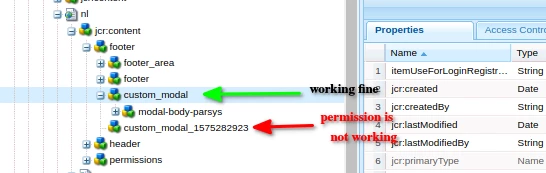
 

My initial guess this happened for the suffix part of 'custom_modal_XXXXXX'.
Here is my template policies code:

<footer
cq:policy="foundation/components/iparsys/policy_22227343659454"
jcr:primaryType="nt:unstructured"
sling:resourceType="wcm/core/components/policies/mapping">
<custom_modal
cq:policy="project/components/content/demo/custom-modal/policy_1613041747453"
jcr:primaryType="nt:unstructured"
sling:resourceType="wcm/core/components/policies/mapping">
<modal-body-parsys
cq:policy="wcm/foundation/components/parsys/policy_16686984188315"
jcr:primaryType="nt:unstructured"
sling:resourceType="wcm/core/components/policies/mapping"/>
</custom_modal>
</footer>

Can anyone suggest how I enable policy  

This post is no longer active and is closed to new replies. Need help? Start a new post to ask your question.
Best answer by Pawan-Gupta

Hello,


The policies related to component or its underneath child nodes are stored and managed using component node name (similar you can test with styling system as well) as i figured out. 


Now, to deal with your problem with iParsys inheritance and managing child parsys policy, you have to manually copy the new node name (via copy pasting the working policy (in your case case custom_model) and change the node name to new name custom_modal_XXXXXX (based on your case the created node name - but still referring same policy as working one) under the "Policy" area inside template hierarchy via using crx/de and should reflect correctly.


(I surprise to see that this problem only occurs with iParsys but non regular parsys - may be inheritance place some role there)


I hope this helps!!

1 reply

Pawan-Gupta
Pawan-GuptaAccepted solution
Level 8
April 26, 2021

Hello,


The policies related to component or its underneath child nodes are stored and managed using component node name (similar you can test with styling system as well) as i figured out. 


Now, to deal with your problem with iParsys inheritance and managing child parsys policy, you have to manually copy the new node name (via copy pasting the working policy (in your case case custom_model) and change the node name to new name custom_modal_XXXXXX (based on your case the created node name - but still referring same policy as working one) under the "Policy" area inside template hierarchy via using crx/de and should reflect correctly.


(I surprise to see that this problem only occurs with iParsys but non regular parsys - may be inheritance place some role there)


I hope this helps!!

Sady_Rifat
Community Advisor
Community Advisor
April 27, 2021

Thanks @pawan-gupta for your reply. Yes, manual process is working but needs an automated process like normal parsys. If it's not possible then need to think about other way but not manual.