Invalid Private Key Alias - AEM Mobile Signing Tool - Android - p12 | Community
Skip to main content
divisj
May 22, 2016
Solved

Invalid Private Key Alias - AEM Mobile Signing Tool - Android - p12

  • May 22, 2016
  • 1 reply
  • 907 views

According to Experience Manager Mobile Help / Sign iOS and Android Apps​:

     "For Android apps, if you specify a .p12 certificate, specify the password."

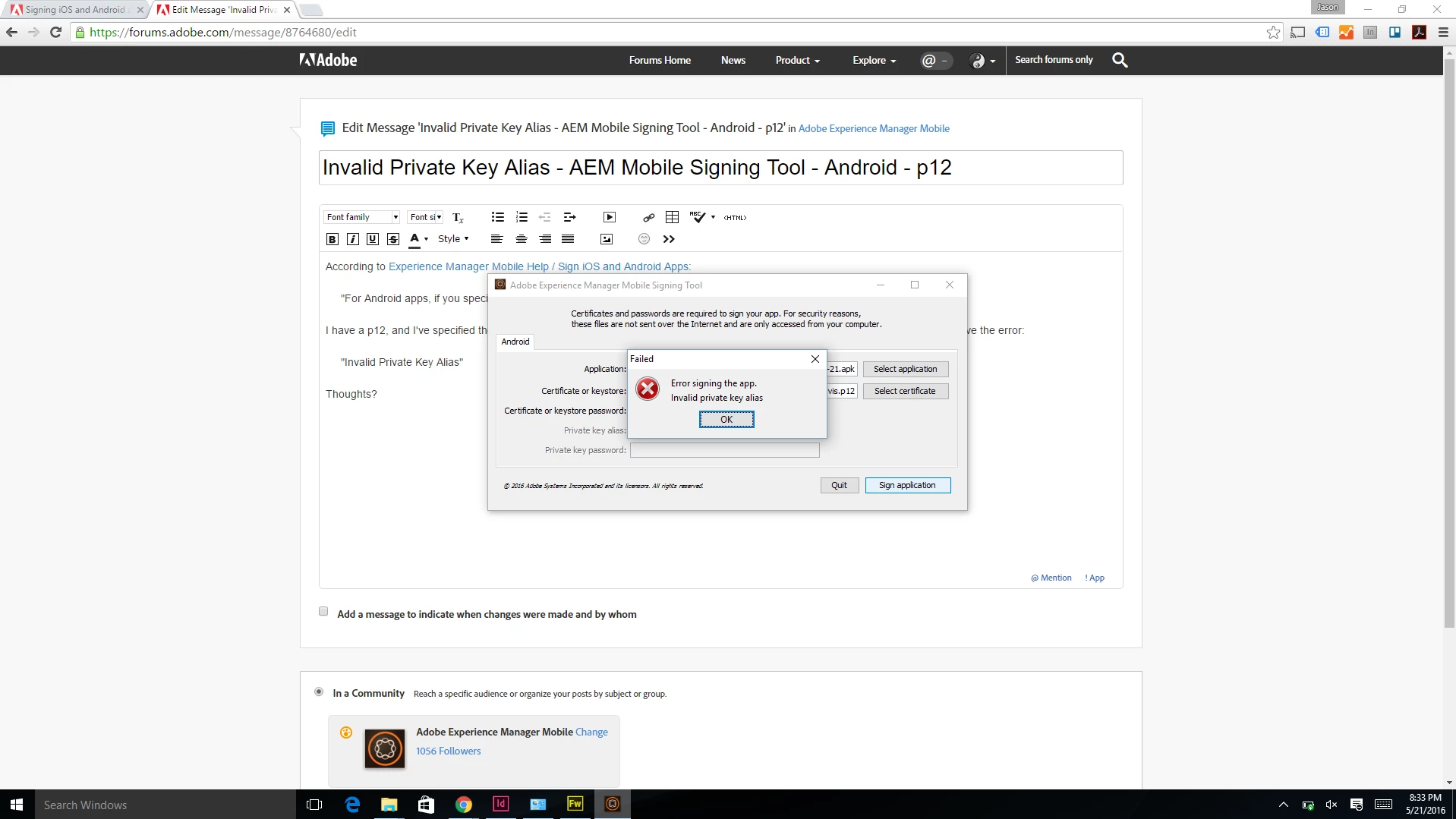
I have a p12, and I've specified the password. The Private Key Alias field and Private Key Password field are disabled, and yet, I receive the error:

     "Invalid Private Key Alias"

Thoughts?
This post is no longer active and is closed to new replies. Need help? Start a new post to ask your question.
Best answer by divisj

I was using a p12 file that I had generated a couple of years ago and had been signing apps with. I followed the instructions at Android Publishing Guide, and was able to sign the app successfully.

1 reply

divisj
divisjAuthorAccepted solution
May 22, 2016

I was using a p12 file that I had generated a couple of years ago and had been signing apps with. I followed the instructions at Android Publishing Guide, and was able to sign the app successfully.