
Solved
Integrate SonarQube with Github and deploy code using jenkins
Hi all,
I want to run sonarqube analysis on committed code in github and push the code to aem using jenkins. This should be automated process. How can I achieve it?
Regards
Hi all,
I want to run sonarqube analysis on committed code in github and push the code to aem using jenkins. This should be automated process. How can I achieve it?
Regards
Hi @rk39193348,
A while back I wrote a 4 part tutorial on how to set this up using Docker images: https://medium.com/@theopendle/github-jenkins-sonarqube-integration-for-java-maven-1-4-installation-ab4bdb53fcdd
The tutorial will teach you step-by-step but I also uploaded the source code to GitHub: https://github.com/theopendle/docker-ci
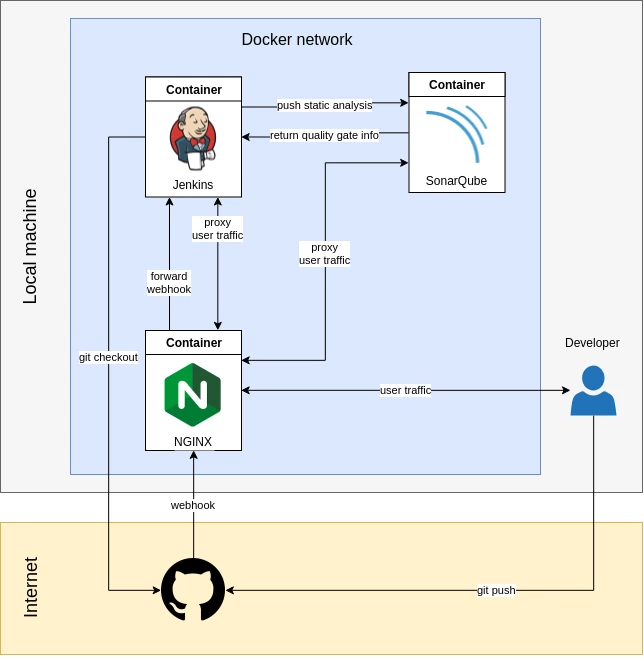
The end result is the following architecture (you will obviously need to adapt it to fit your environnement/network. This is what I used for my home developments):
The only stage you want to do which is not covered in that tutorial is the deployment, which can be done by uploading to AEM via the Package Manager API. You can find some example cURL commands here: https://helpx.adobe.com/lu_en/experience-manager/kb/common-AEM-Curl-commands.html#PACKAGES
Enter your E-mail address. We'll send you an e-mail with instructions to reset your password.