Installed AEM version 6.5 with SP18, Workbench won't run. | Community
Skip to main content
Level 2
May 22, 2024
Solved

Installed AEM version 6.5 with SP18, Workbench won't run.

  • May 22, 2024
  • 3 replies
  • 916 views

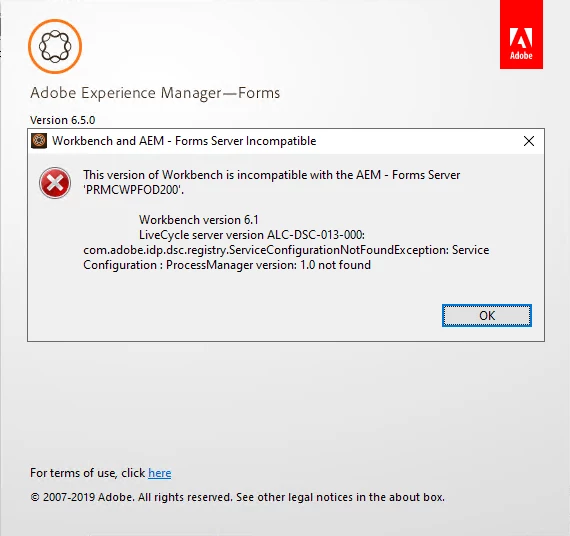
I installed AEM server 6.5 with SP18 and Workbench 6.5.  Workbench says, "This version of Workbench is incompatible with AEM - Forms Server.  Any ideas?
 

This post is no longer active and is closed to new replies. Need help? Start a new post to ask your question.
Best answer by CarlWilk

Thanks for the suggestions.  I ended up uninstalling and reinstalling using the Express Mode and all was good.  So very strange.

3 replies

Rohan_Garg
Community Advisor
Community Advisor
May 22, 2024

Hi @carlwilk,

Your screenshot displays Workbench version as 6.1

You can try the latest AEM 6.5.20.0 Forms Workbench Installer with AEM Forms 6.5.20.0 Add-on package.

Download Link - https://experience.adobe.com/#/downloads/content/software-distribution/en/aem.html

It worked correctly for me.


Please refer to the below links too once - 

Install Workbench

Supported Platforms for AEM Forms on JEE

WorkbenchHelp


Hope this helps!

Rohan Garg


gkalyan
Community Advisor and Adobe Champion
May 22, 2024

@carlwilk 


AEM Workbench 6.5 is compatible with AEM Forms 6.5, but there may be an issue with the service pack (SP18) you installed. Here are a few potential solutions:
  • Check the compatibility matrix for AEM 6.5 SP18 to ensure Workbench 6.5 is supported with that specific service pack version. Service packs can sometimes introduce compatibility issues.
  • Try uninstalling SP18 from your AEM Forms server and see if Workbench 6.5 works with the base AEM 6.5 version without the service pack. If it does, there may be an incompatibility between Workbench and that specific service pack.
  • Check the Workbench log files for any specific errors that could indicate the root cause of the incompatibility. The logs may provide more details on what is causing the issue.


Here is a documentation about backward compatibility 

https://experienceleague.adobe.com/en/docs/experience-manager-65/content/implementing/deploying/upgrading/backward-compatibility

CarlWilkAuthorAccepted solution
Level 2
May 22, 2024

Thanks for the suggestions.  I ended up uninstalling and reinstalling using the Express Mode and all was good.  So very strange.

gkalyan
Community Advisor and Adobe Champion
May 22, 2024

Great! it is working now.

kautuk_sahni
Community Manager
Community Manager
June 7, 2024

@carlwilk I hope you found the AEM community helpful. We look forward to your return as either a learner or a mentor. The community flourishes with SMEs like you. Please encourage your AEM peers to contribute as well. Happy AEM learning!

Kautuk Sahni