including client lib inside the template | Community
Skip to main content
mudaliar847906
Level 2
September 21, 2021
Solved

including client lib inside the template

  • September 21, 2021
  • 7 replies
  • 2155 views

Hi Team,


I have component in that html file have codelike below.
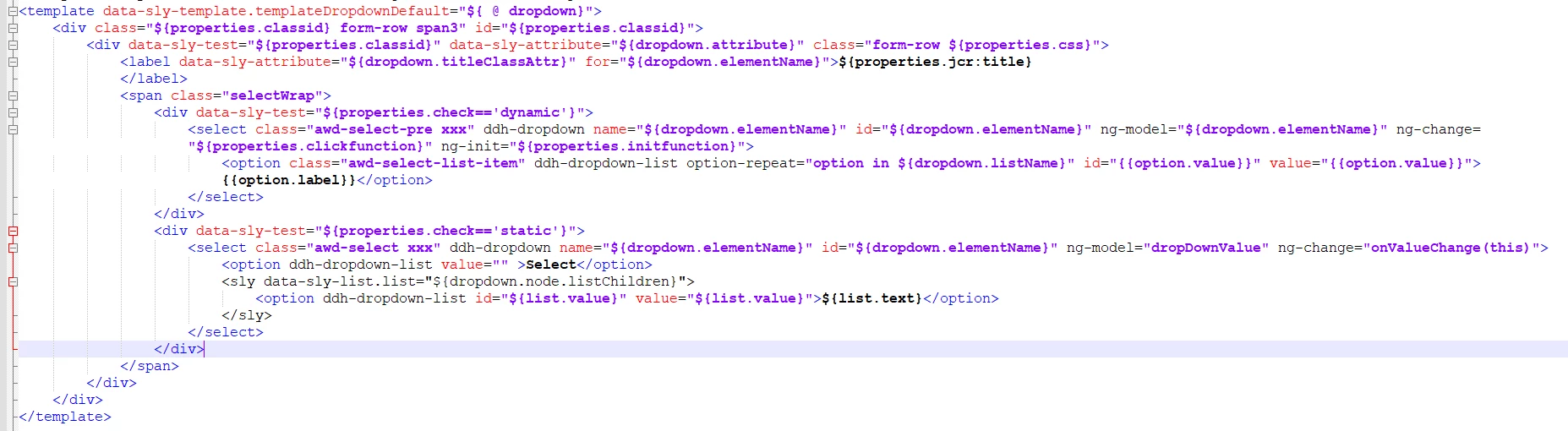
In that i need to add client library to make some css change i did by adding data sly but  css is not reflrcting below is screen shot
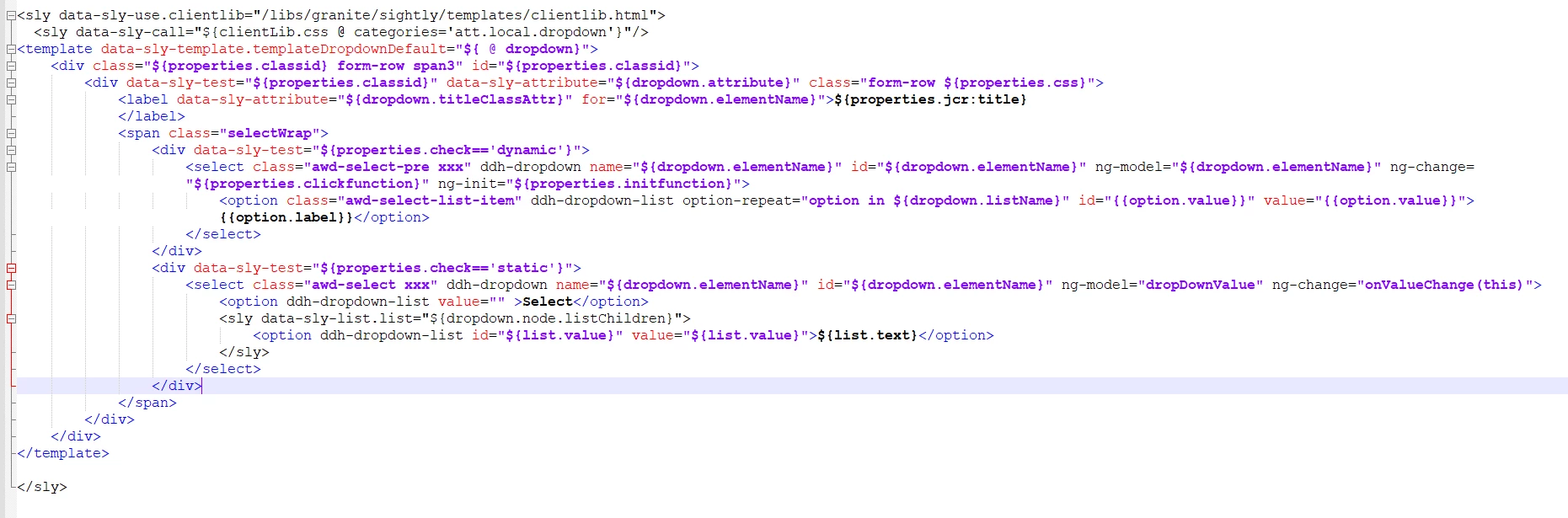


Any one how how to specify the client lib inside template tage let me know.


Regards

Manikantha R


This post is no longer active and is closed to new replies. Need help? Start a new post to ask your question.
Best answer by Sanjay_Bangar

Hi @mudaliar847906 ,

         Please check the syntax for calling the css.one more thing if you want to call css or js components specific your component then you can directly call in your HTL. Like below

<sly data-sly-use.clientlib="/libs/granite/sightly/templates/clientlib.html"
data-sly-call="${clientlib.all @ categories='clientlib1,clientlib2'}"/>


Altenate way to call your clientlibs you need to embed your clientlibs to base clientlibs.


Kr,

Sanjay


7 replies

Kishore_Kumar_
Level 9
September 21, 2021

Put inside the template and check please.


Also generally create a clientlibs at a component level and then embed in your page/base clientlibs.

Rohit-Negi
Level 3
September 21, 2021

Hi @mudaliar847906 


you have used data-sly-use.clientlib and in  data-sly-call you are using clientLib(L as capital) , can you check if that have any issue.

If not then can you put both these under template tag as:

<template data-sly-use.clientLib="${'/libs/granite/sightly/templates/clientlib.html'}" data-sly-call="${clientLib.css @ categories='test.clientlibs'}" >


Thanks!

Fanindra_Surat
Community Advisor
Community Advisor
September 21, 2021

Hi @mudaliar847906 -


The variable names in data-sly-use and data-sly-call need to be of same case. They are case sensitive.

Either change the first line to data-sly-use.clientLib OR update the second line to clientlib.css

 
Thanks,
Fani
 
Suraj_Kamdi
Community Advisor
Community Advisor
September 21, 2021

@mudaliar847906 

Use this code


<template data-sly-template.demo="${@ someVariable}" >
<
sly data-sly-use.clientlib="/libs/granite/sightly/templates/clientlib.html">
<sly data-sly-call="${clientlib.css @ categories=test1}"></sly>
<sly data-sly-call="${clientlib.js @ categories=test2}"></sly>
</sly>
</template>


Suraj Kamdi
Vijayalakshmi_S
Level 10
September 21, 2021

Hi @mudaliar847906,

We can avoid an additional <sly> and make use of the existing <template> tag itself for block statements data-sly-use and data-sly-call next to data-sly-template

<template data-sly-template.tempOne="${ @ page}" data-sly-use.clientLib="/libs/granite/sightly/templates/clientlib.html" data-sly-call="${clientLib.css @ categories='clientlibCategoryName'}">
    <h4>Content from separate Template file, origin page : ${page.path}</h4>
</template>

This will work and cross check once from clientlibs end as well (availability of css.txt file with inclusion of desired CSS files)

Anny0505
Community Advisor
Community Advisor
September 21, 2021

@mudaliar847906 ,


I believe you have component which is tagged to your template. Please create clientlibs folder as shown below. add your  css, js, css.txt, js.txt and create props dependencies,categories etc.


cq:ClientLibraryFolder] > sling:Folder
  - dependencies (string) multiple
  - categories (string) multiple
  - embed (string) multiple
  - channels (string) multiple


and add categories as shown in below to your page component.

<sly data-sly-use.clientLib="/libs/granite/sightly/templates/clientlib.html"><sly data-sly-call="${clientlib.all @ categories='we-retail.dependencies'}"></sly><sly data-sly-call="${clientlib.css @ categories='we-retail.base'}"></sly></sly>


Try to create a page sing your template and open the page in-cognito window and see your css/js applied to your template.


Thanks,

Aruna

Sanjay_Bangar
Community Advisor
Sanjay_BangarCommunity AdvisorAccepted solution
Community Advisor
September 23, 2021

Hi @mudaliar847906 ,

         Please check the syntax for calling the css.one more thing if you want to call css or js components specific your component then you can directly call in your HTL. Like below

<sly data-sly-use.clientlib="/libs/granite/sightly/templates/clientlib.html"
data-sly-call="${clientlib.all @ categories='clientlib1,clientlib2'}"/>


Altenate way to call your clientlibs you need to embed your clientlibs to base clientlibs.


Kr,

Sanjay


kautuk_sahni
Community Manager
Community Manager
September 23, 2021

@sanjay_bangar Goos to have greate AEM SME in our Community. Keep the great work going. 

Kautuk Sahni