In AEM Editable template, Responsive authoring not working for custom breakpoints | Community
Skip to main content
Level 4
January 7, 2021
Solved

In AEM Editable template, Responsive authoring not working for custom breakpoints

  • January 7, 2021
  • 1 reply
  • 2661 views

We are on AEM 6.5.3 and working on setting up the responsive authoring for a desktop and large desktop. We did two things.

    1. We have modified the grid.less for desktop and large desktop breakpoint. (code is below)

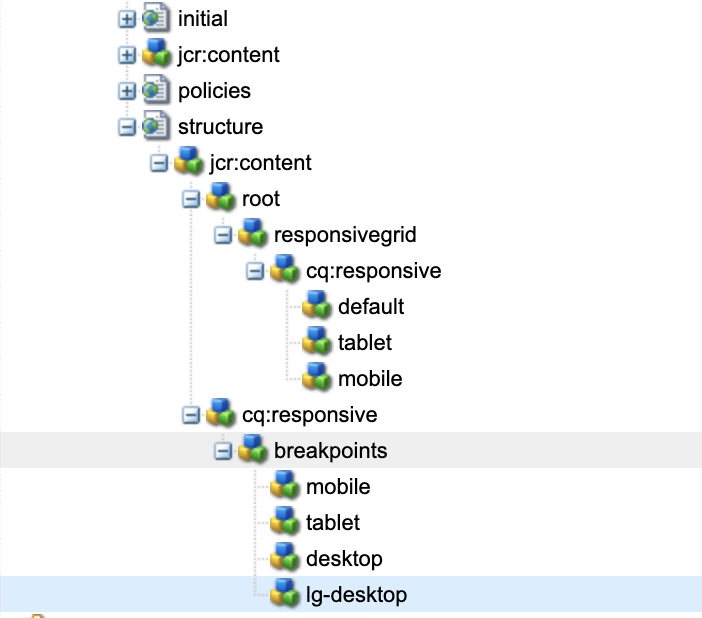
    2. And added the respective breakpoint responsive node at the template for desktop and large desktop breakpoint.


But while doing responsive authoring, I can author only in the phone, tablet, and default mode.

Can anybody please provide any pointers to do responsive authoring for a desktop and large desktop?


below is the grid file, here you can see I have defined desktop and large desktop breakpoints. And I have the same nodes at the template.


@15844621 "/libs/wcm/foundation/clientlibs/grid/grid_base.less";


/* maximum amount of grid cells to be provided */

@max_col: 12;


/* default breakpoint */

.aem-Grid {

    .generate-grid(default, @max_col);

     width: auto;

}


/* phone breakpoint */

@590883 (max-width: 600px) {

    .aem-Grid {

        .generate-grid(phone, @max_col);

    }

}


/* tablet breakpoint */

@590883 (min-width: 600px) and (max-width: 768px) {

    .aem-Grid {

        .generate-grid(tablet, @max_col);

    }

}


/* small desktop breakpoint */

@590883 (min-width: 768px) and (max-width: 1024px) {

    .aem-Grid {

        .generate-grid(desktop, @max_col);

    }

}


/* medium desktop breakpoint */

@590883 (min-width: 1024px) and (max-width: 1280px) {

    .aem-Grid {

        .generate-grid(lg-desktop, @max_col);

    }

}


This post is no longer active and is closed to new replies. Need help? Start a new post to ask your question.
Best answer by Vijayalakshmi_S

Hi @karanmahi,

Could you please let know

  • If the new breakpoint added at template level is not available in emulator at first place or it is available but you are not able to see it activating for devices within that range while authoring?
  • After adding at editable template level, are you authoring in template or page?

In the screenshot, could see cq:responsive node is added under responsivegrid node too. This is not needed. 

It is needed either in ../structure/jcr:content/(for template or template-type level) or ../pagepath/jcr:content (for page level) 

1 reply

Vijayalakshmi_S
Vijayalakshmi_SAccepted solution
Level 10
January 8, 2021

Hi @karanmahi,

Could you please let know

  • If the new breakpoint added at template level is not available in emulator at first place or it is available but you are not able to see it activating for devices within that range while authoring?
  • After adding at editable template level, are you authoring in template or page?

In the screenshot, could see cq:responsive node is added under responsivegrid node too. This is not needed. 

It is needed either in ../structure/jcr:content/(for template or template-type level) or ../pagepath/jcr:content (for page level) 

karanmahiAuthor
Level 4
January 8, 2021
Issue is, how to do responsive authoring in large desktop breakpoint? In layout mode, how to select large desktop option?