


Investigating
Improve ability to toggle (show/hide) fields in the new CF editor
| Request for Feature Enhancement (RFE) Summary: |
The current API and the example shared in the docs to toggle (show/hide) fields in the new CF editor does not work as expected and contains multiple issues. Docs: https://developer.adobe.com/uix/docs/services/aem-cf-editor/api/data/#setting-styles-to-the-field |
| Use-case: | We have a few CF models where fields are shown or hidden depending on the type selection an editor makes. After creating a new CF, the editor first needs to select a provider, and then different fields show depending on the selection. |
| Current/Experienced Behavior: | While developing a small plugin for the new CF editor to show/hide fields based on a selection according to the documentation provided [1]. Concretely, we are relying on the api.setStyles , but we noticed two bugs: 1) This approach works fine for standard input fields, but not for select boxes/enumeration fields, they remain visible even after we try to hide them with CSS display:none 2) The standard input fields that do get hidden, but leave a margin that creates unnecessary blank space (this happens because the style is not applied on the container DIV) |
| Improved/Expected Behavior: | Fix both bugs and enable plugin developers to properly apply style to toggle input fields |
| Environment Details (AEM version/service pack, any other specifics if applicable): | AEMaaCS, version 2024.10.18311.20241017T104455Z |
| Customer-name/Organization name: | Assa Abloy |
| Screenshot (if applicable): | 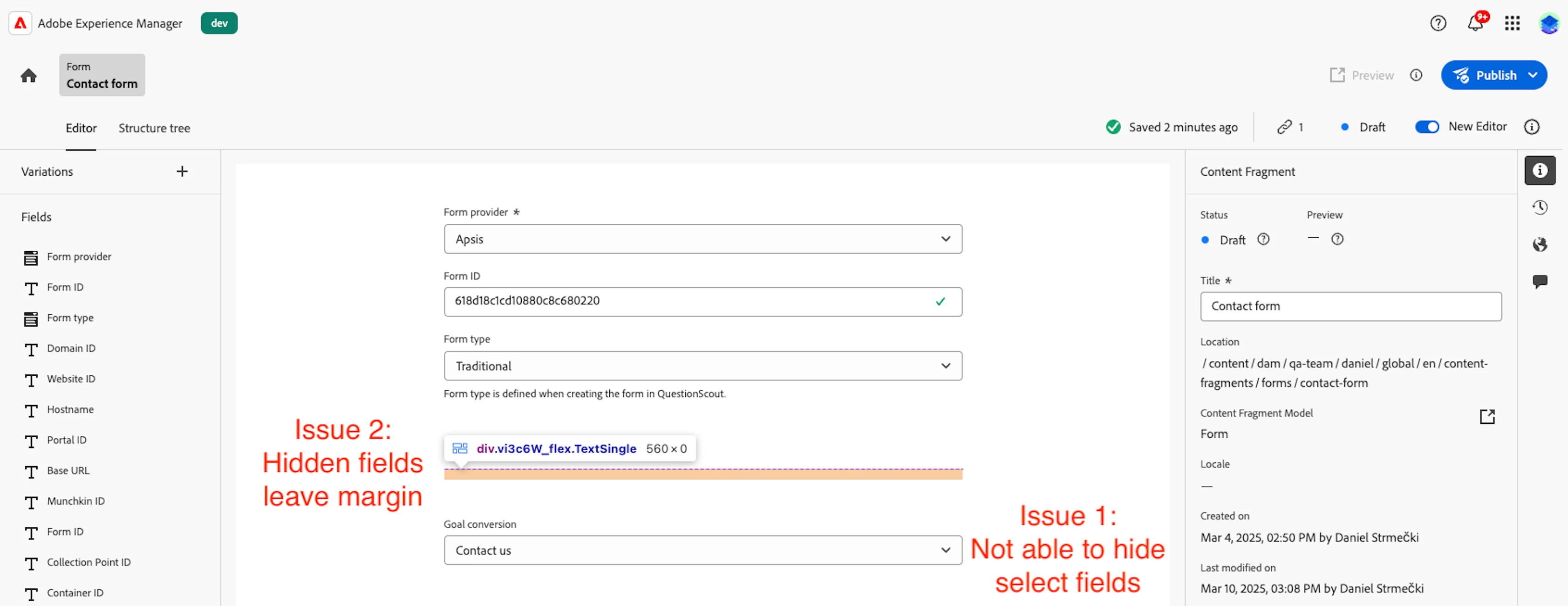 |
| Code package (if applicable): | api.setStyles(fieldName, {"display": "none"}); |