Image Picker in Multifield Updates All Items | Community
Skip to main content
Level 2
March 12, 2026
Question

Image Picker in Multifield Updates All Items

  • March 12, 2026
  • 2 replies
  • 30 views

Hi everyone,

I am facing an issue with an image picker inside a multifield in an AEM author dialog.

Scenario:

Inside a multifield, I added a fileupload component to allow authors to select an image asset.

Dialog configuration example:

<file
jcr:primaryType="nt:unstructured"
sling:resourceType="cq/gui/components/authoring/dialog/fileupload"
granite:class="cmp-image__editor-file-upload"
enableNextGenDynamicMedia="{Boolean}true"
class="cq-droptarget"
fieldLabel="Image Asset"
fileNameParameter="./fileName"
fileReferenceParameter="./fileReference"
mimeTypes="[image/gif,image/jpeg,image/png,image/tiff,image/svg+xml]"
name="./file"
title="Upload Image Asset"/>

Issue:

When the author selects or changes an image in one multifield item, the selected image is automatically applied to all other multifield items. So essentially, Selecting image in item 1, updates item 2, item 3, etc.
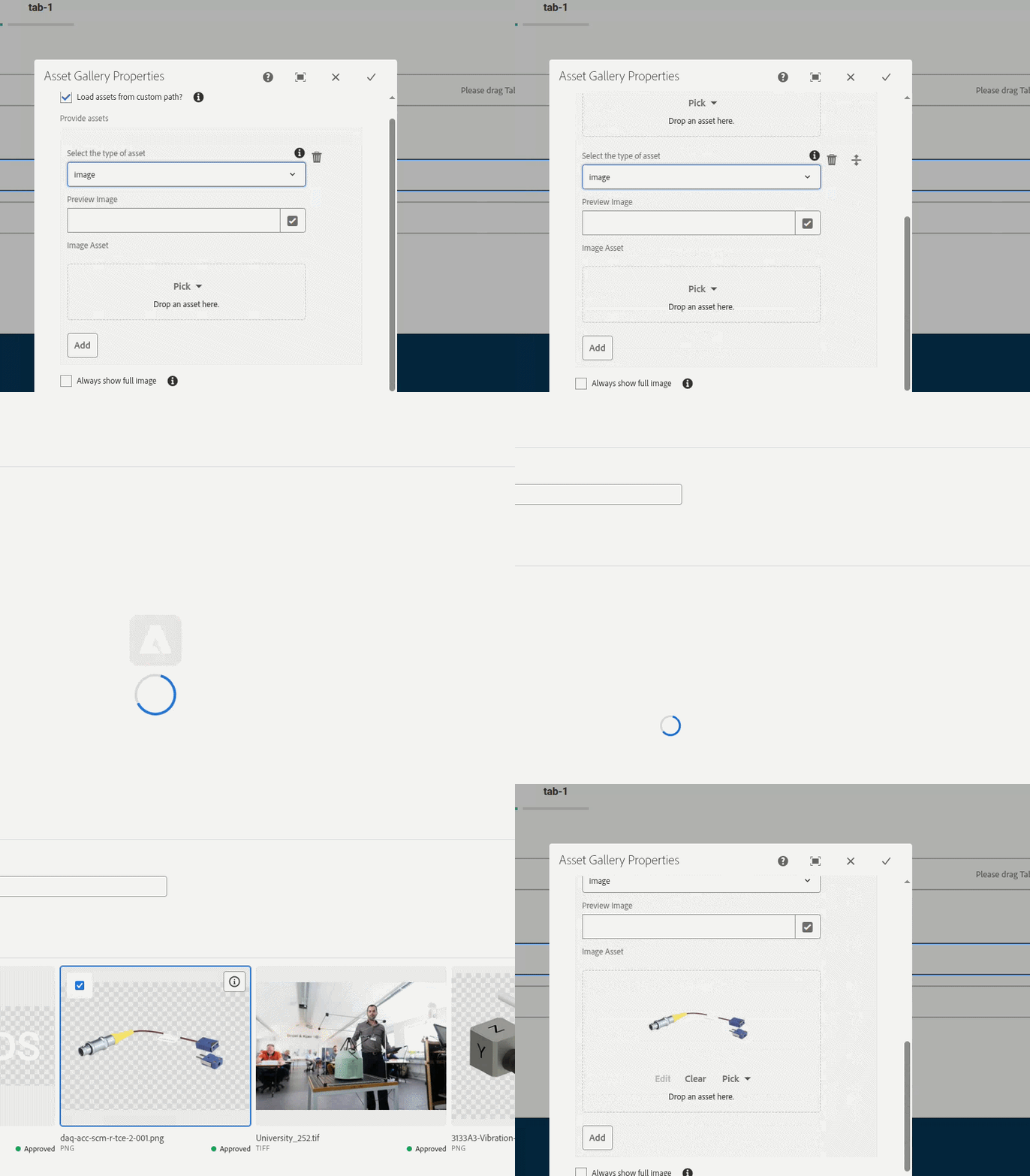
Issue Visualize

Also after submit the dialog the image is not saved in CRX.
We are using AMS 6.5.19 and the for picker clientlibs used: core.wcm.components.image.v3.editor
Note: We need to use remote picker as for asset storage we are using Adobe Asset Service.


Is there a recommended way to implement an image picker inside multifield while still using Core Component features?

Any guidance or workaround would be appreciated.

2 replies

VishalKa5
Level 5
March 12, 2026

Hi ​@SadyRifat ,


In Adobe Experience Manager (AEM) 6.5, this issue usually happens when the fileupload field inside the multifield is not configured with unique storage paths, so all items reference the same property.

Main Points (Short & Point-wise)

  1. Use Composite Multifield

    • Configure the multifield with composite="{Boolean}true" so each item stores its data separately.

  2. Correct Field Name

    • Use name="./fileReference" (or inside a node like ./item/fileReference) instead of ./file.

    • This ensures each multifield item saves its own image reference.

  3. Avoid Shared DOM/Class Conflicts

    • The clientlib core.wcm.components.image.v3.editor may bind the picker globally.

    • Ensure the field does not reuse the same granite:class or selector across all items.

  4. Proper Node Structure

    • Store values like:


    ./items/item0/fileReference
    ./items/item1/fileReference

    so every multifield entry has its own asset reference.

  5. CRX Save Issue

    • If the property name is incorrect (name="./file"), AEM may not persist the value after dialog submit.

Conclusion:
Use a composite multifield with a proper fileReference property for each item, and avoid shared selectors so that each item stores and updates its own image independently.

Thanks,

Vishal

SadyRifatAuthor
Level 2
March 12, 2026

Hi ​@VishalKa5 ,
The multifield composit is already there and there is no conflict I can confirm “Avoid Shared DOM”, I didn’t fully understand your 2nd solution “Correct Field Name” or “Proper Node Structure”

This is my full dialog. Could you please correct me where exactly I need to change?

<?xml version="1.0" encoding="UTF-8"?>
<jcr:root xmlns:sling="http://sling.apache.org/jcr/sling/1.0" xmlns:granite="http://www.adobe.com/jcr/granite/1.0" xmlns:jcr="http://www.jcp.org/jcr/1.0" xmlns:nt="http://www.jcp.org/jcr/nt/1.0" xmlns:cq="http://www.day.com/jcr/cq/1.0"
jcr:primaryType="nt:unstructured"
jcr:title="Asset Gallery Properties"
sling:hideChildren="*"
sling:resourceType="cq/gui/components/authoring/dialog"
extraClientlibs="[core.wcm.components.image.v3.editor,acs-commons.widgets.showhidedialogfields,hbkworld.showhide-multifield]">
<content
jcr:primaryType="nt:unstructured"
sling:resourceType="granite/ui/components/coral/foundation/container">
<layout
jcr:primaryType="nt:unstructured"
sling:resourceType="granite/ui/components/coral/foundation/layouts/fixedcolumns"
margin="{Boolean}false"
type="nav"/>
<items jcr:primaryType="nt:unstructured">
<column
granite:class="coral-RichText-FixedColumn-column"
jcr:primaryType="nt:unstructured"
sling:resourceType="granite/ui/components/coral/foundation/container">
<items jcr:primaryType="nt:unstructured">
<content
jcr:primaryType="nt:unstructured"
sling:resourceType="granite/ui/components/coral/foundation/fixedcolumns"
margin="{Boolean}true">
<items jcr:primaryType="nt:unstructured">
<column
granite:class="coral-RichText-FixedColumn-column"
jcr:primaryType="nt:unstructured"
sling:resourceType="granite/ui/components/coral/foundation/container">
<items jcr:primaryType="nt:unstructured">
<assetField
jcr:primaryType="nt:unstructured"
sling:resourceType="granite/ui/components/coral/foundation/container">
<granite:data
jcr:primaryType="nt:unstructured"
acs-checkboxshowhidetargetvalue="true"/>
<items jcr:primaryType="nt:unstructured">
<multi
jcr:primaryType="nt:unstructured"
sling:resourceType="granite/ui/components/coral/foundation/form/multifield"
composite="{Boolean}true"
fieldLabel="Provide assets">
<field
jcr:primaryType="nt:unstructured"
sling:resourceType="granite/ui/components/coral/foundation/container"
margin="{Boolean}true"
name="./assetField">
<items jcr:primaryType="nt:unstructured">
<content
jcr:primaryType="nt:unstructured"
sling:resourceType="granite/ui/components/coral/foundation/container">
<items jcr:primaryType="nt:unstructured">
<imageField
jcr:primaryType="nt:unstructured"
sling:resourceType="granite/ui/components/coral/foundation/container">
<items jcr:primaryType="nt:unstructured">
<image
jcr:primaryType="nt:unstructured"
sling:resourceType="cq/gui/components/authoring/dialog/fileupload"
granite:class="cmp-image__editor-file-upload"
class="cq-droptarget"
enableNextGenDynamicMedia="{Boolean}true"
allowUpload="{Boolean}false"
fieldLabel="Image Asset"
name="./image/fileReference"
fileReferenceParameter="./fileReference"
fileNameParameter="./fileName"
mimeTypes="[image/gif,image/jpeg,image/png,image/tiff,image/svg+xml]"
title="Select Adobe Asset"/>
</items>
</imageField>
</items>
</content>
</items>
</field>
</multi>
</items>
</assetField>
</items>
</column>
</items>
</content>
</items>
</column>
</items>
</content>
</jcr:root>


AmitVishwakarma
Community Advisor
Community Advisor
March 12, 2026

Hi ​@SadyRifat 

In AEM 6.5.19, putting the Core/Dynamic Media fileupload field (with remote picker) inside a multifield is not supported. All rows share the same internal state, so selecting an image in one item updates all items and nothing is correctly stored in CRX.
 

The supported options are:

  • Model it as multiple Image components instead of a multifield, or
  • Use a composite multifield with a simple pathfield (local DAM only), or
  • Build a custom JS-based remote picker per row.

There is no stable configuration where the standard remote image picker + multifield "just works" in 6.5; the behavior you see is expected from this unsupported combination.

Amit Vishwakarma - Adobe Commerce Champion 2025 | 16x Adobe certified | 4x Adobe SME
SadyRifatAuthor
Level 2
March 12, 2026

Thanks ​@AmitVishwakarma ,
That make sense. With our current setup and business flow we couldn’t pick asset from local DAM.
Probably we need to go for custom JS-based solution. To boost my work do you have any ready script which can help me?

AmitVishwakarma
Community Advisor
Community Advisor
March 12, 2026

@SadyRifat any JS workaround is project‑specific and will depend on your dialog markup and clientlibs. If you really need to go the custom JS route, the typical approach is:

  1. Create a dialog clientlib
    • categories: cq.authoring.dialog
    • js.txt pointing to your JS file.
  2. On dialog-ready, hook into the multifield events
    • Listen for coral-collection:add on your multifield.
    • For each existing and newly added item, call a function like initRemotePickerForItem(item).
  3. In initRemotePickerForItem
    • Find the .cmp-image__editor-file-upload inside that one multifield row.
    • Ensure you only initialize it once (e.g., via a data flag).
    • Re‑initialize the picker for that specific field, following the same pattern used by the Core Image v3 editor JS.

In practice, the implementation is done by studying and reusing the logic from the Core Image v3 editor clientlib (e.g. the JS under /etc.clientlibs/core/wcm/components/image/v3/editor/clientlibs), and adapting that initialization to be per‑multifield‑item instead of global.

So: there's no ready‑made generic script I can safely share that will "just work" in every project, but the pattern above (dialog clientlib + dialog-ready + coral-collection:add + per‑row init based on core image editor code) is the correct starting point.

JS skeleton (one picker instance per multifield row)

(function (document, $, Coral) {
"use strict";

// Multifield and fileupload selectors – adjust to your dialog structure
var MF_SELECTOR = ".your-multifield-selector"; // e.g. [data-granite-coral-multifield-name='./images']
var FILEUPLOAD_SELECTOR = ".cmp-image__editor-file-upload"; // your fileupload class

function initRemotePickerForItem(item) {
var $item = $(item);
var $fileUpload = $item.find(FILEUPLOAD_SELECTOR);

if (!$fileUpload.length) {
return;
}

// Avoid double-init when dialog is reopened or item re-used
if ($fileUpload.data("remote-picker-initialized")) {
return;
}
$fileUpload.data("remote-picker-initialized", true);

// 🔴 TODO: project-specific init
// Here you:
// - hook your remote asset picker to THIS fileupload only
// - make sure selected asset updates the correct ./fileReference in this row
//
// Typical pattern:
// - inspect how core image v3 editor clientlib initializes the picker
// - copy only the relevant parts and call them here with $fileUpload
//
// Example placeholder:
// initMyRemoteAssetPicker($fileUpload[0]);
}

function initForMultifield($mf) {
// Initialize existing items
$mf.find("coral-multifield-item").each(function () {
initRemotePickerForItem(this);
});

// Initialize new items when added
$mf[0].addEventListener("coral-collection:add", function (event) {
if (event && event.detail && event.detail.item) {
initRemotePickerForItem(event.detail.item);
}
});
}

// Run when the dialog opens
$(document).on("dialog-ready", function () {
$(MF_SELECTOR).each(function () {
initForMultifield($(this));
});
});

})(document, Granite.$, Coral);
  • Replace MF_SELECTOR with something that uniquely selects your multifield (e.g. a custom granite:class or data-*).
  • Keep FILEUPLOAD_SELECTOR aligned with your fileupload's granite:class.
  • In initRemotePickerForItem, copy/adapt the initialization logic from the Core Image V3 editor clientlib so that it:
    • Binds one remote picker instance to that specific fileupload.
    • Writes to the correct ./fileReference under that multifield item node

This skeleton only solves the "one picker per multifield row" wiring; the actual remote picker logic is still project‑specific and should mirror what Core Image V3 does.

Amit Vishwakarma - Adobe Commerce Champion 2025 | 16x Adobe certified | 4x Adobe SME