Image multifield using Coral ui3 | Community
Skip to main content
Level 3
September 30, 2018
Solved

Image multifield using Coral ui3

  • September 30, 2018
  • 4 replies
  • 2824 views

Hi,

I have tried to use the Image inside a mutifield in-order to accommodate a  Gallery(Set of 5-10 images) using Coral ui3 multifield

How ever i am not able to submit the dialog as throwing below error.Is there any references(examples) used only Coralui3 with out using Coralui2/acs-commons.

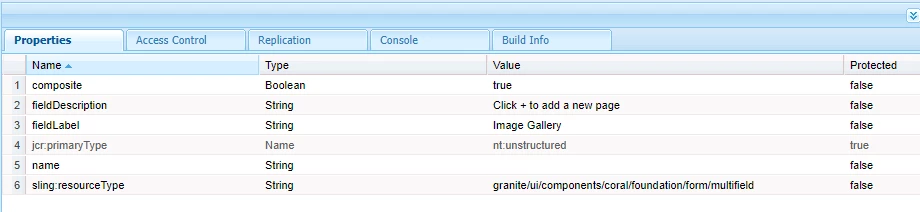
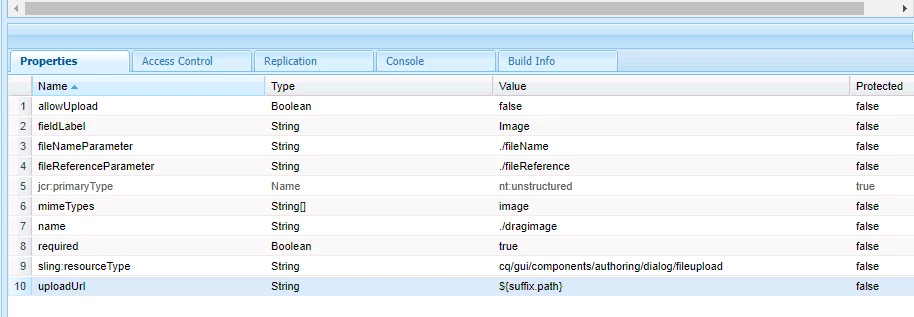
Below is the Screen shot reference for the same which used inside multifield?Any OOTB component with only Coral ui3?

This post is no longer active and is closed to new replies. Need help? Start a new post to ask your question.
Best answer by smacdonald2008

See this article and video. It shows you how to use images within a component that uses a multi-field. You can see for each section in the multi-field - an image is successfully rendered in the web page.

Scott's Digital Community: Creating a HTL Repeating Data Set 6.4 Component that uses Sling Models

This article shows use of Sling Models too.

4 replies

kautuk_sahni
Community Manager
Community Manager
October 1, 2018
smacdonald2008
smacdonald2008Accepted solution
Level 10
October 1, 2018

See this article and video. It shows you how to use images within a component that uses a multi-field. You can see for each section in the multi-field - an image is successfully rendered in the web page.

Scott's Digital Community: Creating a HTL Repeating Data Set 6.4 Component that uses Sling Models

This article shows use of Sling Models too.

Level 3
October 1, 2018

Hi,

In this use case used the path browser to pick the image not using File upload to drag and drop the image.

I am expecting a drag and drop option for author from side-kick to a multifield component which not implemented any where in OOTB functionality. Is it a customization issue or any other issues with coral ui3 for file upload for images?

smacdonald2008
Level 10
October 1, 2018

A better practice is to use the Touch UI to get the images into the DAM.

Managing Assets with the Touch-Optimized UI

Then use the granite/ui/components/coral/foundation/form/pathfield. - as shown in the article - to reference the given images in a multi field. There is no issues when following this approach.